

Help With Editing My Menu
BMM_Archive · July 15, 2026

Original Source
- Original title: Help With Editing My Menu
- Original author: RaddRadda
- Original date: February 27, 2014
- Source thread: https://forums.rpgmakerweb.com/threads/help-with-editing-my-menu.24270/
- Source forum path: Game Development Engines > Ruby Game System (RGSS) Scripts > RGSSx Script Support
Summary
I'm currently trying to edit the menu for a game I'm working on. What I would like to happen is pretty simple. You go into the menu and see the small bit of info at the bottom. You click Items and the Items pop up above the character info. But I can't figure out how to do this without the character info disappearing. I'd rather keep it up, since I think it looks fuller. Will include screenshots, if I can figure this out... { "lightbox_close": "Close", "lightbox_next": "Next",
Archived First Post
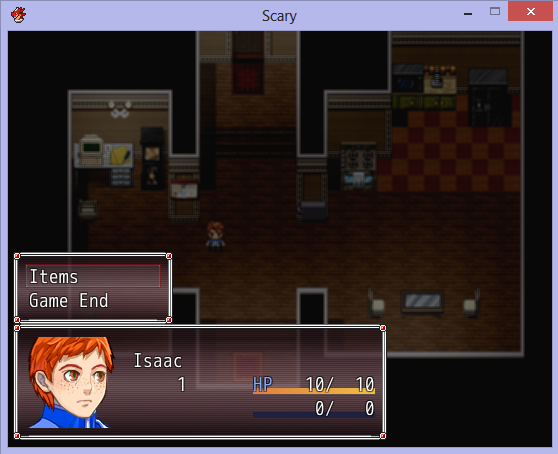
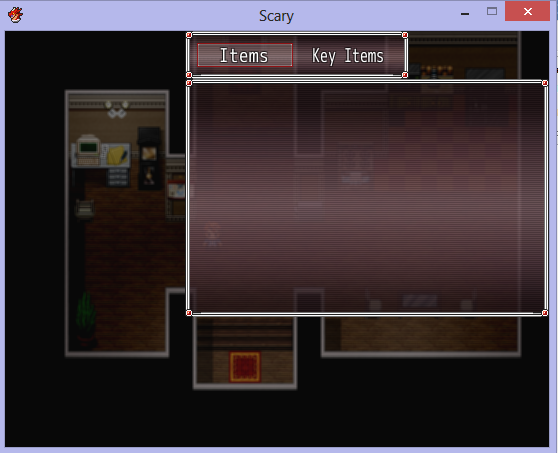
There we go. Yeah, I want both of those screens up at once. At least hopefully. Been messing around with Ace's scripts for a bit to figure out how to get this far, so I'm getting somewhat comfortable with screwing around.
Downloads / Referenced Files
RPG Maker Web attachments are mirrored locally when available. Other external links remain hosted by their original creator or third-party service.
- Local mirror: 4586-750b7f7df49a94b57b74bd3759ab2f90.png
SHA-256:cceafce1eedd5116c17cfba27ec024d9e734d3601fbe5b0fa73f9cf6d8d56eaf
Original attachment URL: https://forums.rpgmakerweb.com/attachments/screenshot-one-png.11571/ - Local mirror: 4587-1c8ff51a0a1efebcf47c88c900b418cf.png
SHA-256:93e7524fda4db16517fdf8f89c36c5f2b2ea75c3d6bceb9ccaea1dc8de011e45
Original attachment URL: https://forums.rpgmakerweb.com/attachments/screenshot-2-png.11572/
Referenced Images / Attachments
Creator Claims / Removal
If you are the original creator and want this listing reassigned, edited, or removed, join BMMPlay and contact the moderators with proof that matches the original RPG Maker Web profile, linked GitHub, itch.io page, or another public creator identity.
Replies (0)
No replies yet.
Topic Summary
Loading summary...