

Advance Game Time question(solved)
BMM_Archive · July 15, 2026

Original Source
- Original title: Advance Game Time question(solved)
- Original author: ncognito
- Original date: March 1, 2014
- Source thread: https://forums.rpgmakerweb.com/threads/advance-game-time-question-solved.24353/
- Source forum path: Game Development Engines > Ruby Game System (RGSS) Scripts > RGSSx Script Support
Summary
So i found this Advanced Game Time script by vlue and im using a custom menu clock but i cant seem to get the AM/PM to show on the clock and the Month and Day dosent have a space between the two, can someone take a look at this n tell me what im doing wrong? { "lightbox_close": "Close", "lightbox_next": "Next",
Archived First Post
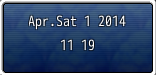
any and all help would be appreciated. Ty in advance
Downloads / Referenced Files
RPG Maker Web attachments are mirrored locally when available. Other external links remain hosted by their original creator or third-party service.
- Local mirror: 4612-845b11404f60e75826940636f2524312.png
SHA-256:1e3bc3015c4cef4d243bc579a452ed6bf238f2a25c03699741e1acca5b8077e0
Original attachment URL: https://forums.rpgmakerweb.com/attachments/igc-png.11601/
Referenced Images / Attachments
Creator Claims / Removal
If you are the original creator and want this listing reassigned, edited, or removed, join BMMPlay and contact the moderators with proof that matches the original RPG Maker Web profile, linked GitHub, itch.io page, or another public creator identity.
Replies (0)
No replies yet.
Topic Summary
Loading summary...