

PV Games ZLevel Script Bug?
BMM_Archive · July 15, 2026

BMM_Archive
Preserved forum archive. This topic stores the original first post and locally mirrored RPG Maker Web attachments when available. It is posted by the BMMPlay archive account, not by the original creator.
Original Source
- Original title: PV Games ZLevel Script Bug?
- Original author: BigJoshieC
- Original date: December 27, 2013
- Source thread: https://forums.rpgmakerweb.com/threads/pv-games-zlevel-script-bug.21481/
- Source forum path: Game Development Engines > Ruby Game System (RGSS) Scripts > RGSSx Script Support
Summary
Has anyone else encountered this? The ZLevel Script that is provided with PV Games downloads seems to behave incorrectly when making your sprite transparent. Here is a picture example of the issue I am having: { "lightbox_close": "Close", "lightbox_next": "Next",
Archived First Post
Has anyone else encountered this? The ZLevel Script that is provided with PV Games downloads seems to behave incorrectly when making your sprite transparent. Here is a picture example of the issue I am having:
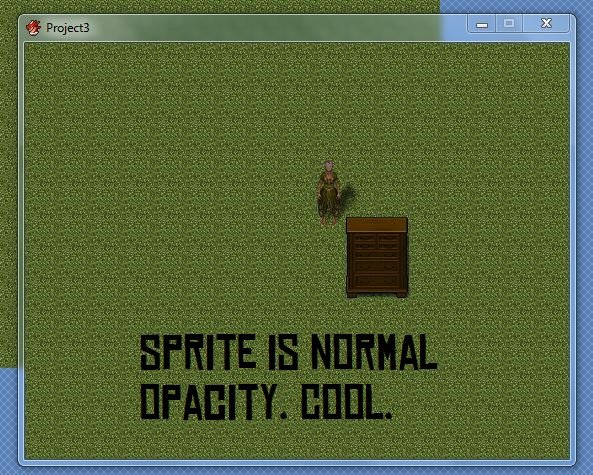
When I move behind this mysterious wardrobe (or any item that has star passability) my sprite turns transparent as intended. But once I reach the upper right of this wardrobe this happens:
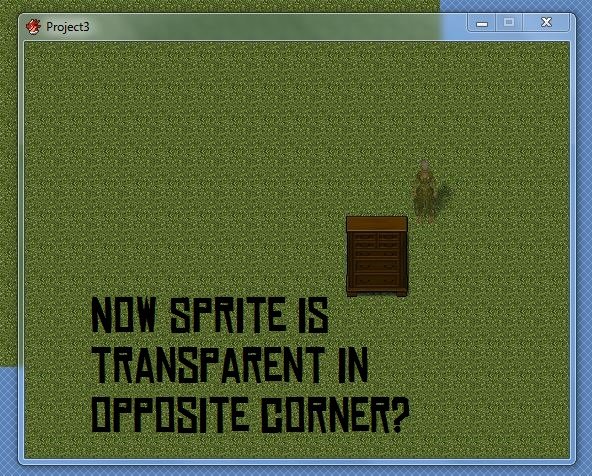
The script works while behind a star tile. But it also makes the sprite transparent while standing one tile to the right of a star tile.
This is done on a completely clean install (aside from the added graphics.) It seems like the script is checking and adjusting the tile to the right of any star tile in addition to the star tile itself. Unfortunately my scripting is too poor right now to figure out how this is happening.
I've also tried the script from several downloads (as I've gotten three different PV Games downloads) and they are all identical.
Thanks!
When I move behind this mysterious wardrobe (or any item that has star passability) my sprite turns transparent as intended. But once I reach the upper right of this wardrobe this happens:
The script works while behind a star tile. But it also makes the sprite transparent while standing one tile to the right of a star tile.
This is done on a completely clean install (aside from the added graphics.) It seems like the script is checking and adjusting the tile to the right of any star tile in addition to the star tile itself. Unfortunately my scripting is too poor right now to figure out how this is happening.
I've also tried the script from several downloads (as I've gotten three different PV Games downloads) and they are all identical.
Thanks!
Downloads / Referenced Files
RPG Maker Web attachments are mirrored locally when available. Other external links remain hosted by their original creator or third-party service.
- Local mirror: 3439-956989222e3652e56fc9513592028afe.jpg
SHA-256:1ffe7e1108e8852ae653e979b81f1512d9e80f00230f659f0b65e94a98a5ea15
Original attachment URL: https://forums.rpgmakerweb.com/attachments/issue2-jpg.9903/ - Local mirror: 3440-2e9cd9af75d7a8dc0f9ebb66dd9b45c9.jpg
SHA-256:925b6db620698b4b2fe3fab9bd4deb31c0e889a33b0700da5185e068c39a36d1
Original attachment URL: https://forums.rpgmakerweb.com/attachments/issue-jpg.9904/
Referenced Images / Attachments
Creator Claims / Removal
If you are the original creator and want this listing reassigned, edited, or removed, join BMMPlay and contact the moderators with proof that matches the original RPG Maker Web profile, linked GitHub, itch.io page, or another public creator identity.
Replies (0)
No replies yet.
0
replies
26
views
Topic Summary
Loading summary...