

Cursor script help!
BMM_Archive · July 15, 2026

Original Source
- Original title: Cursor script help!
- Original author: doggybananashoe
- Original date: December 21, 2013
- Source thread: https://forums.rpgmakerweb.com/threads/cursor-script-help.21243/
- Source forum path: Game Development Engines > Ruby Game System (RGSS) Scripts > RGSSx Script Support
Summary
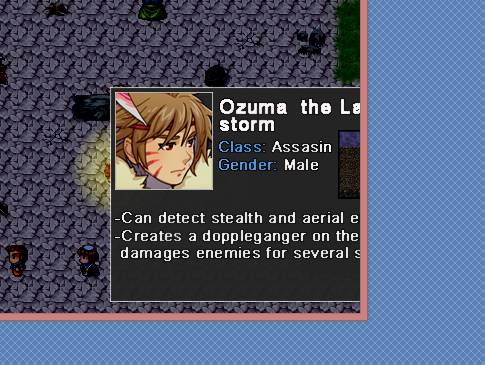
Hi, I'm new to this forum, so i'm not sure where i should ask for help regarding scripts, i hope nobody gets too mad for it. I installed a script to RPG maker vx ace which adds a cursor to the game (you can use your computer mouse). the script works fine and all , but when i add the comment to an event "MOUSE PIC*picturename*" and the picture i choose is too big, it just goes outside of the game (i added a screenshot to show what happens). What...
Archived First Post
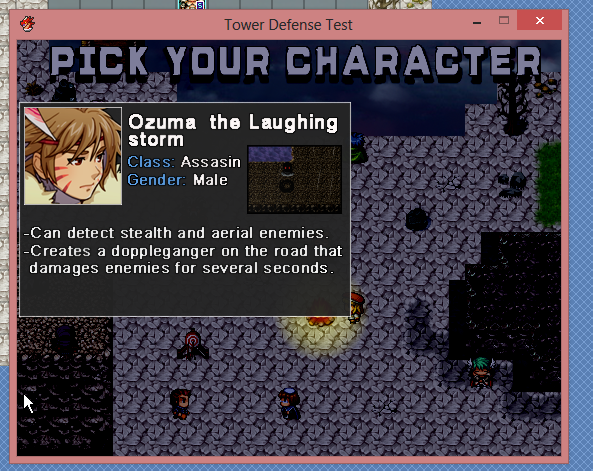
I would like to ask if anyone that knows scripting, could modify the cursor script in order to fix this problem
i have an idea for the solution and i attached a second screenshot. I made it using photoshop. Is it possible to make sure that the whole imagine is inside the game and doesn't get cut?
script link: http://pastebin.com/raw.php?i=JnpDKivi
credits to Jet, the creator of the script.
Downloads / Referenced Files
RPG Maker Web attachments are mirrored locally when available. Other external links remain hosted by their original creator or third-party service.
- Local mirror: 3385-1a7241c9f8ded253fdc147fe80cbc8da.png
SHA-256:e7ad37a15da7d83c228029226430d20bd7d8ad093587ba083303e5dd071fdb99
Original attachment URL: https://forums.rpgmakerweb.com/attachments/problem-png.9823/ - Local mirror: 3386-5c91305eb2bf7a23cb8216d6b48dbad4.png
SHA-256:42b1cbd917a5779af11d8f25e449c6d325ba44b9b100d875c5919a301619b121
Original attachment URL: https://forums.rpgmakerweb.com/attachments/solution-png.9824/
License / Terms Note
credits to Jet, the creator of the script. { "lightbox_close": "Close", "lightbox_next": "Next",
Referenced Images / Attachments
Creator Claims / Removal
If you are the original creator and want this listing reassigned, edited, or removed, join BMMPlay and contact the moderators with proof that matches the original RPG Maker Web profile, linked GitHub, itch.io page, or another public creator identity.
Replies (0)
No replies yet.
Topic Summary
Loading summary...