

Victor's Fog Script and displaced overlay images
BMM_Archive · July 15, 2026

Original Source
- Original title: Victor's Fog Script and displaced overlay images
- Original author: Candacis
- Original date: December 2, 2013
- Source thread: https://forums.rpgmakerweb.com/threads/victors-fog-script-and-displaced-overlay-images.20541/
- Source forum path: Game Development Engines > Ruby Game System (RGSS) Scripts > RGSSx Script Support
Summary
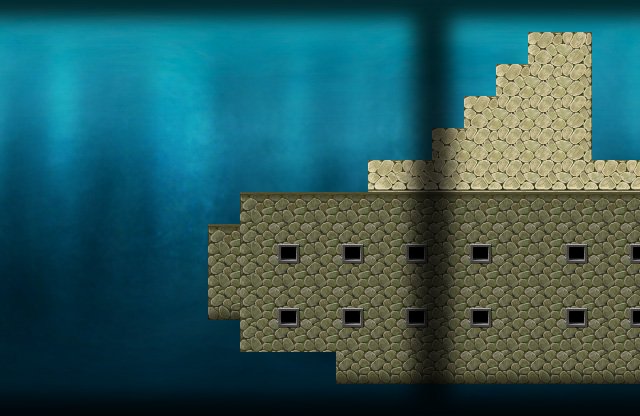
Hello, I'm having a bit of a problem with Victor's Fog and Overlay Script. My screen resolution is 640x416 and I have a fog/overlay that is 640x416 as well. It's basically a dark border around the edges of the screen. I set it up so that the overlay is not moving, that works. But right now the images doesn't line up with the screen at all. I have one of the dark borders in the middle of the map instead being at the screen edges. Image is attached so that...
Archived First Post
I'm having a bit of a problem with Victor's Fog and Overlay Script. My screen resolution is 640x416 and I have a fog/overlay that is 640x416 as well. It's basically a dark border around the edges of the screen. I set it up so that the overlay is not moving, that works. But right now the images doesn't line up with the screen at all. I have one of the dark borders in the middle of the map instead being at the screen edges.
Image is attached so that you can see what I mean (please ignore the placeholder graphics..)
Can I somehow change the starting point of the overlay image? What is causing this displacement? Or should I use an additional overlay script (or event) for this static border?
I plan on having two additional moving fogs on the map, the border one should be on top of the other two fogs that's why I wanted to stick with Victor's script, but I'm happy for any helpful pointers.
Downloads / Referenced Files
RPG Maker Web attachments are mirrored locally when available. Other external links remain hosted by their original creator or third-party service.
- Local mirror: 3092-7e7fddcaddfc8a6f0148cc49040d746d.jpg
SHA-256:13194f7724b93dde5b71573f90d466acb177126eedffcf5642ff64241fc833c3
Original attachment URL: https://forums.rpgmakerweb.com/attachments/fog_displaced-jpg.9442/
Referenced Images / Attachments
Creator Claims / Removal
If you are the original creator and want this listing reassigned, edited, or removed, join BMMPlay and contact the moderators with proof that matches the original RPG Maker Web profile, linked GitHub, itch.io page, or another public creator identity.
Replies (0)
No replies yet.
Topic Summary
Loading summary...