

Issues with parallax mapping
BMM_Archive · July 15, 2026

Original Source
- Original title: Issues with parallax mapping
- Original author: Sapientia
- Original date: November 20, 2013
- Source thread: https://forums.rpgmakerweb.com/threads/issues-with-parallax-mapping.20179/
- Source forum path: Game Development Engines > Ruby Game System (RGSS) Scripts > RGSSx Script Support
Summary
Hi there, During the course of a little pet project of mine, i've been experimenting with parallax mapping using Yami's Overlay Script. Everything has been going pretty smoothly, considering this is my first time trying it out - having successfully completed around 20 individual scenes. However -on what seem to be random maps - for some unknown reason, the 'ground' overlay is in the correct position, while the 'parallax' overlay is positioned in completely the wrong place. I'll use pictures to help explain: {
Archived First Post
During the course of a little pet project of mine, i've been experimenting with parallax mapping using Yami's Overlay Script. Everything has been going pretty smoothly, considering this is my first time trying it out - having successfully completed around 20 individual scenes. However -on what seem to be random maps - for some unknown reason, the 'ground' overlay is in the correct position, while the 'parallax' overlay is positioned in completely the wrong place.
I'll use pictures to help explain:
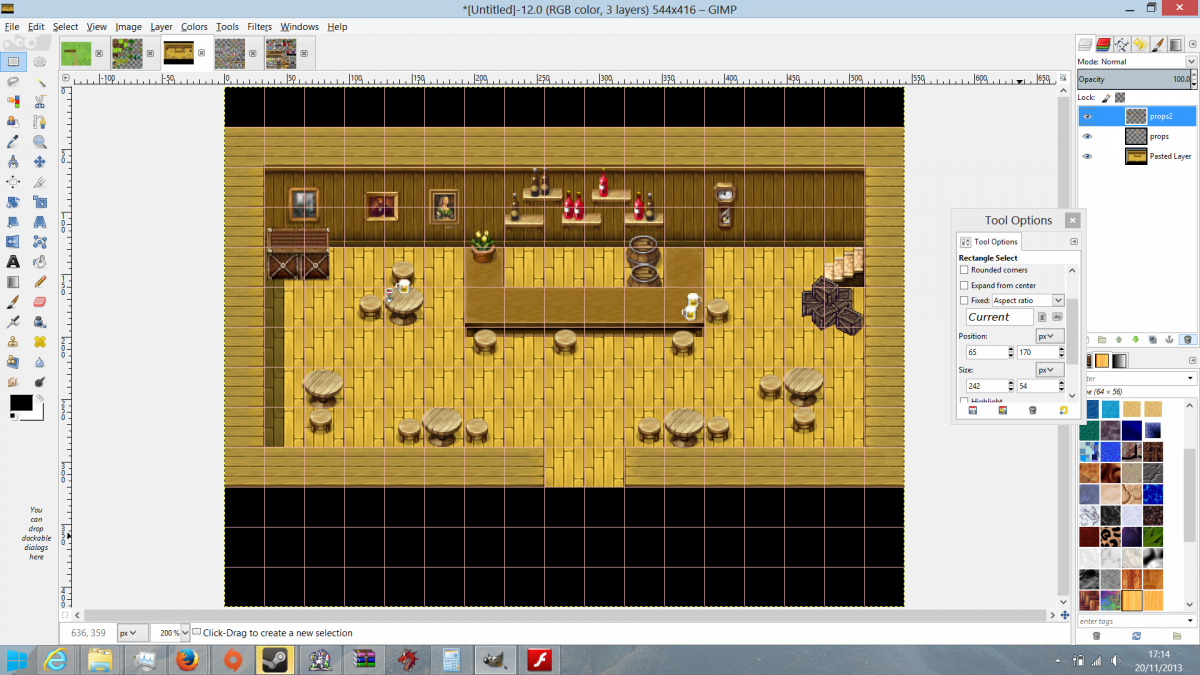
Here is the overlays together in Gimp. As you can see everything is in the correct position.
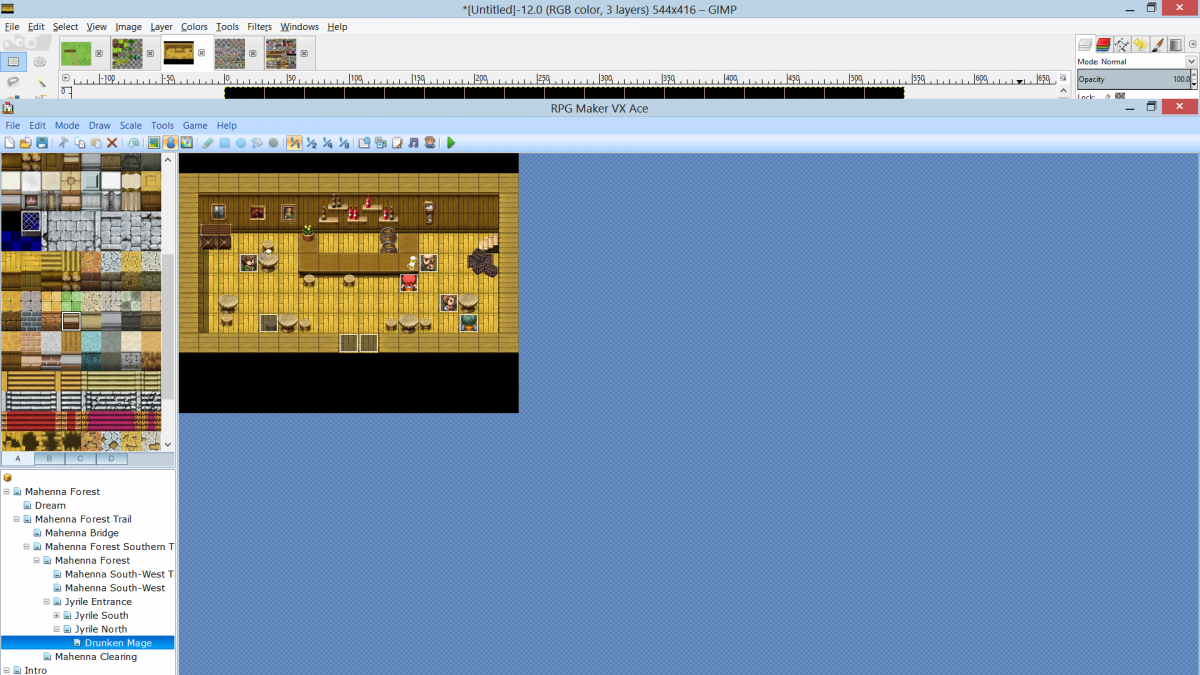
Here, again, in RPG Maker everything looks as if it is in the correct position.
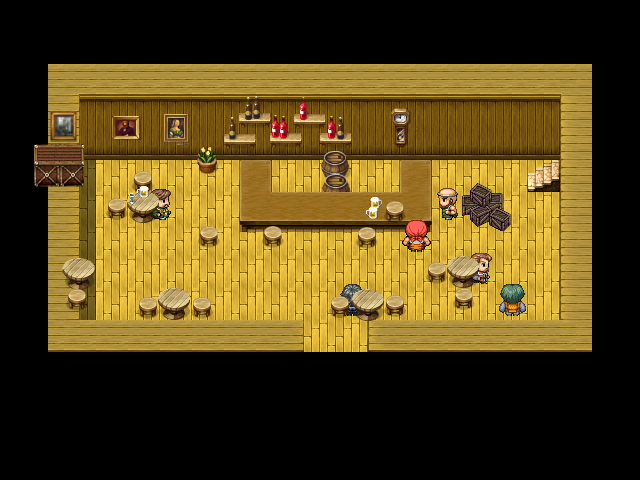
However, when in game the props (barrels, tables, shelves etc) are in completely the wrong position.
When naming the overlays, i name the ground 'ground<mapid>-1', and the parallax 'par<mapid>-1', which has worked for me in every other scene.
If you any of you could offer any assistance on what the issue is here, I would greatly appreciate it.
Thanks
Downloads / Referenced Files
RPG Maker Web attachments are mirrored locally when available. Other external links remain hosted by their original creator or third-party service.
- Local mirror: 2968-5c149f5701da8c8d88fdd1cb536f16ee.png
SHA-256:6dd39dc1c6d89a960c5fd137241e8b79d0e2b1a8630f068db57cd758fec97193
Original attachment URL: https://forums.rpgmakerweb.com/attachments/usinggimp1-png.9280/ - Local mirror: 2967-b1e1849d485ae334b1354cd4d744b5cb.png
SHA-256:7a1d59b3005abece749766b1a56a05efe6b48f478829157c5480a9612ef604e3
Original attachment URL: https://forums.rpgmakerweb.com/attachments/inrpg-png.9279/ - Local mirror: 2966-e3beac4a996fc6de03b826deadf1ca2e.png
SHA-256:29c5442428fe270a0edf7f336ac1bafd76955eced7490a5bd0e1d49ecf013c52
Original attachment URL: https://forums.rpgmakerweb.com/attachments/ingame-png.9278/
Referenced Images / Attachments
Creator Claims / Removal
If you are the original creator and want this listing reassigned, edited, or removed, join BMMPlay and contact the moderators with proof that matches the original RPG Maker Web profile, linked GitHub, itch.io page, or another public creator identity.
Replies (0)
No replies yet.
Topic Summary
Loading summary...