

RTP33g1 Battle Hud
BMM_Archive · July 15, 2026

Original Source
- Original title: RTP33g1 Battle Hud
- Original author: R-Soul
- Original date: November 17, 2013
- Source thread: https://forums.rpgmakerweb.com/threads/rtp33g1-battle-hud.20053/
- Source forum path: Game Development Engines > Ruby Game System (RGSS) Scripts > RGSSx Script Support
Summary
Hi HI! ;D!~ I was searching for a battle hud that enabled me to make an individual bar per actor, and after searching for quite some time, I found it. And while I was on it, I found Ziifee's Spin Command, and decided to implement it along with the hud. But after some testing I noticed something, the hud stayed there, it didn't moved at all.
Archived First Post
I was searching for a battle hud that enabled me to make an individual bar per actor, and after searching for quite some time, I found it. <33
And while I was on it, I found Ziifee's Spin Command, and decided to implement it along with the hud.
But after some testing I noticed something, the hud stayed there, it didn't moved at all.
I can move freely the Ziifee Command Window, but I just can't do the same for the Hud.
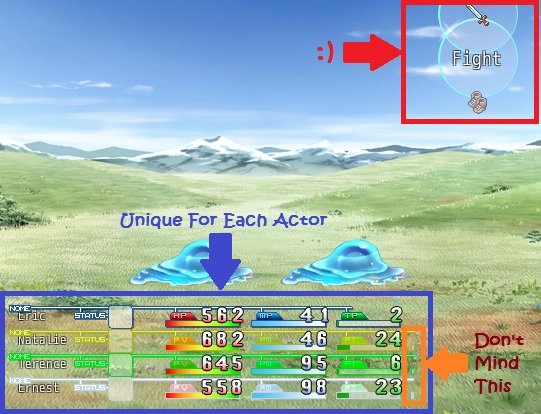
And if I try to move it, it happens this:
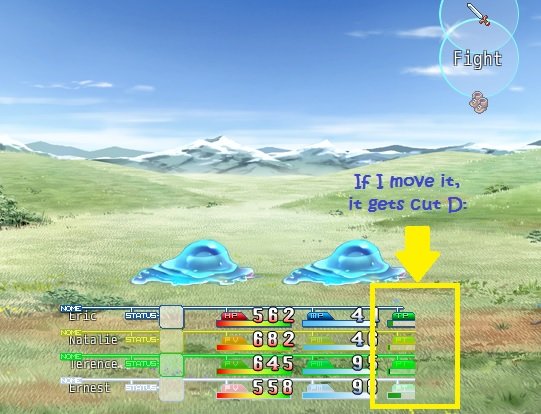
The reason I want to move it, its because if I leave it on the bottom left corner (default), the Ziifee Window will disapear when the actors start to well, act. Leaving an empty space on the bottom right.
So can you help me:
1) Center the Battle Hud avoiding it to get cut
or
2) Make the Hud Center itself when its time to "act". (I know this is requesting a)+ an extra though ><)
Oh, and I did Modify 3 lines:
176. s[0].bitmap = Cache.system(BTSKIN_00 + <span style="color: #ff0000">actor.name) <span style="color: #0000ff">(Added to make each hud line unique per actor by adding its name at the end of the image's name)
618. @actor_command_window.viewport = nil<span style="color: #0000ff"> (Added this to move Ziifee freely)
632. @party_command_window.viewport = nil <span style="color: #0000ff">(Same as above)
Here is a demo of the project I used the scripts at:
Battle Hud With Spin Command.rar
One more thing, the battle hud comes from a script made by STR33g1 and translated by Melosx.
Thank You In Advance
Downloads / Referenced Files
RPG Maker Web attachments are mirrored locally when available. Other external links remain hosted by their original creator or third-party service.
- Local mirror: 2926-f4e00a1b58c4be6d5566e080bfad3b6a.jpg
SHA-256:d722e96a5a22532caccd13dfa5e18a22af08542b90fbc81c6b19b2bd32f2d240
Original attachment URL: https://forums.rpgmakerweb.com/attachments/rtp33g1-1-jpg.9229/ - Local mirror: 2927-c9bacb7e35143e937f9362b57dc6b32a.jpg
SHA-256:4bf161befa62076a90c2ad8047d8289d74aac622aeebc37b419dd8b004a4473b
Original attachment URL: https://forums.rpgmakerweb.com/attachments/rtp33g1-2-jpg.9230/
Referenced Images / Attachments
Creator Claims / Removal
If you are the original creator and want this listing reassigned, edited, or removed, join BMMPlay and contact the moderators with proof that matches the original RPG Maker Web profile, linked GitHub, itch.io page, or another public creator identity.
Replies (0)
No replies yet.
Topic Summary
Loading summary...