

Icons incorrect in Ace Battle Engine & Battle Symphony
BMM_Archive · July 15, 2026

Original Source
- Original title: Icons incorrect in Ace Battle Engine & Battle Symphony
- Original author: ninjalex
- Original date: October 19, 2013
- Source thread: https://forums.rpgmakerweb.com/threads/icons-incorrect-in-ace-battle-engine-battle-symphony.19183/
- Source forum path: Game Development Engines > Ruby Game System (RGSS) Scripts > RGSSx Script Support
Summary
I have been using Yanfly Engine Ace - Ace Battle Engine v1.22 and Yami Engine Symphony - Battle Symphony for quite sometime in my games. I have encountered the issue of having the parameters icons while in battle being an incorrect icon. It seems like an easy fix however I haven't been able to figure out how to change the icon graphic. State graphics are fine. The error is when I use a skill that increases or decreases attack, defense, speed, magic attack,MDF,LUK, MaxHP and MaxMp. "I did try using "Yanfly Engine RD - Icon...
Archived First Post
-------------------------------------------------------
Here is a list of all the scripts I am using:
--------------------------------------------------------
Ace Core Engine: http://yanflychannel.wordpress.com/rmvxa/core-scripts/ace-core-engine/
<span style="color: #333333">Ace Battle Engine: http://yanflychannel.wordpress.com/rmvxa/battle-scripts/ace-battle-engine/
Enemy HP Bars: http://yanflychannel.wordpress.com/rmvxa/battle-scripts/ace-battle-engine/enemy-hp-bars/
Class System: http://yanflychannel.wordpress.com/rmvxa/core-scripts/class-system/
Ace Equip Engine: http://yanflychannel.wordpress.com/rmvxa/gameplay-scripts/ace-equip-engine/
Enemy Levels: http://yanflychannel.wordpress.com/rmvxa/gameplay-scripts/enemy-levels/
Slippery Tiles: http://yanflychannel.wordpress.com/rmvxa/field-scripts/slippery-tiles/
Ace Item Menu: http://yanflychannel.wordpress.com/rmvxa/menu-scripts/ace-item-menu/
Ace Menu Engine: http://yanflychannel.wordpress.com/rmvxa/menu-scripts/ace-menu-engine/
Ace Save Engine: http://yanflychannel.wordpress.com/rmvxa/menu-scripts/ace-save-engine/
New Game+: http://yanflychannel.wordpress.com/rmvxa/menu-scripts/ace-save-engine/new-game/
Ace Shop Options: http://yanflychannel.wordpress.com/rmvxa/menu-scripts/ace-shop-options/
Ace Skill Menu: http://yanflychannel.wordpress.com/rmvxa/menu-scripts/ace-skill-menu/
Ace Status Menu: http://yanflychannel.wordpress.com/rmvxa/menu-scripts/ace-status-menu/
System Options: http://yanflychannel.wordpress.com/rmvxa/menu-scripts/system-options/
CSCA Core Script: http://www.rpgmakervxace.net/topic/6879-csca-core-script/
CSCA Game Info: http://www.rpgmakervxace.net/topic/6515-csca-game-info/
CSCA Encyclopedia: http://www.rpgmakervxace.net/topic/2775-csca-encyclopedia-w-bestiary/
Syvkal's Menu Bars VXAce: http://forums.rpgmakerweb.com/index.php?/topic/840-syvkals-menu-bars-vxace/
Galv’s Basic Music Player V.1.6: http://galvs-scripts.com/galvs-basic-music-player/
Galv’s Magic Shards V.1.7: http://galvs-scripts.com/galvs-magic-shards/
Victor Engine Basic Module: https://dl.dropboxusercontent.com/u/27014140/Scripts/Victor%20Engine%20-%20Basic%20Module.txt
Grade Victory Screen: http://forums.rpgmakerweb.com/index.php?/topic/3439-grade-victory-screen/
--------------------------------------------------------
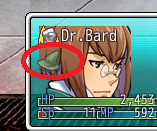
Example: The picture down below is an example of the error I am getting. Dr. Bard casts "attack up" and a green hat icon is shown.
Also here is the icon set I am using: http://s1281.photobucket.com/user/Alex_Cowell/media/IconSet_zps40e536e1.png.html?filters%5Buser%5D=135340134&filters%5Brecent%5D=1&sort=1&o=0
I figured out the problem.
Downloads / Referenced Files
RPG Maker Web attachments are mirrored locally when available. Other external links remain hosted by their original creator or third-party service.
- Download: https://dl.dropboxusercontent.com/u/27014140/Scripts/Victor%20Engine%20-%20Basic%20Module.txt
- Local mirror: 2648-bf6c8828b6d8949fde2d380af3b64573.png
SHA-256:130954fd453f2d2b7f877cbb4ffcfc863816021ce875ed2ff541608219b4989f
Original attachment URL: https://forums.rpgmakerweb.com/attachments/help2-png.8841/
Referenced Images / Attachments
Creator Claims / Removal
If you are the original creator and want this listing reassigned, edited, or removed, join BMMPlay and contact the moderators with proof that matches the original RPG Maker Web profile, linked GitHub, itch.io page, or another public creator identity.
Replies (0)
No replies yet.
Topic Summary
Loading summary...