

Issue with Neon Black's Scrolling States
BMM_Archive · July 15, 2026

Original Source
- Original title: Issue with Neon Black's Scrolling States
- Original author: Syltti
- Original date: September 26, 2013
- Source thread: https://forums.rpgmakerweb.com/threads/issue-with-neon-blacks-scrolling-states.18452/
- Source forum path: Game Development Engines > Ruby Game System (RGSS) Scripts > RGSSx Script Support
Summary
Okay, I think this is one issue anyone who has used this script might've come across at some point; After selecting an action for one Actor in battle, if you go into a skill menu for the next Actor, part of the first Actor is displayed (using YEA's Battle Engine). Actually, the part that shows up is the are where the state/buff icons are drawn: { "lightbox_close": "Close", "lightbox_next": "Next",
Archived First Post
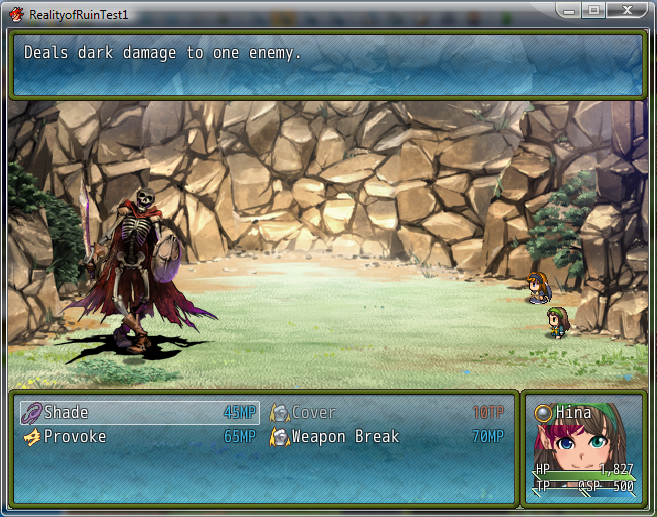
I think it might have something to do with an update Neon Black made to the script,
Anyone know how to fix this?Updated to version 1.1.
Improved how states are stored to prevent stacking but provide better refreshing.
Also made it so state rectangles store the area behind them, preventing a bitmap clearing error.
Here's the version of the script I have in use:
###--------------------------------------------------------------------------#### CP Scrolling States VX script ## Version 1.1 ## ## Credits: ## Original code by: Neon Black ## Modified by: ## ## This work is licensed under the Creative Commons Attribution-NonCommercial ## 3.0 Unported License. To view a copy of this license, visit ## [URL="http://creativecommons.org/licenses/by-nc/3.0/.%C2%A0%C2%A0%C2%A0%C2%A0%C2%A0%C2%A0%C2%A0%C2%A0%C2%A0%C2%A0%C2%A0%C2%A0%C2%A0%C2%A0%C2%A0%C2%A0%C2%A0%C2%A0%C2%A0%C2%A0%C2%A0%C2%A0%C2%A0%C2%A0%C2%A0%C2%A0%C2%A0%C2%A0"]http://creativecommons.org/licenses/by-nc/3.0/. [/URL] ## Permissions beyond the scope of this license are available at ## [URL="http://cphouseset.wordpress.com/liscense-and-terms-of-use/.%C2%A0%C2%A0%C2%A0%C2%A0%C2%A0%C2%A0%C2%A0%C2%A0%C2%A0%C2%A0%C2%A0%C2%A0%C2%A0%C2%A0%C2%A0%C2%A0"]http://cphouseset.wordpress.com/liscense-and-terms-of-use/. [/URL] ## ## Contact: ## NeonBlack - neonblack23@live.com (e-mail) or "neonblack23" on skype ####--------------------------------------------------------------------------######--------------------------------------------------------------------------#### Revision information: ## V1.1 - 11.14.2012 ## Improved state rectangle drawing ## V1.0 - 7.15.2012 ## Wrote and debugged main script ####--------------------------------------------------------------------------######--------------------------------------------------------------------------#### Compatibility: ## Alias - Window_Base: initialize, update ## Overwrites - Window_Base: draw_actor_icons ## New Objects - Window_Base: draw_icons_area, clear_all_icons ## Scroll_States: initialize, change?, update_icons, ## clear_icon_area ####--------------------------------------------------------------------------######--------------------------------------------------------------------------#### Instructions: ## Place this script in the "Materials" section of the scripts above main. ## This script is plug and play and overwrites how states, buff, and debuffs ## are displayed. The only setting this script contains modifies the speed ## at which the states change and can be altered below. ####--------------------------------------------------------------------------######--------------------------------------------------------------------------#### Config: ## These are the default values used by several of the functions in the ## script. You may change these values as you find your game requires in ## order to give the player a better playing experience based on your game. ## #module CP # Do not #module SCROLL_STATES # change these. ## ####----- -----#### The number of frames before the icons change. 1 frame = 1/60 of a second. #TRANS = 45 # Default = 45 ## ####--------------------------------------------------------------------------######--------------------------------------------------------------------------#### The following lines are the actual core code of the script. While you are ## certainly invited to look, modifying it may result in undesirable results. ## Modify at your own risk! ####--------------------------------------------------------------------------###endend$imported = {} if $imported == nil$imported["CP_SCROLLING_STATES"] = 1.1class Scroll_States ## This class holds the state icons for windows. attr_reader :x attr_reader :y attr_reader :width attr_reader :icons attr_accessor :bitmap def initialize(x, y, width, states, level = 0) @x = x ## Sets up required aspects of the states class. @y = y @width = width @states = states @bitmap = Bitmap.new([width, 1].max, 24) update_icons(level) end def change?(level) ## Determines if a refresh is required. return false if (@width / 24 >= @states.size) return true if (level % CP::SCROLL_STATES::TRANS == 0) return false end def update_icons(level) return @icons = [0] if @states.empty? ## Skip if no states. total = @width / 24 return @icons = @states if total >= @states.size ## No refresh needed. start = (level / CP::SCROLL_STATES::TRANS) % @states.size double = @states + @states ## Doubles the states for overlap. top = [double.size, start + total].min @icons = [] for i in start...top ## Create the shown states in order. @icons.push(double[i]) end endendclass Window_Base < Window alias cp_sswb_initialize initialize def initialize(x, y, width, height) cp_sswb_initialize(x, y, width, height) @icon_areas = {} ## Sets up an array for the states. @icon_scroll = false @icon_timer = 0 end alias cp_sswb_update update def update cp_sswb_update unless @icon_areas.empty? ## Ignore if no states were drawn. @icon_timer += 1 ## A timer used by states. @icon_areas.each_value do |area| next unless area.change?(@icon_timer) draw_icons_area(area) end end end def draw_icons_area(area) contents.clear_rect(area.x, area.y, area.width, 24) ## Clears state area. contents.blt(area.x, area.y, area.bitmap, area.bitmap.rect) area.update_icons(@icon_timer) ## Updates the icons. area.icons.each_with_index {|n, i| draw_icon(n, area.x + 24 * i, area.y) } end def clear_all_icons ## Clears all icon spots for redraw. @icon_areas.each_key {|key| clear_icon_area(key)} @icon_areas = {} ## Resets the array. @icon_scroll = false ## Do not reset this frame. end def clear_icon_area(key) return if @icon_areas[key].nil? area = @icon_areas[key] contents.clear_rect(area.x, area.y, area.width, 24) contents.blt(area.x, area.y, area.bitmap, area.bitmap.rect) @icon_areas[key] = nil end def draw_actor_icons(actor, x, y, width = 96) ## Overwrite this method. icons = (actor.state_icons + actor.buff_icons) key = [x, y, width] clear_icon_area(key) temp = Scroll_States.new(x, y, width/2, icons) ## Creates an icon holder. @icon_areas[key] = temp rect = Rect.new(x, y, width, 24) @icon_areas[key].bitmap.blt(0, 0, contents, rect) draw_icons_area(@icon_areas[key]) ## Draw the newest set. endend###--------------------------------------------------------------------------#### End of script. ####--------------------------------------------------------------------------###Downloads / Referenced Files
RPG Maker Web attachments are mirrored locally when available. Other external links remain hosted by their original creator or third-party service.
- Local mirror: 2352-17fa901ea038b297151f72e15e68a60d.png
SHA-256:880523c337bba0d0cf18ee61f7d56b3ef9bc933863246fe9729ea712ab0644a1
Original attachment URL: https://forums.rpgmakerweb.com/attachments/sample-png.8431/
License / Terms Note
###--------------------------------------------------------------------------#### CP Scrolling States VX script ## Version 1.1 ## ## Credits: ## Original code by: Neon Black ## Modified by: ## ## This work is licensed under the Creative Commons Attribution-NonCommercial ## 3.0 Unported License. To view a copy of this license, visit ## [URL="http://creativecommons.org/licenses/by-nc/3.0/.%C2%A0%C2%A0%C2%A0%C2%A0%C2%A0%C2%A0%C2%A0%C2%A0%C2%A0%C2%A0%C2%A0%C2%A0%C2%A0%C2%A0%C2%A0%C2%A0%C2%A0%C2%A0%C2%A0%C2%A0%C2%A0%C2%A0%C2%A0%C2%A0%C2%A0%C2%A0%C2%A0%C2%A0"]http://creativecommons.org/licenses/by-nc/3.0/. [/URL] ## Permissions beyond the scope of this license are available at ## [URL="http://cphouseset.wordpress.com/liscense-and-terms-of-use/.%C2%A0%C2%A0%C2%A0%C2%A0%C2%A0%C2%A0%C2%A0%C2%A0%C2%A0%C2%A0%C2%A0%C2%A0%C2%A0%C2%A0%C2%A0%C2%A0"]http://cphouseset.wordpress.com/liscense-and-terms-of-use/. [/URL] ## ## Contact: ## NeonBlack - neonblack23@live.com (e-mail) or "neonblack23" on skype ####--------------------------------------------------------------------------######--------------------------------------------------------------------------#### Revision information: ## V1.1 - 11.14.2012 ## Improved...
Referenced Images / Attachments
Creator Claims / Removal
If you are the original creator and want this listing reassigned, edited, or removed, join BMMPlay and contact the moderators with proof that matches the original RPG Maker Web profile, linked GitHub, itch.io page, or another public creator identity.
Replies (0)
No replies yet.
Topic Summary
Loading summary...