Preserved forum archive. This topic stores the original first post and locally mirrored RPG Maker Web attachments when available. It is posted by the BMMPlay archive account, not by the original creator.
Original Source
Original title: Tint-Issue with Yamis Overlay Mapping Script
Source forum path: Game Development Engines > Ruby Game System (RGSS) Scripts > RGSSx Script Support
Summary
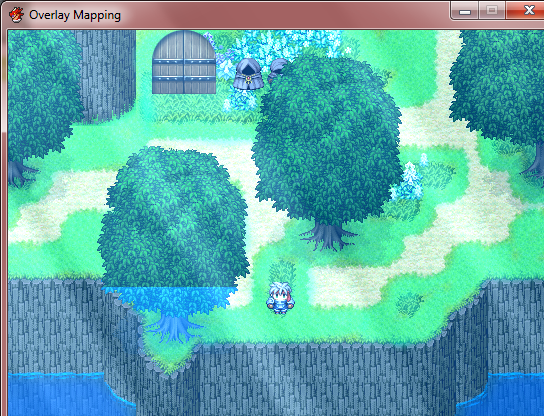
Hello out there! I wanted to work with Yamis Overlay Mapping Script: http://www.rpgmakervxace.net/topic/258-overlay-mapping/ But when I use the Tint Screen-Command, the ground-layer and the parallax-layer (also the event-graphics) are treated in different ways. The ground looks much brighter, so I get some problems with cutted tiles an event-layers. {
But when I use the Tint Screen-Command, the ground-layer and the parallax-layer (also the event-graphics) are treated in different ways. The ground looks much brighter, so I get some problems with cutted tiles an event-layers.
(Cut a tree in half to show it)
Downloads / Referenced Files
RPG Maker Web attachments are mirrored locally when available. Other external links remain hosted by their original creator or third-party service.
Local mirror:1800-32c879d30f26ed4b25b6393232825e7d.png SHA-256: feaf51470d21afd5517202d13b735b64a8a91e198963959ae82d757baf825ef0 Original attachment URL: https://forums.rpgmakerweb.com/attachments/tint-fehler-png.7616/
Referenced Images / Attachments
tint-fehler.png
Creator Claims / Removal
If you are the original creator and want this listing reassigned, edited, or removed, join BMMPlay and contact the moderators with proof that matches the original RPG Maker Web profile, linked GitHub, itch.io page, or another public creator identity.