public

Rpg Maker Developers Group

Simple enough for a child, powerful enough for a developer

2 Followers

Menu Mayhem 3: Showing bitmaps

BMM Archive · July 15, 2026

Preserved forum archive. This topic stores the original first post and locally mirrored RPG Maker Web attachments when available. It is posted by the BMMPlay archive account, not by the original creator.

Original Source

  • Original title: Menu Mayhem 3: Showing bitmaps
  • Original author: LaFlibuste
  • Original date: July 7, 2015
  • Source thread: https://forums.rpgmakerweb.com/threads/menu-mayhem-3-showing-bitmaps.42010/
  • Source forum path: Game Development Engines > Ruby Game System (RGSS) Scripts > RGSS3 Scripts (RMVX Ace) > RGSS3 Script Requests

Summary

Hi again, RGSS3-savvy RPG making people! So I am trying to create a custom menu layout. I currently am fighting with character portraits. I want the character status screen to be horizontal-based and be adjustable depending of how many characters are in the party (between 1 and 5). Since I didn't want the game to arbitrarily crop large portrait images for me, I created a collection of pre-seized portrait images. So far, everything I've talked about works: the status window's columns amount varies with item_max, each member's status scale according...


Archived First Post

Hi again, RGSS3-savvy RPG making people!

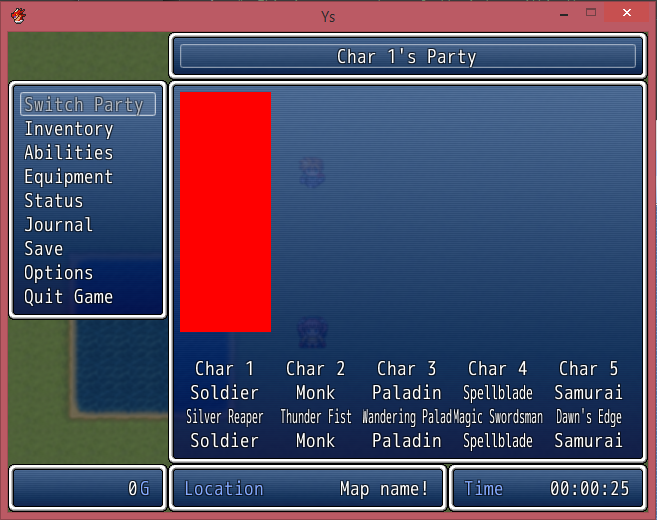
So I am trying to create a custom menu layout. I currently am fighting with character portraits. I want the character status screen to be horizontal-based and be adjustable depending of how many characters are in the party (between 1 and 5). Since I didn't want the game to arbitrarily crop large portrait images for me, I created a collection of pre-seized portrait images. So far, everything I've talked about works: the status window's columns amount varies with item_max, each member's status scale according to item_max, the game finds the right pictures, etc. There's only one issue, I even after looking at a variety of menu script, I can't find what I did wrong: the game stacks the portrait images in the first column (see picture below):

Protected download

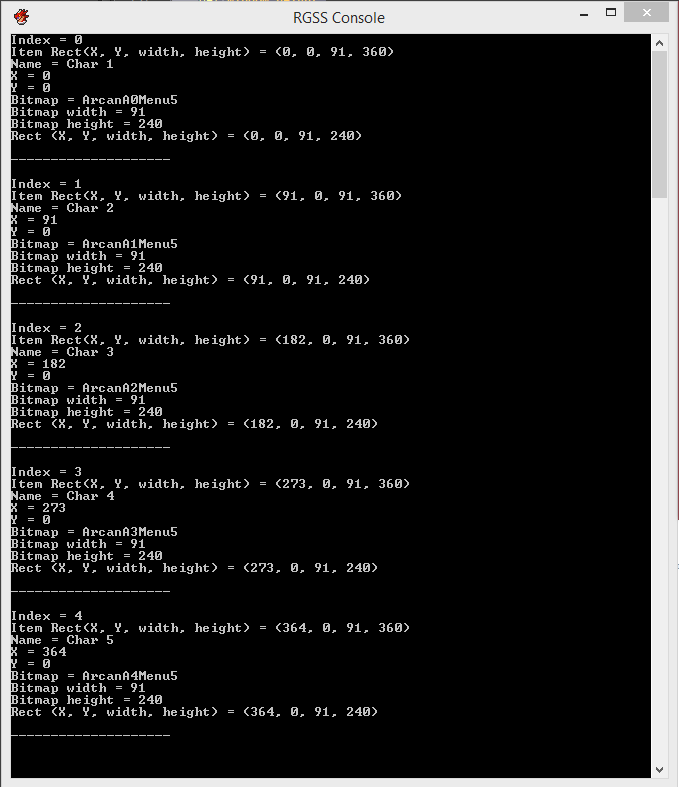
Although all rects seem fine and the characters names and stuff are drawn in the right columns! So why just the portraits? I've inserted a bunch of print calls and the output seems fine (see console output below):

Protected download

For the sake of completion, here's my menu window code:

class Window_FlibMenuStatus < Window_Selectable def initialize super(160,fitting_height(1), window_width, window_height) refresh deactivate end def window_width return Graphics.width - 160 end def window_height return Graphics.height - (fitting_height(1) * 2) end def col_max return $game_party.all_members_ids.size end def item_max return $game_party.all_members_ids.size end def item_rect(index) rect = Rect.new rect.width = contents.width / item_max rect.height = contents.height rect.x = index * rect.width rect.y = 0 return rect end def refresh make_item_list create_contents draw_all_items end def make_item_list @data = $game_party end def draw_item(index) char = $game_party.members.entries[index] rect = item_rect(index) print "Index = " + index.to_s + "\n" print "Item Rect(X, Y, width, height) = " print rect print "\n" if char.nil? return end draw_char_portrait(char, rect.x, rect.y) draw_actor_name(char, rect.x, rect.height - 96 , rect.width) draw_actor_class(char, rect.x, rect.height - 72 , rect.width) draw_actor_nickname(char, rect.x, rect.height - 48, rect.width) draw_actor_subclass(char, rect.x, rect.height - 24, rect.width) end def draw_char_portrait(actor, x, y, enabled = true) print "Name = " + actor.name + "\n" print "X = " + x.to_s + "\n" print "Y = " + y.to_s + "\n" print "Bitmap = " + actor.face_name + actor.face_index.to_s + "Menu" + item_max.to_s + "\n" bitmap = Cache.picture(actor.face_name + actor.face_index.to_s + "Menu" + item_max.to_s) print "Bitmap width = " + bitmap.width.to_s + "\n" print "Bitmap height = " + bitmap.height.to_s + "\n" rect = Rect.new(x, y, bitmap.width, bitmap.height) print "Rect (X, Y, width, height) = " print rect print "\n\n--------------------\n\n" contents.blt(x, y, bitmap, rect, enabled ? 255 : translucent_alpha) bitmap.dispose end def draw_actor_name(actor, x, y, width = 112) change_color(hp_color(actor)) draw_text(x, y, width, line_height, actor.name, 1) end def draw_actor_class(actor, x, y, width = 112) change_color(normal_color) draw_text(x, y, width, line_height, actor.class.name, 1) end def draw_actor_nickname(actor, x, y, width = 180) change_color(normal_color) draw_text(x, y, width, line_height, actor.nickname, 1) end # Modification required def draw_actor_subclass(actor, x, y, width = 112) change_color(normal_color) draw_text(x, y, width, line_height, actor.class.name, 1) endend
So, anybody has any idea of what I might be missing? Thanks a lot!

Downloads / Referenced Files

Log in to download

Log in, then follow the RPG Maker Developers Group to see these download links.

Log in to download

Referenced Images / Attachments

Screen Shot 2015-07-07 at 12.09.58 PM.png
Screen Shot 2015-07-07 at 12.10.06 PM.png
Creator Claims / Removal

If you are the original creator and want this listing reassigned, edited, or removed, join BMMPlay and contact the moderators with proof that matches the original RPG Maker Web profile, linked GitHub, itch.io page, or another public creator identity.

#039#rpg-maker-archive#rgss3-requests

Replies (0)

No replies yet.

0 replies 1 view

Log in to reply.

User Avatar