


Need help with custom menus
BMM_Archive · July 15, 2026

Preserved forum archive. This topic stores the original first post and locally mirrored RPG Maker Web attachments when available. It is posted by the BMMPlay archive account, not by the original creator.
Original Source
- Original title: Need help with custom menus
- Original author: LaFlibuste
- Original date: June 28, 2015
- Source thread: https://forums.rpgmakerweb.com/threads/need-help-with-custom-menus.41699/
- Source forum path: Game Development Engines > Ruby Game System (RGSS) Scripts > RGSS3 Scripts (RMVX Ace) > RGSS3 Script Requests
Summary
Hello people, First off, I am very sorry if this isn't in the right section, this is my first post on these forums. If this isn't the right place for asking for scripting help, please move this post.
Archived First Post
Hello people,
First off, I am very sorry if this isn't in the right section, this is my first post on these forums. If this isn't the right place for asking for scripting help, please move this post.
Okay, so one of the key features I want for this game I am planning if for the player to control a 5-characters party (I used Yanfly's Party System script to extend the party but didn't use his party menu) which he can split anytime through a nifty menu. For the party splitting, I used Tsukihime's Party Manager. The player should then be able to merge the parties back together by talking to idle party events (done with Tsukihime's Party Manager's various add-ons), but this should be trivial if I can manage to get the first part working, and this is why I am here asking for some tips or pointers.
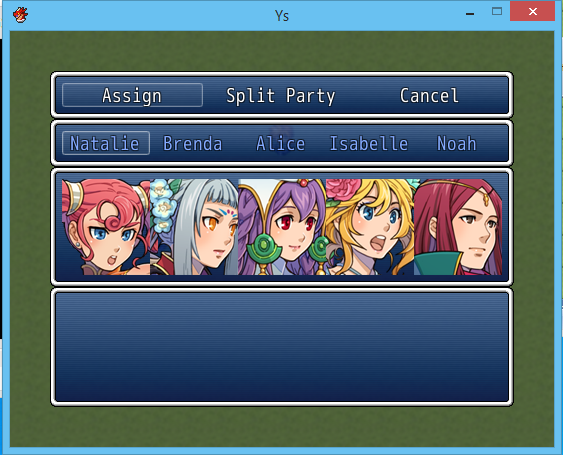
Here is what the menu looks like (I must admit I am nonetheless rather proud to have the display working so well, seeing how this is my first script ever!)
When the player selects the Assign command, he can toggle the characters between current party and new party. When the portraits are in the top window, they are assigned to the current one, etc. When the player selects the Split Party command, characters whose portraits are shown in the lower window are removed from the party and a new party is created for them.
I currently have three main issues with my script. The first is a trivial feature I could do without, the second is rather annoying and should really be corrected, and the third is a total deal breaker:
Non-working trivial feature: when the player is selecting which member to assign where, I wanted him to be able to use the up and down arrow keys / commands to shift characters, in addition to the k handler toggling the window in which they appear. The toggling works, but not the :up and :down shifting... The handlers are defined around line 195 and the associated methods are defined around line 280 (see script below).
Important feature: for some reason, when toggling the characters between current and new parties, the portraits' location is not updated. They always stay in the top window, although I know they actor has been switched array since I hear the Sound cue and, if I select the Split Party command, they are removed from the party. Maybe the issue lies within my Window class definition between line 102 and 171? That or it is a refresh thing, but I'm not sure which one it would be...?
Deal-breaker: Alas! characters assigned to the new party are removed from the current one, but a new party is not created! I suspect it might have something to do with the variables in my confirm_split method between lines 228 and 267, as I inserted print calls to try and debug them but nothing is printed in the console... And I know the problem is not with Tsukihime's script, because I am able to create a new party from eventing.Edit: I'm not yet there, but good progress was made with this problem. See second post.
And here's the whole 330 lines code. If anyone wanted to look it over quickly, I'd be very grateful! Also, if it helps, my code is placed below all others (All of Tsukihime's Party Manager scripts and Yanfly's Party System script, namely)
Code updated
And I am now going to bed, seeing how I've been working on this for over 12 straight hours
Thanks a lot in advance for anything!
First off, I am very sorry if this isn't in the right section, this is my first post on these forums. If this isn't the right place for asking for scripting help, please move this post.
Okay, so one of the key features I want for this game I am planning if for the player to control a 5-characters party (I used Yanfly's Party System script to extend the party but didn't use his party menu) which he can split anytime through a nifty menu. For the party splitting, I used Tsukihime's Party Manager. The player should then be able to merge the parties back together by talking to idle party events (done with Tsukihime's Party Manager's various add-ons), but this should be trivial if I can manage to get the first part working, and this is why I am here asking for some tips or pointers.
Here is what the menu looks like (I must admit I am nonetheless rather proud to have the display working so well, seeing how this is my first script ever!)
Protected download
I currently have three main issues with my script. The first is a trivial feature I could do without, the second is rather annoying and should really be corrected, and the third is a total deal breaker:
Non-working trivial feature: when the player is selecting which member to assign where, I wanted him to be able to use the up and down arrow keys / commands to shift characters, in addition to the k handler toggling the window in which they appear. The toggling works, but not the :up and :down shifting... The handlers are defined around line 195 and the associated methods are defined around line 280 (see script below).
def create_memberselect_window @members_window = Window_MemberSelect.new(@former_party) @members_window.set_handlerup, methodmember_merge)) @members_window.set_handlerdown, methodmember_split)) @members_window.set_handlerok, methodmember_toggle)) @members_window.set_handlercancel, methodmember_confirm)) end
Code:
class Window_ShowParty < Window_Base def initialize(shown_party, height_adjust) super(40, 40 + fitting_height(height_adjust), window_width, fitting_height(visible_line_number)) @shown_party = shown_party refresh end def col_max return 5 end def item_max return 5 end def window_width return Graphics.width - 80 end def visible_line_number return 4 end def item_rect(index) rect = Rect.new rect.width = contents.width / item_max rect.height = contents.height rect.x = index * rect.width rect.y = 0 return rect end def refresh make_item_list create_contents draw_all_items end def make_item_list @data = @shown_party.clone end def draw_item(index) actor = $game_actors[@data[index]] rect = item_rect(index) if actor.nil? return end dx = rect.width / 2 dy = rect.height - 16 # Choose if you want to display sprites or faces by commenting one of these lines draw_actor_face(actor, rect.x, rect.y) # draw_actor_graphic(actor, rect.x + dx, rect.y + dy) end def draw_all_items item_max.times { |i| draw_item(i) } end # I wasn't sure what this code was doing, I copied it because Yanfly used it, but it produced errors so I commented it out...=begin def draw_face(face_name, face_index, dx, dy, enabled = true) bitmap = Cache.face(face_name) dw = [96, item_rect(0).width-4].min rect = Rect.new(face_index % 4 * 96, face_index / 4 * 96, dw, 92) contents.blt(dx+2, dy+2, bitmap, rect, enables ? 255: translucent_alpha) bitmap.dispose end=end end
Code:
# This methods splits the party and exits the menu def confirm_split unless @new_party.select {|a| a > 0} # Choosing a free ID for the new party @new_party_id = [1,2,3,4,5] $game_parties.each do |party| @new_party_id.delete(party.id) end # I tried to insert some print calls here to debug, but it prints nothing...? print "New Party id" print @new_party_id print @new_party_id[0] print "New party Array" print @new_party # Determining new party location if $game_player.direction == 2 @new_party_location = create_location($game_party.location.map_id,$game_party.location.x,$game_party.location.y - 1) elsif $game_player.direction == 4 @new_party_location = create_location($game_party.location.map_id,$game_party.location.x + 1,$game_party.location.y) elsif $game_player.direction == 6 @new_party_location = create_location($game_party.location.map_id,$game_party.location.x - 1,$game_party.location.y) elsif $game_player.direction == 8 @new_party_location = create_location($game_party.location.map_id,$game_party.location.x,$game_party.location.y + 1) end # Same comment about the print calls here print "New party location" print @new_party_location.map_id print @new_party_location.x print @new_party_location.y # Removing empty positions from the new party's array to avoid errors new_party.delete(0,nil) #creating new party create_party(@new_party_id[0],@new_party,@new_party_location) endCode updated
Code:
=begin Script author: LaFlibuste Special thanks to Yanfly's Party System, whose party menu script I used as a base for this one. =end class Window_PartySplitCommand < Window_HorzCommand def initialize super(40,40) self.index = 0 activate end def window_width Graphics.width - 80 end def col_max return 3 end def make_command_list add_command("Assign", :select) add_command("Split Party", :split) add_command("Cancel", :abandon) end end class Window_MemberSelect < Window_Selectable def initialize(former_party) super(40,40 + fitting_height(1), window_width, fitting_height(visible_line_number)) @former_party = former_party self.index = 0 deactivate refresh end def window_width Graphics.width - 80 end def col_max return 5 end def item_max return 5 end def visible_line_number return 1 end def get_partymembers_names(party_array) @members_names = [] party_array.each do |id| unless id == 0 $game_actors[id] ? @members_names << $game_actors[id].name : nil else @members_names << "" end end return @members_names end def item_rect(index) rect = Rect.new rect.width = contents.width / item_max rect.height = contents.height rect.x = index * rect.width rect.y = 0 return rect end def refresh make_item_list create_contents draw_all_items end def make_item_list @data = @former_party.clone end def draw_item(index) actor_names = get_partymembers_names(@data) rect = item_rect(index) dx = rect.width dy = rect.height reset_font_settings change_color(system_color) draw_text(rect, actor_names[index], 1) reset_font_settings end end class Window_ShowParty < Window_Base def initialize(shown_party, height_adjust) super(40, 40 + fitting_height(height_adjust), window_width, fitting_height(visible_line_number)) @shown_party = shown_party refresh end def col_max return 5 end def item_max return 5 end def window_width return Graphics.width - 80 end def visible_line_number return 4 end def item_rect(index) rect = Rect.new rect.width = contents.width / item_max rect.height = contents.height rect.x = index * rect.width rect.y = 0 return rect end def refresh make_item_list create_contents draw_all_items end def make_item_list @data = @shown_party.clone end def draw_item(index) actor = $game_actors[@data[index]] rect = item_rect(index) if actor.nil? return end dx = rect.width / 2 dy = rect.height - 16 # Choose if you want to display sprites or faces by commenting one of these lines draw_actor_face(actor, rect.x, rect.y) # draw_actor_graphic(actor, rect.x + dx, rect.y + dy) end def draw_all_items item_max.times { |i| draw_item(i) } end # I wasn't sure what this code was doing, I copied it because Yanfly used it, but it produced errors so I commented it out =begin def draw_face(face_name, face_index, dx, dy, enabled = true) bitmap = Cache.face(face_name) dw = [96, item_rect(0).width-4].min rect = Rect.new(face_index % 4 * 96, face_index / 4 * 96, dw, 92) contents.blt(dx+2, dy+2, bitmap, rect, enables ? 255: translucent_alpha) bitmap.dispose end=end end # Scene definitionclass Scene_PartySplit < Scene_MenuBase def start super @former_party = $game_party.battle_members_array.clone @current_party = $game_party.battle_members_array @new_party = [0,0,0,0,0] create_command_window create_memberselect_window create_actualparty_window create_newparty_window end # Creating the windows def create_command_window @command_window = Window_PartySplitCommand.new @command_window.set_handler(:select, method(:select_members)) @command_window.set_handler(:split, method(:confirm_split)) @command_window.set_handler(:abandon, method(:cancel_split)) @command_window.set_handler(:cancel, method(:cancel_split)) end def create_memberselect_window @members_window = Window_MemberSelect.new(@former_party) @members_window.set_handler(:up, method(:member_merge)) @members_window.set_handler(:down, method(:member_split)) @members_window.set_handler(:ok, method(:member_toggle)) @members_window.set_handler(:cancel, method(:member_confirm)) end def create_actualparty_window @actualparty_window = Window_ShowParty.new(@current_party, 3) end def create_newparty_window @newparty_window = Window_ShowParty.new(@new_party, 8) end # Defining handler methods def select_members @members_window.activate end def window_refresh $game_party.rearrange_actors @command_window @members_window @actualparty_window @newparty_window $game_player.refresh $game_map.need_refresh = true end # This methods splits the party and exits the menu def confirm_split unless @new_party == [0,0,0,0,0] # Choosing a free ID for the new party @new_party_id = [1,2,3,4,5] $game_parties.each do |party| @new_party_id.delete(party.id) end # Determining new party location if $game_player.direction == 2 @new_party_location = [$game_party.location.map_id,$game_party.location.x,$game_party.location.y - 1] elsif $game_player.direction == 4 @new_party_location = [$game_party.location.map_id,$game_party.location.x + 1,$game_party.location.y] elsif $game_player.direction == 6 @new_party_location = [$game_party.location.map_id,$game_party.location.x - 1,$game_party.location.y] elsif $game_player.direction == 8 @new_party_location = [$game_party.location.map_id,$game_party.location.x,$game_party.location.y + 1] else @new_party_location = [$game_party.location.map_id,$game_party.location.x,$game_party.location.y] end print "ID, members array & location array" print @new_party_id print @new_party print @new_party_location # Passing those variables to the game so we can create a new party. $game_variables[21] = @new_party_id[0] $game_variables[22] = @new_party $game_variables[23] = @new_party_location @new_party_id.clear @new_party.clear @new_party_location.clear end return_scene end # This method reverts the party and exits the menu def cancel_split $game_party.battle_members_array = @former_party.clone window_refresh return_scene end # These 3 methods switch characters between current party and new party def member_merge index = @members_window.index if @new_party[index] != 0 Sound.play_equip @current_party[index] = @new_party[index] @new_party[index] = 0 window_refresh @members_window.activate end end def member_split index = @members_window.index if @current_party[index] != 0 Sound.play_equip @new_party[index] = @current_party[index] @current_party[index] = 0 window_refresh @members_window.activate end end def member_toggle index = @members_window.index if @new_party[index] != 0 Sound.play_equip @current_party[index] = @new_party[index] @new_party[index] = 0 window_refresh elsif @current_party[index] != 0 Sound.play_equip @new_party[index] = @current_party[index] @current_party[index] = 0 window_refresh end @members_window.activate end # This last method sends the user back to the command menu. # It also checks that the current party isn't empty, which would cause issues def member_confirm unless @current_party == [0,0,0,0,0] @command_window.activate else Sound.play_buzzer @members_window.activate end end end Thanks a lot in advance for anything!
Downloads / Referenced Files
Log in to download
Log in, then follow the RPG Maker Developers Group to see these download links.
Log in to downloadReferenced Images / Attachments
Creator Claims / Removal
If you are the original creator and want this listing reassigned, edited, or removed, join BMMPlay and contact the moderators with proof that matches the original RPG Maker Web profile, linked GitHub, itch.io page, or another public creator identity.


Replies (0)
No replies yet.
0
replies
12
views
Topic Summary
Loading summary...
