

Custom Battle System Request
BMM_Archive · July 15, 2026

Original Source
- Original title: Custom Battle System Request
- Original author: Kazuki
- Original date: December 10, 2014
- Source thread: https://forums.rpgmakerweb.com/threads/custom-battle-system-request.34821/
- Source forum path: Game Development Engines > Ruby Game System (RGSS) Scripts > RGSS3 Scripts (RMVX Ace) > RGSS3 Script Requests
Summary
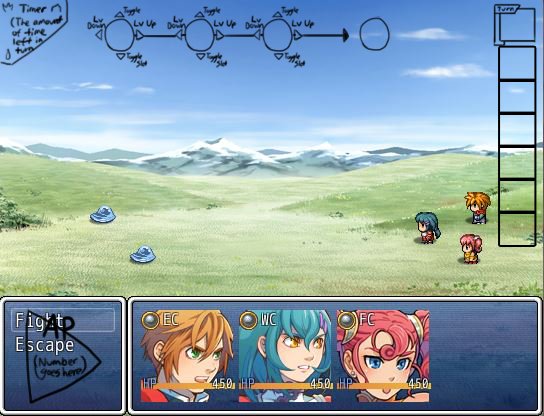
The main party will consist of 3 characters. The main objective of the battle system is to input different elements and item components together to create your attack or item. I also need to hide the commands, the command window and the status window. The main three elements being fire, water, and earth. Also there are secondary elements that can be made when combing the base element here a list of them: fire+water=steam fire+earth=lava earth+water=ice fire+earth+water= life force (ultimate element in game). You also have to combine items by using...
Archived First Post
The Z key is to confirm your decision, X is to cancel, R is to access the combos you have learned, D is to use the guard command and V is to escape battle. There is also an AP system so the player doesn't use powerful attacks all the time without consequence. The Max total of AP you can gain is 18 and the player starts with 9 at the start of battle. The elements consume AP based on what level they are, each element starts at 1 and ends at 3. You regenerate 3 AP after that certain character's turn has ended. If a character has 0 AP there turn is skipped however, they regenerate 3 AP once their turn has been skipped. Here's a list of how AP is consumed.
Lv. 1 Magic = 1AP (can be put in all three input slots)
Lv. 2 Magic = 2AP (can be put in all three input slots)
Lv. 3 Magic = 3AP (can be put in all three input slots)
Bottle(can only be used in the first input) Bottle Lv. 1 = 2 AP Bottle Lv. 2 = 3AP Bottle Lv. 3 = 4AP
Tonic (can only be used in the second and third input)
Healing Powder (can only be used in the second and third input)
Sacred Ash (can only be used in the second and third input)
Defend = 1 AP, turn ends after you use this command
Escape = 0 AP, uses the escape command
I have also attached a screen capture of how I would like to set up the UI in battle. I am using the yanfly scripts to achieve the visual battlers and the visual enemies as well.
If you are interested reply to this topic and I will give you all the possible combo that can be performed with the elements and items. Also thanks for taking the time to read this. Payment is negotiable.
Downloads / Referenced Files
RPG Maker Web attachments are mirrored locally when available. Other external links remain hosted by their original creator or third-party service.
- Source: visual battlers
- Source: visual enemies
- Local mirror: 9035-c729970e93216083ef38189018a26541.jpg
SHA-256:2c6d13edfc6bdf63975a0101056f58e7ae75c5458d3a2a8588ecbf5eb1375a81
Original attachment URL: https://forums.rpgmakerweb.com/attachments/ui-display-jpg.18250/
Referenced Images / Attachments
Creator Claims / Removal
If you are the original creator and want this listing reassigned, edited, or removed, join BMMPlay and contact the moderators with proof that matches the original RPG Maker Web profile, linked GitHub, itch.io page, or another public creator identity.
Replies (0)
No replies yet.
Topic Summary
Loading summary...