

[ACE] Custom Gallery Menu w/ Unlockable Extras Wanted!
BMM_Archive · July 15, 2026

Original Source
- Original title: [ACE] Custom Gallery Menu w/ Unlockable Extras Wanted!
- Original author: Halfmoon Media
- Original date: November 1, 2014
- Source thread: https://forums.rpgmakerweb.com/threads/ace-custom-gallery-menu-w-unlockable-extras-wanted.33488/
- Source forum path: Game Development Engines > Ruby Game System (RGSS) Scripts > RGSS3 Scripts (RMVX Ace) > RGSS3 Script Requests
Summary
I've always been a fan of games that let you unlock movies and pictures as you go and I know I'm not the only one. I'd love to give my players the same experience, if that's something they'd like. I am looking for an Extras Menu from which you can select: Movies, Pictures, or Music. These 4 scenes should all appear and function similar to each other, which is why I am grouping them in one request. It's probably easier to do the 4 scenes in separate scripts, but that...
Archived First Post
I am looking for an Extras Menu from which you can select: Movies, Pictures, or Music. These 4 scenes should all appear and function similar to each other, which is why I am grouping them in one request. It's probably easier to do the 4 scenes in separate scripts, but that is up to the scripter, since you will know better than I.
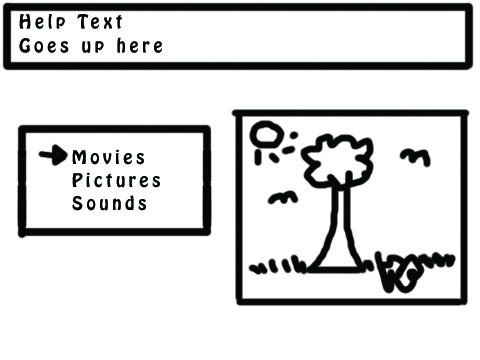
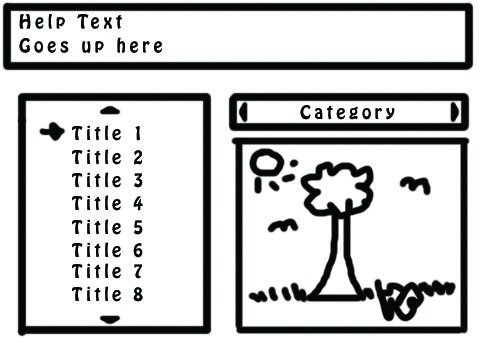
All of the scenes will follow the same general layout:
- Help Text located at the top.
- A left hand list that should be scrollable with at least 1-2 lines of buffer at the top (between the list and the help text) and the bottom (between the list and the bottom of the screen)
- Each option in that list should have a thumbnail image that will change on the right-hand side as you scroll.IE, cursor hovers on "Movies," the image is a film reel. If the cursor is on "Pictures," the image is a digital camera, etc.
[*]Extras in each sub menu (movies, pictures, sounds) should also be unlockable with a switch
[*]All scenes should be compatible with GDS Picture Menu script
- Shadowmasters Bestiary and Theo's StoryJournal are compatible, but Casper's Item Encyclopedia is not, for example.
- If an Extra is not yet unlocked, the text should display "?????" and be grayed out.
- Map music should stop on Sounds and Movies menus but still play/resume on the Main Extras Menu/Pictures MenuPressing Z on a movie will play the movie; pressing X will stop the movie and go back to the sub-menu
- Pressing Z on a song will play the song; pressing X will stop the song
- Pressing Z on a picture will view the image at full size (640x480 instead of just the thumbnail); pressing X goes back to the sub-menuZooming capabilities are NOT required or wanted
[*]In the 3 sub-menus, "Q" & "W" will change the category (Ex, Dungeon music, battle music, town music, theme music, etc...)
- All files (movies, pictures, and sounds) can be assigned to a category
- All files must have a display name which is different than the file name
[*]Main Menu compatibility is not necessary
[*]I must be able to specify the folder that the files are stored in (too many files floating around gets very annoying and very confusing)
- Preferably, all three file types (movies, songs, pictures) can be stored in 3 separate folders. Not the end of the world if not
Basic information about the game I am using this for can be found in my signature until I make a proper post for it.
If this project proves more difficult than initially anticipated, or should other various circumstances occur, this will change to a paid commission. Scripters may also PM me regarding making this a paid commission with a fair price offer and an example or two of their previous works.
Downloads / Referenced Files
RPG Maker Web attachments are mirrored locally when available. Other external links remain hosted by their original creator or third-party service.
- Local mirror: 8616-0f900ffd1d04a8ce808aa6908af1a43f.jpg
SHA-256:87c91bdced18a18a79e989f153a684da87059e31bf62f7ceed1e11efb1579daa
Original attachment URL: https://forums.rpgmakerweb.com/attachments/extras-main-menu-jpg.17651/ - Local mirror: 8617-7a4563745583720dbe244191644221de.jpg
SHA-256:cf4bb55d8b45083d9132b0ab72c0589647d95a39a99186270742b0c575d83f38
Original attachment URL: https://forums.rpgmakerweb.com/attachments/extras-sub-menu-jpg.17652/
Referenced Images / Attachments
Creator Claims / Removal
If you are the original creator and want this listing reassigned, edited, or removed, join BMMPlay and contact the moderators with proof that matches the original RPG Maker Web profile, linked GitHub, itch.io page, or another public creator identity.
Replies (0)
No replies yet.
Topic Summary
Loading summary...