

Requesting a Script that displays a value based on an integer
BMM_Archive · July 15, 2026

BMM_Archive
Preserved forum archive. This topic stores the original first post and locally mirrored RPG Maker Web attachments when available. It is posted by the BMMPlay archive account, not by the original creator.
Original Source
- Original title: Requesting a Script that displays a value based on an integer
- Original author: deathsia
- Original date: October 24, 2014
- Source thread: https://forums.rpgmakerweb.com/threads/requesting-a-script-that-displays-a-value-based-on-an-integer.33255/
- Source forum path: Game Development Engines > Ruby Game System (RGSS) Scripts > RGSS3 Scripts (RMVX Ace) > RGSS3 Script Requests
Summary
Yanfly equipment engine Yami's Equipment Learning Script Now while this request sounds like something extremely simple...It actully most likely is. Or its not and I'm asking for a WHOLE LOT MORE than i thought...
Archived First Post
Yanfly equipment engine
Yami's Equipment Learning Script
Now while this request sounds like something extremely simple...It actully most likely is.
Or its not and I'm asking for a WHOLE LOT MORE than i thought...
Okay, so to start this off I'm going to provide a visual example:
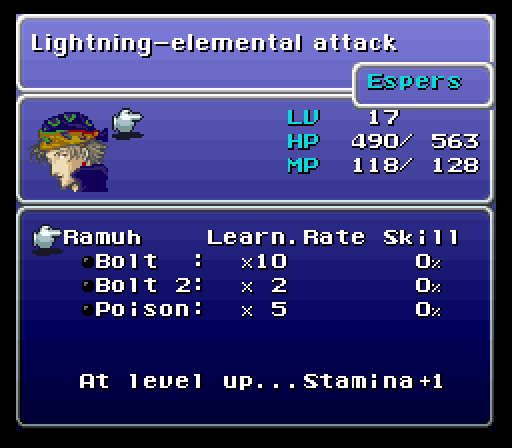
Okay so, you see how in this image, it displays the spell and the % to completion.
What I'm asking for is a script that grabs the values that Yami's Equipment Learning Script for the spells the character is currently learning and displayed either in it's own scene or as an added value next to the spells name in the skills window where spells and abilities are displayed.
Yami's equipment script already does this but he coded in a failsafe to detect if Yanfly's equipment manager script was installed or not and if it was, it would hide itself to prevent conflicting between scripts. Smart.
I'm attempting to make my own addon for the equipment learning script that displays these values but considering my knowledge is limited, I doubt I'll have any success.
EDIT: I found what "I think" is the part of the script that draws the values. I'll put it here for reference though chances are I'm so far off the mark of what's exactly needed that this will be useless but oh well..
Yami's Equipment Learning Script
Now while this request sounds like something extremely simple...It actully most likely is.
Or its not and I'm asking for a WHOLE LOT MORE than i thought...
Okay, so to start this off I'm going to provide a visual example:
Okay so, you see how in this image, it displays the spell and the % to completion.
What I'm asking for is a script that grabs the values that Yami's Equipment Learning Script for the spells the character is currently learning and displayed either in it's own scene or as an added value next to the spells name in the skills window where spells and abilities are displayed.
Yami's equipment script already does this but he coded in a failsafe to detect if Yanfly's equipment manager script was installed or not and if it was, it would hide itself to prevent conflicting between scripts. Smart.
I'm attempting to make my own addon for the equipment learning script that displays these values but considering my knowledge is limited, I doubt I'll have any success.
EDIT: I found what "I think" is the part of the script that draws the values. I'll put it here for reference though chances are I'm so far off the mark of what's exactly needed that this will be useless but oh well..
Code:
#==============================================================================# ¡ Window_EquipLearning#==============================================================================class Window_EquipLearning < Window_Selectable #-------------------------------------------------------------------------- # initialize #-------------------------------------------------------------------------- def initialize(x, y, width, height) super(x, y, width, height) self.opacity = 0 end #-------------------------------------------------------------------------- # ap_gauge_color1 #-------------------------------------------------------------------------- def ap_gauge_color1 text_color(YES::EQUIPMENT_LEARNING::COLOR_GAUGE[:color1]) end #-------------------------------------------------------------------------- # ap_gauge_color2 #-------------------------------------------------------------------------- def ap_gauge_color2 text_color(YES::EQUIPMENT_LEARNING::COLOR_GAUGE[:color2]) end #-------------------------------------------------------------------------- # item_max #-------------------------------------------------------------------------- def item_max @data.nil? ? 1 : @data.size end #-------------------------------------------------------------------------- # current_item_enabled? #-------------------------------------------------------------------------- def current_item_enabled? false end #-------------------------------------------------------------------------- # enable? #-------------------------------------------------------------------------- def enable?(skill) true end #-------------------------------------------------------------------------- # equip= #-------------------------------------------------------------------------- def equip=(equip) contents.clear @equip = equip return unless @equip @data = @equip.el_skills.collect { |i| $data_skills[i] } refresh end #-------------------------------------------------------------------------- # actor= #-------------------------------------------------------------------------- def actor=(actor) @actor = actor end #-------------------------------------------------------------------------- # item #-------------------------------------------------------------------------- def item @data.nil? ? nil : @data[index] end #-------------------------------------------------------------------------- # draw_item #-------------------------------------------------------------------------- def draw_item(index) skill = @data[index] if skill rect = item_rect(index) rect.width -= 4 draw_ap(skill, rect.x + 2, rect.y, rect.width, enable?(skill)) draw_item_name(skill, rect.x, rect.y, enable?(skill)) end end #-------------------------------------------------------------------------- # draw_ap #-------------------------------------------------------------------------- def draw_ap(item, x, y, width, enable = true) if @actor draw_gauge(x, y, width - 4, @actor.per_elp(item.id), ap_gauge_color1, ap_gauge_color2) draw_current_and_max_values(x, y, width - 4, @actor.cur_elp(item.id), @actor.req_elp(item.id), normal_color, normal_color) else draw_gauge(x, y, width - 4, 0, ap_gauge_color1, ap_gauge_color2) draw_current_and_max_values(x, y, width - 4, 0, item.el_require, normal_color, normal_color) end end #-------------------------------------------------------------------------- # update_help #-------------------------------------------------------------------------- def update_help @help_window.set_item(item) end #-------------------------------------------------------------------------- # activate #-------------------------------------------------------------------------- def activate self.index = 0 super end end # Window_EquipLearningDownloads / Referenced Files
RPG Maker Web attachments are mirrored locally when available. Other external links remain hosted by their original creator or third-party service.
- Source: Yanfly equipment engine
- Local mirror: 8557-917c8afce79dc8033c5524bca1289174.png
SHA-256:988614350db256588d80a675ebae30dda4ec4c3b9410bbfa1674e288ec9106cf
Original attachment URL: https://forums.rpgmakerweb.com/attachments/16-21062011_082538-png.17566/
Referenced Images / Attachments
Creator Claims / Removal
If you are the original creator and want this listing reassigned, edited, or removed, join BMMPlay and contact the moderators with proof that matches the original RPG Maker Web profile, linked GitHub, itch.io page, or another public creator identity.
Replies (0)
No replies yet.
0
replies
15
views
Topic Summary
Loading summary...