

Item scene modification
BMM_Archive · July 15, 2026

Original Source
- Original title: Item scene modification
- Original author: lemongreen
- Original date: May 31, 2014
- Source thread: https://forums.rpgmakerweb.com/threads/item-scene-modification.27568/
- Source forum path: Game Development Engines > Ruby Game System (RGSS) Scripts > RGSS3 Scripts (RMVX Ace) > RGSS3 Script Requests
Summary
Edit: I've actually figured out how to script this from the base scripts myself for the most part (I really didn't think I was able to understand RSS3 all that well yet...) I still need help changing the item numbers to show up only on certain conditions (if possible) If you (for whatever reason) need the edits I've made I'll be happy to share them. Spoiler {
Archived First Post
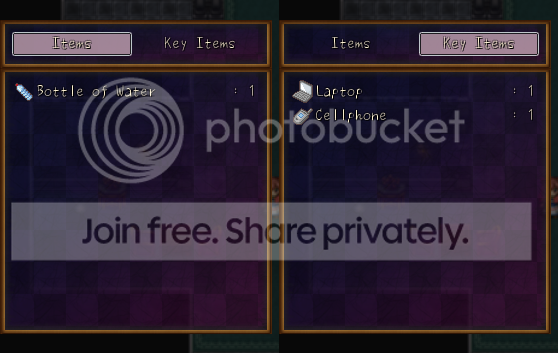
As of right now I'm using soulpour777's Horror game menu (edited to just be the items scene) but I'd like to be able to have more of a distinction between regular items and key items (especially since I'm thinking of having RPG elements in this game and with just one category visible in the items menu that's not really seeming like a viable idea)
What I'd like is something like this:
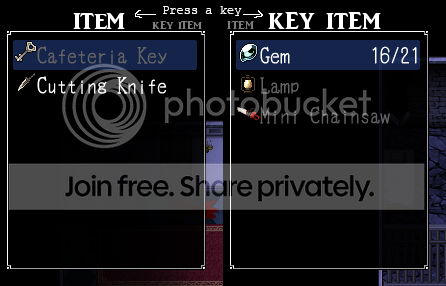
This is actually two different screenshots of the items menu in the game Mad Father; basicly it's setup so that if you hit the left or right arrow keys it switches between Items and Key Items (and I know Mad Father was actually made using Wolf Editor, but the basic setup can't be that hard to port over)
It doesn't have to look like that, either; I'd just really like a simple item screen that isn't overly crowded or badly mutilated by my bad skills. (or just looks wrong when you try to remove stuff...)
Thanks in advance to anyone who can help out.
Downloads / Referenced Files
RPG Maker Web attachments are mirrored locally when available. Other external links remain hosted by their original creator or third-party service.
- Download: here's the script
Referenced Images / Attachments
Creator Claims / Removal
If you are the original creator and want this listing reassigned, edited, or removed, join BMMPlay and contact the moderators with proof that matches the original RPG Maker Web profile, linked GitHub, itch.io page, or another public creator identity.
Replies (0)
No replies yet.
Topic Summary
Loading summary...