

[Solved] [JS] A few questions regarding Background pictures.
BMM_Archive · July 15, 2026

Original Source
- Original title: [Solved] [JS] A few questions regarding Background pictures.
- Original author: megumi014
- Original date: September 6, 2018
- Source thread: https://forums.rpgmakerweb.com/threads/solved-js-a-few-questions-regarding-background-pictures.99809/
- Source forum path: Game Development Engines > RPG Maker Javascript Plugins > Learning Javascript
Summary
Hi, I hope I can make a few questions under the same threat, if not I will split them. I'm currently working on the [Select Item] (Window_EventItem) function to transform it into an Inventory. Instead of drawing the items it just draws the icons (128x128), that I will switch for drawings on the Icon-sheet. I'm working directly on the code, not in a pluggin, since I'm still learning and it's easier for me this way until I learn more. This is the part that works correctly:
Archived First Post
I'm currently working on the [Select Item] (Window_EventItem) function to transform it into an Inventory. Instead of drawing the items it just draws the icons (128x128), that I will switch for drawings on the Icon-sheet.
I'm working directly on the code, not in a pluggin, since I'm still learning and it's easier for me this way until I learn more.
This is the part that works correctly:
//-----------------------------------------------------------------------------
// Window_EventItem
//
// The window used for the event command [Select Item]. MODIFIED.

function Window_EventItem() {
    this.initialize.apply(this, arguments);
}

Window_EventItem.prototype = Object.create(Window_ItemList.prototype);
Window_EventItem.prototype.constructor = Window_EventItem;


Window_EventItem.prototype.initialize = function(messageWindow) {
    this._messageWindow = messageWindow;
    var width = 900; // changed
    var height = 600; // changed
    Window_ItemList.prototype.initialize.call(this, (Graphics.boxWidth / 2) - (width / 2), (Graphics.boxHeight / 2) - (height / 2), width, height); //changed to center the box
    this.opacity = 0; // added
    this.openness = 0;
    this.deactivate();
    this.setHandler('ok',     this.onOk.bind(this));
    this.setHandler('cancel', this.onCancel.bind(this));
};

Window_EventItem.prototype.maxCols = function() {
    return 6;
};

Window_EventItem.prototype.spacing = function() {
    return 12; // Need to improve.
};

// Changed the size for the icons.

Window_EventItem.prototype.itemWidth = function() {
    return 130;
};

Window_EventItem.prototype.itemHeight = function() {
    return 130;
};

// Instead of drawing the text it only draws the Icons, sized 128x128.

Window_EventItem.prototype.drawItem = function(index) {
    var item = this._data[index];
    if (item) {
        var rect = this.itemRect(index);
        rect.width -= this.textPadding();
        this.changePaintOpacity(this.isEnabled(item));
        this.drawItemName(item, rect.x, rect.y, rect.width);
        this.changePaintOpacity(1);
    }
};

Window_EventItem.prototype.drawItemName = function(item, x, y, width) {
    width = width || 312;
    if (item) {
        var iconBoxWidth = Window_Base._iconWidth + 4;
        this.resetTextColor();
        this.drawIcon(item.iconIndex, x + 2, y + 2);
    }
};

Window_EventItem.prototype.start = function() {
    this.refresh();
    //this.updatePlacement(); REMOVED
    this.select(0);
    this.open();
    this.activate();
};

Window_EventItem.prototype.includes = function(item) {
    var itypeId = $gameMessage.itemChoiceItypeId();
    return DataManager.isItem(item) && item.itypeId === itypeId;
};

Window_EventItem.prototype.isEnabled = function(item) {
    return true;
};

Window_EventItem.prototype.onOk = function() {
    var item = this.item();
    var itemId = item ? item.id : 0;
    $gameVariables.setValue($gameMessage.itemChoiceVariableId(), itemId);
    this._messageWindow.terminateMessage();
    this.close();
};

Window_EventItem.prototype.onCancel = function() {
    $gameVariables.setValue($gameMessage.itemChoiceVariableId(), 0);
    this._messageWindow.terminateMessage();
    this.close();
};
And it looks like this in game (ignore the super fancy drawing skills plz):
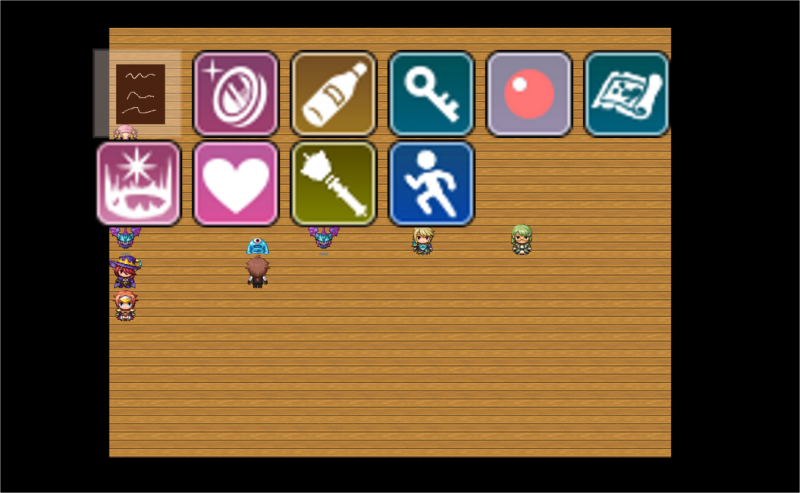
The problem comes when I try to add a Background to the window. I can put it manually on the program with Show Picture, but I'd like to learn how to do it on the code properly.
I have tried adding this:
Window_EventItem.prototype.start = function() {
    this.refresh();
    this.createBackground(); // add
    this.select(0);
    this.open();
    this.activate();
};

Window_EventItem.prototype.createBackground = function() {
    this._background = new Sprite();
    this._background.bitmap = ImageManager.loadPicture('INV_Basesmall');
    this._background.x = this._messageWindow.x - 60;
    this._background.y = this._messageWindow.x - 40;
    //this._background.anchor.x = 0;
    //this._background.anchor.y = 0;
    this.addChild(this._background);
};
And it shows up on the screen, but on top of the window, instead of behind. I tried adding different lines (ofc not at the same time) under the .x and .y lines, but none of them works, like:
this._background.z = this._messageWindow.x - 50;
this._background.z = 0;
And I also tried changing the this.createBackground(); before the refresh, but it doesn't work either. I also tried to create the background on one function and update the position in another function, but still nothing.
I don't know if the way I'm calling the background is wrong, or I'm calling it on the wrong place/order. I found a function called addChildToBack but I'm not sure how to use it or if it would fix the problem, or if I should work on the Game_Message.prototype.setItemChoice on the Objects code.
-----------------
The other question I have is regarding the handlers of this window. I'd like to be able to close it with the key 'i' too, but it doesn't work.
I added this line on the Input.keyMapper
73: 'i', // Ithis.setHandler('i', this.onCancel.bind(this));I'm so lost XD any help would be more than welcomed.
Downloads / Referenced Files
RPG Maker Web attachments are mirrored locally when available. Other external links remain hosted by their original creator or third-party service.
- Local mirror: 76900-5e4511ab4b93894e95eaf72191704477.png
SHA-256:52dfb170328bf08e15f87723857f3bd00e22e1246293326b55ac48c94c423eca
Original attachment URL: https://forums.rpgmakerweb.com/attachments/inventario_nobg-png.97820/
Referenced Images / Attachments
Creator Claims / Removal
If you are the original creator and want this listing reassigned, edited, or removed, join BMMPlay and contact the moderators with proof that matches the original RPG Maker Web profile, linked GitHub, itch.io page, or another public creator identity.
Replies (0)
No replies yet.
Topic Summary
Loading summary...