

Can someone fix my strange symbols?
BMM_Archive · July 15, 2026

BMM_Archive
Preserved forum archive. This topic stores the original first post and locally mirrored RPG Maker Web attachments when available. It is posted by the BMMPlay archive account, not by the original creator.
Original Source
- Original title: Can someone fix my strange symbols?
- Original author: Kwerty-kins
- Original date: March 29, 2014
- Source thread: https://forums.rpgmakerweb.com/threads/can-someone-fix-my-strange-symbols.25496/
- Source forum path: Game Development Engines > Ruby Game System (RGSS) Scripts > RGSS3 Scripts (RMVX Ace) > RGSS3 Script Requests
Summary
Hi all, I'm currently using a custom font in-game, which occasionally displays a strange symbol instead of an arrow = "->" I have obtained a script snippet to fix the error, it fixes the strange symbol in a couple of areas, but I would also like to fix it in my Items list.
Archived First Post
Hi all,
I'm currently using a custom font in-game, which occasionally displays a strange symbol
instead of an arrow = "->"
I have obtained a script snippet to fix the error, it fixes the strange symbol in a couple of areas, but I would also like to fix it in my Items list.
I think this is a fairly easy fix, but I can't seem to figure it out.
Any help fixing this one would be fantastic!
Thanks guys,
EDIT>
It is also displaying a strange symbol in my Items, Equipment and Skills lists.
You can access the Item menu by pressing insert.
Then using right arrow to move to the equipment list
and right arrow again to move to Skill list.
These are the menus that display the symbol.
Again, any help would be great!
As you can see in the attached image,
Scrolling through to the right menus (Equipment, skills) also displays
the box instead of the arrow.
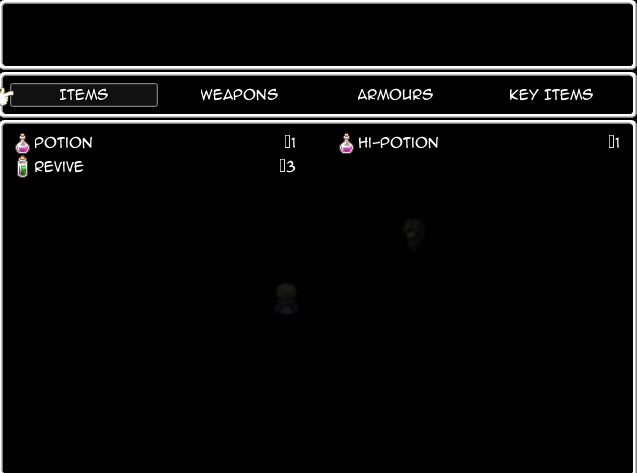
I'm currently using a custom font in-game, which occasionally displays a strange symbol
instead of an arrow = "->"
I have obtained a script snippet to fix the error, it fixes the strange symbol in a couple of areas, but I would also like to fix it in my Items list.
I think this is a fairly easy fix, but I can't seem to figure it out.
# Add function for temporarily switching a window's current drawing font.
class Font
def use( window )
old_font = window.contents.font.dup
window.contents.font = self
yield
window.contents.font = old_font
end
end
# Fixes the arrow character (→) used in places in the UI
# since custom font does not support that character
module Mez
module ArrowFix
FONT = Font.new(["VL Gothic", "Arial"]) # This is the font used for the arrows, checked in order.
end
end
# For Actor Equip Window
class Window_EquipStatus
alias mez_wes_dra draw_right_arrow
def draw_right_arrow(x, y)
Mez::ArrowFix::FONT.use(self) do
mez_wes_dra(x, y)
end
end
end
# For Yanfly Victory Aftermath - remove if not using that script
class Window_VictoryLevelUp
alias mez_wvlu_da draw_arrows
def draw_arrows
Mez::ArrowFix::FONT.use(self) do
mez_wvlu_da
end
end
end
class Font
def use( window )
old_font = window.contents.font.dup
window.contents.font = self
yield
window.contents.font = old_font
end
end
# Fixes the arrow character (→) used in places in the UI
# since custom font does not support that character
module Mez
module ArrowFix
FONT = Font.new(["VL Gothic", "Arial"]) # This is the font used for the arrows, checked in order.
end
end
# For Actor Equip Window
class Window_EquipStatus
alias mez_wes_dra draw_right_arrow
def draw_right_arrow(x, y)
Mez::ArrowFix::FONT.use(self) do
mez_wes_dra(x, y)
end
end
end
# For Yanfly Victory Aftermath - remove if not using that script
class Window_VictoryLevelUp
alias mez_wvlu_da draw_arrows
def draw_arrows
Mez::ArrowFix::FONT.use(self) do
mez_wvlu_da
end
end
end
Thanks guys,
EDIT>
It is also displaying a strange symbol in my Items, Equipment and Skills lists.
You can access the Item menu by pressing insert.
Then using right arrow to move to the equipment list
and right arrow again to move to Skill list.
These are the menus that display the symbol.
Again, any help would be great!
As you can see in the attached image,
Scrolling through to the right menus (Equipment, skills) also displays
the box instead of the arrow.
Downloads / Referenced Files
RPG Maker Web attachments are mirrored locally when available. Other external links remain hosted by their original creator or third-party service.
- Local mirror: 5033-44c33d2040977888b553f811d1c27deb.png
SHA-256:4915c126ab2094d4103ff9449af01d6fc4446ab8fa7e1cf966b5db33ce3bc0cf
Original attachment URL: https://forums.rpgmakerweb.com/attachments/untitled-png.12181/
Referenced Images / Attachments
Creator Claims / Removal
If you are the original creator and want this listing reassigned, edited, or removed, join BMMPlay and contact the moderators with proof that matches the original RPG Maker Web profile, linked GitHub, itch.io page, or another public creator identity.
Replies (0)
No replies yet.
0
replies
16
views
Topic Summary
Loading summary...