

Black/White background when loading menu picture
BMM_Archive · July 15, 2026

Original Source
- Original title: Black/White background when loading menu picture
- Original author: megumi014
- Original date: March 2, 2018
- Source thread: https://forums.rpgmakerweb.com/threads/black-white-background-when-loading-menu-picture.92117/
- Source forum path: Game Development Engines > RPG Maker Javascript Plugins > Learning Javascript
Summary
Hi, I'm trying to learn javascript and I've been messing around with the Command Menu (following a tutorial and trying to change things here and there), but I stumbled upon an issue and I have no idea how to fix it because I don't understand what is the engine doing or why. I'm trying to put a background image on the Command Menu window, and only there (not the whole screen), so I tried this: Code: (function() {
Archived First Post
I'm trying to put a background image on the Command Menu window, and only there (not the whole screen), so I tried this:
(function() {

    // LOCATION MAIN MENU (COMMAND)

    var _Scene_Menu_create = Scene_Menu.prototype.create;
    Scene_Menu.prototype.create = function() {
        _Scene_Menu_create.call(this);
        this._goldWindow.hide(); // Just for now
        this._statusWindow.hide(); // Just for now

        this._commandWindow.x = 0;
        this._commandWindow.y = Graphics.boxHeight / 2 - (this._commandWindow.height / 2);

        this._commandWindow.opacity = 0;
    };


    // COMMAND MENU BACKGROUND IMAGE & UPDATE

    var _Scene_Menu_createBackground = Scene_Menu.prototype.createBackground;
    Scene_Menu.prototype.createBackground = function() {
        this._backgroundSprite = new Sprite();
        this._backgroundSprite.bitmap = ImageManager.loadPicture("Pink3");
        this.addChild(this._backgroundSprite);
        this._isBackgroundScaled = false;

        //this._backgroundSprite.opacity = 255;

    };

    var _Scene_Menu_update = Scene_Menu.prototype.update;
    Scene_Menu.prototype.update = function() {
        _Scene_Menu_update.call(this);
        if(this._isBackgroundScaled == false && this._backgroundSprite.bitmap.width != 0) {
            this._isBackgroundScaled = true;
            this._backgroundSprite.scale.x = Number(this._commandWindow.width / this._backgroundSprite.bitmap.width);
            this._backgroundSprite.scale.y = Number(this._commandWindow.height / this._backgroundSprite.bitmap.height);
            this._backgroundSprite.x = this._commandWindow.x;
            this._backgroundSprite.y = this._commandWindow.y;
        }
    };


})();
The background picture stretches to fit the menu box no matter its position or if i change the screen size, but this happens (the white line is actually a transparent padding I added to check if it made any difference):
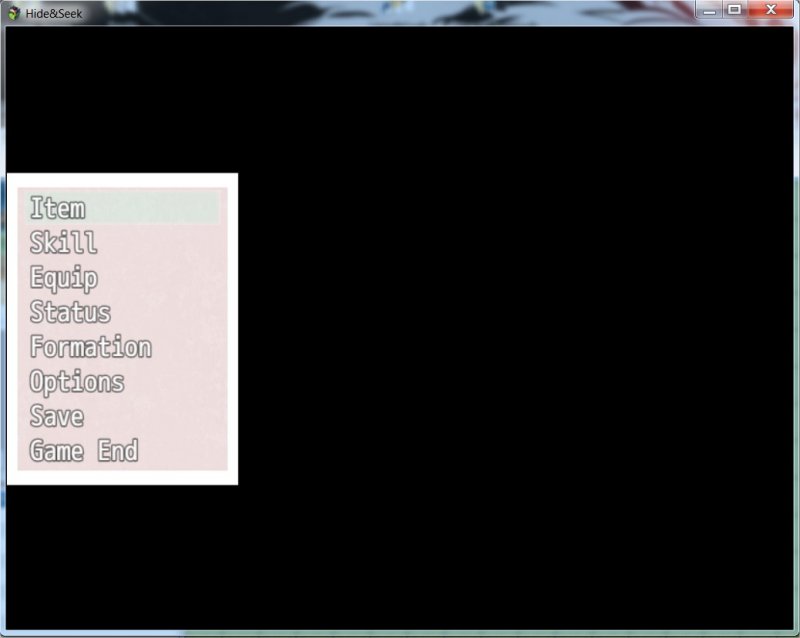
I have tried playing around with the opacity but it doesn't affect that black blackground, and trying to use a picture with the exact screen resolution but filled with a transparency layer makes it go white like this (I didn't care about the pink position for this one):
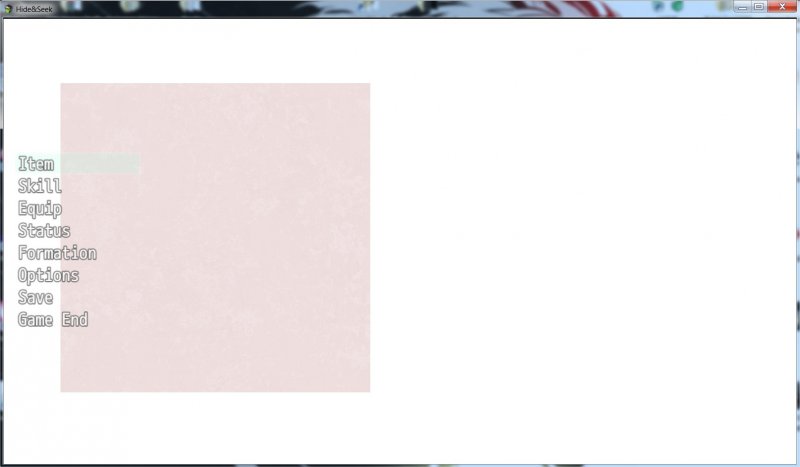
Sooo any help/advice you could give me it would be welcomed. I tried looking up for some options and the only thing I found was the Window_Base bit with updateBackOpacity() but I have no idea if that is what I'm looking for, or If the problem is the way I'm loading the picture.
Downloads / Referenced Files
RPG Maker Web attachments are mirrored locally when available. Other external links remain hosted by their original creator or third-party service.
- Local mirror: 62582-bf42d7ab497ce7942434bd8ca619483e.jpg
SHA-256:ab37151f091c902138964a9dba13f47b3b02f809270e07062e4f1585a2f199a6
Original attachment URL: https://forums.rpgmakerweb.com/attachments/hide-seek-jpg.84084/ - Local mirror: 62583-c737899f0d0257c2078a19fd00293252.jpg
SHA-256:21315f5f0a118090ecde9c316602aa5d0333ade17865159a71a4a8cf232ea184
Original attachment URL: https://forums.rpgmakerweb.com/attachments/hide-seek2-jpg.84085/
Referenced Images / Attachments
Creator Claims / Removal
If you are the original creator and want this listing reassigned, edited, or removed, join BMMPlay and contact the moderators with proof that matches the original RPG Maker Web profile, linked GitHub, itch.io page, or another public creator identity.
Replies (0)
No replies yet.
Topic Summary
Loading summary...