

Need helps to make combining menu system
BMM_Archive · July 15, 2026

BMM_Archive
Preserved forum archive. This topic stores the original first post and locally mirrored RPG Maker Web attachments when available. It is posted by the BMMPlay archive account, not by the original creator.
Original Source
- Original title: Need helps to make combining menu system
- Original author: rechronicle
- Original date: December 26, 2013
- Source thread: https://forums.rpgmakerweb.com/threads/need-helps-to-make-combining-menu-system.21458/
- Source forum path: Game Development Engines > Ruby Game System (RGSS) Scripts > RGSS3 Scripts (RMVX Ace) > RGSS3 Script Requests
Summary
[SIZE=10.5pt]Hello guys, umm I want to make an original menu for the modern-day role-playing game.[/SIZE] [SIZE=10.5pt]I really need help because I don`t understand advance scripting…[/SIZE] [SIZE=10.5pt]Here[/SIZE] [SIZE=10.5pt]is the sketch[/SIZE] [SIZE=10.5pt]
Archived First Post
[SIZE=10.5pt]Hello guys, umm I want to make an original menu for the modern-day role-playing game.[/SIZE]
[SIZE=10.5pt]I really need help because I don`t understand advance scripting…[/SIZE]
[SIZE=10.5pt]Here[/SIZE] [SIZE=10.5pt]is the sketch[/SIZE]
[SIZE=10.5pt]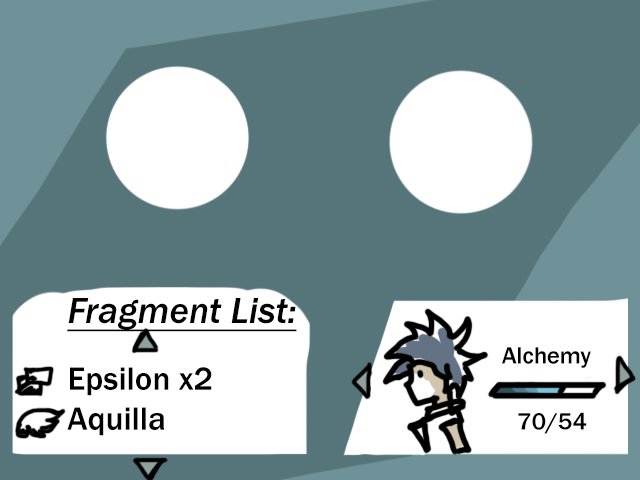 [/SIZE]
[SIZE=10.5pt]You can access this from Menu Screen, and here we found:[/SIZE]
[SIZE=10.5pt]- Bottom left[/SIZE]
[SIZE=10.5pt]Fragment List: Item on inventory that can be used to combine.[/SIZE]
[SIZE=10.5pt] (Control using Up/Down)[/SIZE]
[SIZE=10.5pt]- Bottom right[/SIZE]
[SIZE=10.5pt]User: the one who combine it, every person has different way (ex: Cook, Mixing, Synthesize, etc)[/SIZE]
[SIZE=10.5pt] [/SIZE][SIZE=10.5pt]This affects the result of combined item[/SIZE][SIZE=10.5pt].[/SIZE]
[SIZE=10.5pt] (Change user using Left/Right)[/SIZE]
[SIZE=10.5pt]- 2 Circles[/SIZE]
[SIZE=10.5pt]These are the place to put on the fragments. (Animated)[/SIZE]
[SIZE=10.5pt]- Custom Background[/SIZE]
[SIZE=10.5pt]Next[/SIZE] [SIZE=10.5pt]after you choose the fragments:[/SIZE]
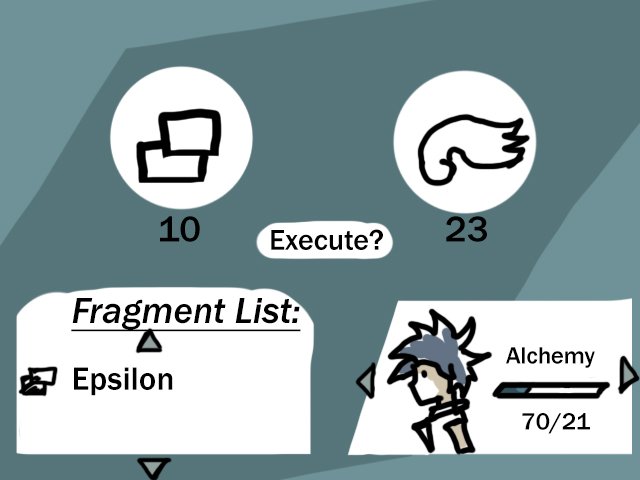
[SIZE=10.5pt]There we can find out the cost of each material under the circles and the Alchemy bar point is decrease.[/SIZE]
[SIZE=10.5pt]You can`t execute combination if the Alchemy bar is not full enough.[/SIZE]
[SIZE=10.5pt]Press the 'ok' button to execute.[/SIZE]
[SIZE=10.5pt]Finally[/SIZE][SIZE=10.5pt], the item created:[/SIZE]
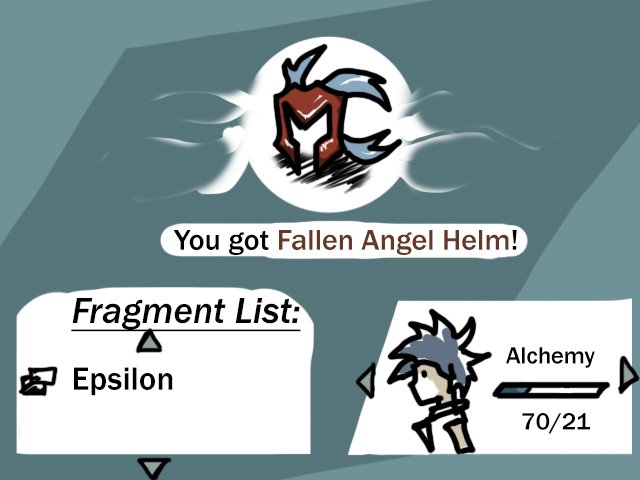
[SIZE=10.5pt]The 2 circles combined into one big circle with the new item in it.[/SIZE]
[SIZE=10.5pt]I want the circles to animate based on the way it combined (ex: burned if Forging, swirled in water if Alchemy)[/SIZE]
[SIZE=10.5pt]That’s it guys, I hope anyone can help me realize the idea [/SIZE]
[SIZE=10.5pt]I really need help because I don`t understand advance scripting…[/SIZE]
[SIZE=10.5pt]Here[/SIZE] [SIZE=10.5pt]is the sketch[/SIZE]
[SIZE=10.5pt]
[/SIZE][SIZE=10.5pt]You can access this from Menu Screen, and here we found:[/SIZE]
[SIZE=10.5pt]- Bottom left[/SIZE]
[SIZE=10.5pt]Fragment List: Item on inventory that can be used to combine.[/SIZE]
[SIZE=10.5pt] (Control using Up/Down)[/SIZE]
[SIZE=10.5pt]- Bottom right[/SIZE]
[SIZE=10.5pt]User: the one who combine it, every person has different way (ex: Cook, Mixing, Synthesize, etc)[/SIZE]
[SIZE=10.5pt] [/SIZE][SIZE=10.5pt]This affects the result of combined item[/SIZE][SIZE=10.5pt].[/SIZE]
[SIZE=10.5pt] (Change user using Left/Right)[/SIZE]
[SIZE=10.5pt]- 2 Circles[/SIZE]
[SIZE=10.5pt]These are the place to put on the fragments. (Animated)[/SIZE]
[SIZE=10.5pt]- Custom Background[/SIZE]
[SIZE=10.5pt]Next[/SIZE] [SIZE=10.5pt]after you choose the fragments:[/SIZE]
[SIZE=10.5pt]There we can find out the cost of each material under the circles and the Alchemy bar point is decrease.[/SIZE]
[SIZE=10.5pt]You can`t execute combination if the Alchemy bar is not full enough.[/SIZE]
[SIZE=10.5pt]Press the 'ok' button to execute.[/SIZE]
[SIZE=10.5pt]Finally[/SIZE][SIZE=10.5pt], the item created:[/SIZE]
[SIZE=10.5pt]The 2 circles combined into one big circle with the new item in it.[/SIZE]
[SIZE=10.5pt]I want the circles to animate based on the way it combined (ex: burned if Forging, swirled in water if Alchemy)[/SIZE]
[SIZE=10.5pt]That’s it guys, I hope anyone can help me realize the idea [/SIZE]
Downloads / Referenced Files
RPG Maker Web attachments are mirrored locally when available. Other external links remain hosted by their original creator or third-party service.
- Local mirror: 3434-fd34964657b7b914bb421c5715d9f8cd.jpg
SHA-256:37c66bb6a6d6410e12802a24ef2ffb23e05c215befd5429fb04edc9e31a9f910
Original attachment URL: https://forums.rpgmakerweb.com/attachments/menu-request-jpg.9897/ - Local mirror: 3432-3e9003bfbfbdfd64f362e818604c488f.jpg
SHA-256:214df0537a3448e68b7ee77f924e9578078854cf4d2cb58e63a1ca44a58b6f8f
Original attachment URL: https://forums.rpgmakerweb.com/attachments/menu-request-2-jpg.9895/ - Local mirror: 3433-2a5a6bfb8d217ee9f4ce00ee2b929f15.jpg
SHA-256:56574713b8b48879d5cc349d759c2d593a5d42f76e3804842f5dae5c7e72108c
Original attachment URL: https://forums.rpgmakerweb.com/attachments/menu-request-3-jpg.9896/
Referenced Images / Attachments
Creator Claims / Removal
If you are the original creator and want this listing reassigned, edited, or removed, join BMMPlay and contact the moderators with proof that matches the original RPG Maker Web profile, linked GitHub, itch.io page, or another public creator identity.
Replies (0)
No replies yet.
0
replies
24
views
Topic Summary
Loading summary...