Preserved forum archive. This topic stores the original first post and locally mirrored RPG Maker Web attachments when available. It is posted by the BMMPlay archive account, not by the original creator.
Original Source
- Original title: [Solved] Getting images to appear below windows
- Original author: mjshi
- Original date: January 11, 2017
- Source thread: https://forums.rpgmakerweb.com/threads/solved-getting-images-to-appear-below-windows.73484/
- Source forum path: Game Development Engines > RPG Maker Javascript Plugins > Learning Javascript
Summary
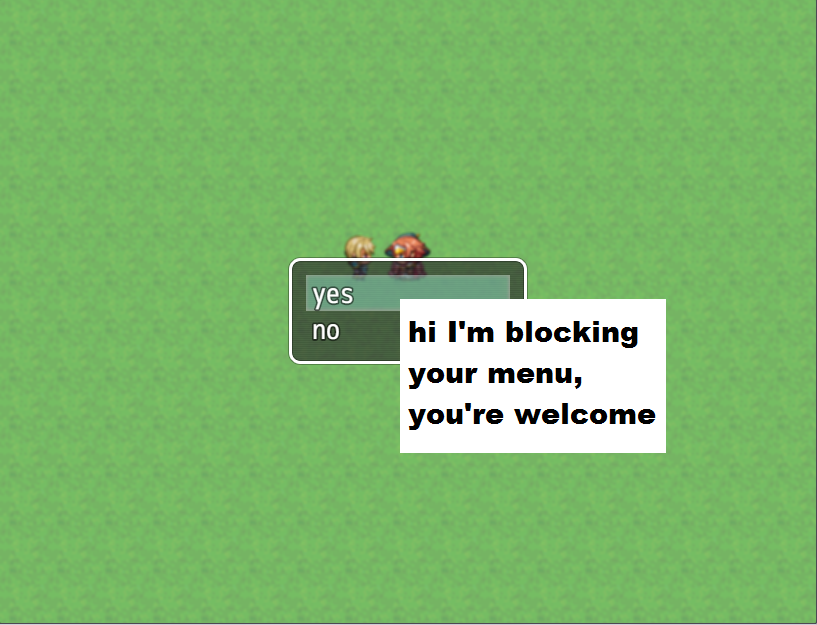
[Solved] Thanks for the pointers, Dreadshadow! Hi there! I don't usually ask questions, but then again I don't usually work with too much with graphics, so... I'm trying to figure out how to show Sprite images below windows in a scene. Attached are the image and plugin file. Place the image in img/pictures/, and call the demo scene with
Archived First Post
[Solved] Thanks for the pointers, Dreadshadow!
Hi there! I don't usually ask questions, but then again I don't usually work with too much with graphics, so...
I'm trying to figure out how to show Sprite images below windows in a scene.
Attached are the image and plugin file. Place the image in img/pictures/, and call the demo scene with
SceneManager.push(Scene_Demo);
... but I'm sure you already knew that.
Scroll down some more for the code.
Thanks in advance for your help!
Protected download
function Scene_Demo() {
this.initialize.apply(this, arguments);
}
Scene_Demo.prototype = Object.create(Scene_MenuBase.prototype);
Scene_Demo.prototype.constructor = Scene_Demo;
Scene_Demo.prototype.initialize = function() {
Scene_MenuBase.prototype.initialize.call(this);
}
Scene_Demo.prototype.create = function() {
Scene_MenuBase.prototype.create.call(this);
this.createCommandWindow();
var img = ImageManager.loadBitmap("img/pictures/", "annoyance");
this._image = new Sprite(img);
this._image.x = 400;
this._image.y = 300;
this.addChild(this._image);
}
Scene_Demo.prototype.createCommandWindow = function() {
this._choiceWindow = new Window_ChooseOne(0, 0);
this._choiceWindow.x = (Graphics.width - this._choiceWindow.width) / 2;
this._choiceWindow.y = (Graphics.height - this._choiceWindow.height) / 2;
this._choiceWindow.setHandler('yes', this.yesCommand.bind(this));
this._choiceWindow.setHandler('no', this.cancelCommand.bind(this));
this._choiceWindow.setHandler('cancel', this.cancelCommand.bind(this));
this.addWindow(this._choiceWindow);
}
Scene_Demo.prototype.yesCommand = function () {}
Scene_Demo.prototype.cancelCommand = function () {
this.popScene();
}
function Window_ChooseOne() {
this.initialize.apply(this, arguments);
}
Window_ChooseOne.prototype = Object.create(Window_Command.prototype);
Window_ChooseOne.prototype.constructor = Window_ChooseOne;
Window_ChooseOne.prototype.makeCommandList = function () {
this.addCommand("yes", 'yes');
this.addCommand("no", 'no');
};
Attachments
View attachment Demo.js
Protected download
Hi there! I don't usually ask questions, but then again I don't usually work with too much with graphics, so...
I'm trying to figure out how to show Sprite images below windows in a scene.
Attached are the image and plugin file. Place the image in img/pictures/, and call the demo scene with
SceneManager.push(Scene_Demo);
... but I'm sure you already knew that.
Scroll down some more for the code.
Thanks in advance for your help!
Protected download
function Scene_Demo() {
this.initialize.apply(this, arguments);
}
Scene_Demo.prototype = Object.create(Scene_MenuBase.prototype);
Scene_Demo.prototype.constructor = Scene_Demo;
Scene_Demo.prototype.initialize = function() {
Scene_MenuBase.prototype.initialize.call(this);
}
Scene_Demo.prototype.create = function() {
Scene_MenuBase.prototype.create.call(this);
this.createCommandWindow();
var img = ImageManager.loadBitmap("img/pictures/", "annoyance");
this._image = new Sprite(img);
this._image.x = 400;
this._image.y = 300;
this.addChild(this._image);
}
Scene_Demo.prototype.createCommandWindow = function() {
this._choiceWindow = new Window_ChooseOne(0, 0);
this._choiceWindow.x = (Graphics.width - this._choiceWindow.width) / 2;
this._choiceWindow.y = (Graphics.height - this._choiceWindow.height) / 2;
this._choiceWindow.setHandler('yes', this.yesCommand.bind(this));
this._choiceWindow.setHandler('no', this.cancelCommand.bind(this));
this._choiceWindow.setHandler('cancel', this.cancelCommand.bind(this));
this.addWindow(this._choiceWindow);
}
Scene_Demo.prototype.yesCommand = function () {}
Scene_Demo.prototype.cancelCommand = function () {
this.popScene();
}
function Window_ChooseOne() {
this.initialize.apply(this, arguments);
}
Window_ChooseOne.prototype = Object.create(Window_Command.prototype);
Window_ChooseOne.prototype.constructor = Window_ChooseOne;
Window_ChooseOne.prototype.makeCommandList = function () {
this.addCommand("yes", 'yes');
this.addCommand("no", 'no');
};
Attachments
View attachment Demo.js
Protected download
Downloads / Referenced Files
Log in to download
Log in, then follow the RPG Maker Developers Group to see these download links.
Log in to downloadReferenced Images / Attachments
Creator Claims / Removal
If you are the original creator and want this listing reassigned, edited, or removed, join BMMPlay and contact the moderators with proof that matches the original RPG Maker Web profile, linked GitHub, itch.io page, or another public creator identity.

Replies (0)
No replies yet.
0
replies
1
view
Topic Summary
Loading summary...