

clearTimeout And setTimeout and setInterval (lag and Bug)
BMM_Archive · July 15, 2026

BMM_Archive
Preserved forum archive. This topic stores the original first post and locally mirrored RPG Maker Web attachments when available. It is posted by the BMMPlay archive account, not by the original creator.
Original Source
- Original title: clearTimeout And setTimeout and setInterval (lag and Bug)
- Original author: Jonforum
- Original date: November 19, 2016
- Source thread: https://forums.rpgmakerweb.com/threads/cleartimeout-and-settimeout-and-setinterval-lag-and-bug.71194/
- Source forum path: Game Development Engines > RPG Maker Javascript Plugins > Learning Javascript
Summary
I why i have array incrementation when i use clearTimeout Example whit this code AvatarFrame[1] = 0; // the TimeOut store in this array function Avatar1(WhatToDo) {
Archived First Post
I why i have array incrementation when i use clearTimeout
Example whit this code
AvatarFrame[1] = 0; // the TimeOut store in this array
function Avatar1(WhatToDo) {
clearTimeout(timerAvatar[1]); // clear the timeOut Array
if (WhatToDo == 'Stop') { return;} // If call Avatar1('Stop'), this stop the function
timerAvatar[1] = setTimeout(function() { // give timeout to the array timerAvatar[1]
console.log(timerAvatar[1]); // this show the timeOut ID valur ?? i think
console.log('Avatar 1 framme'); // show TXT for fun in the SetTimeout
Avatar1(); }, 3); // CallBack Function and End of TimeOut
}
So when i call
Avatar1();
Or
AvatarAnim(1,0,'Talk'); // in other function
This give my animation
View attachment 52434
And i notice a reduction in fps and the console.log incremented array ???.
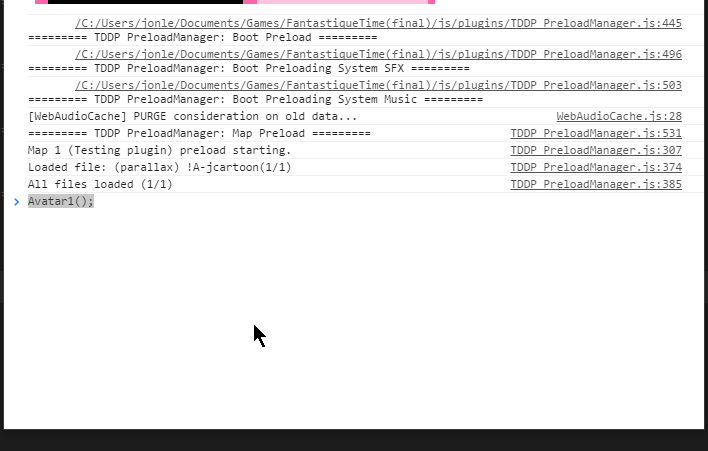
I go from 120 to 109 FPS. With
setInterval
Do you have sugestions to help me to optimise this.
That TimeOut Function i use is badly written or mismanaged by RPGmaker.
If I use the Parallels Event to display the animation directly.
I do not notice any drop in FPS
Thank you for your clarification.
This is an example for testing.
Here is the complete plugin.
Tank you
Example whit this code
AvatarFrame[1] = 0; // the TimeOut store in this array
function Avatar1(WhatToDo) {
clearTimeout(timerAvatar[1]); // clear the timeOut Array
if (WhatToDo == 'Stop') { return;} // If call Avatar1('Stop'), this stop the function
timerAvatar[1] = setTimeout(function() { // give timeout to the array timerAvatar[1]
console.log(timerAvatar[1]); // this show the timeOut ID valur ?? i think
console.log('Avatar 1 framme'); // show TXT for fun in the SetTimeout
Avatar1(); }, 3); // CallBack Function and End of TimeOut
}
So when i call
Avatar1();
Or
AvatarAnim(1,0,'Talk'); // in other function
This give my animation
View attachment 52434
And i notice a reduction in fps and the console.log incremented array ???.
I go from 120 to 109 FPS. With
setInterval
Do you have sugestions to help me to optimise this.
That TimeOut Function i use is badly written or mismanaged by RPGmaker.
If I use the Parallels Event to display the animation directly.
I do not notice any drop in FPS
Thank you for your clarification.
This is an example for testing.
Here is the complete plugin.
/*:
*
*@plugindesc Gestion des menue
*
*
@author Djmisterjon
*§
*@help
*Lorsque click sur menue mais aussi le menue des dées
*
*
*/
// trick
//SceneManager.preferableRendererType = function() { return 'canvas'; }; Change perfec blend mode ( affiche les bon mode blend)
//=============================================================================
// Game_BOOT
//Booting all variable function and array.
//=============================================================================
console.log('awfdaf');
//=============================================================================
// Game Variable
//=============================================================================
AvatarFrame = [];
AvatarFrame[1] = 0; // frame toujours en evolution pour avatar 0 a 12
AvatarFrame[2] = 0; // frame toujours en evolution pour avatar 0 a 12
timerAvatar = [];
AvatarInterval = [];
oldAvatarID = [];
oldAvatarID[1] = 8; // default picture id avatar 1
oldAvatarID[2] = 9; // default picture id avatar 2
AvatarDefXy = [];
AvatarDefXy[1] = [100,650];
AvatarDefXy[2] = [220,765];
//=============================================================================
// Game arrays & objets
//=============================================================================
//=============================================================================
// Game avatar Function
//=============================================================================
//
function AvatarAnim(Avatar, ID, WhatToDo, Ax, Ay, TalkingType) {
clearInterval(AvatarInterval[Avatar]);
AvatarInterval[Avatar] = 0;
clearTimeout(timerAvatar[Avatar]);
timerAvatar[Avatar] = 0;
//Si dans le call function utilise 0 affiche au meme ID que avant ex: AvatarAnim(1,0,'Talk');
if (ID == 0) {
ID = oldAvatarID[Avatar];
}
// Si acient id nest pas egal ces que on a changer le ID Donc supprimer ancient ID
else if (oldAvatarID[Avatar] !== ID) {
var OldX = $gameScreen.picture(oldAvatarID[Avatar])._x; // utile permet de faire un MoveTo en changean de ID
var OldY = $gameScreen.picture(oldAvatarID[Avatar])._y;
$gameScreen.erasePicture(oldAvatarID[Avatar]);
$gameScreen.showPicture(ID, 'H' + Avatar + '-IDLE-' + AvatarFrame[Avatar], 1, OldX, OldY, 100, 100, 255, 0);
}
oldAvatarID[Avatar] = ID;
if (WhatToDo == 'SHOW') {
$gameScreen.showPicture(ID, 'H' + Avatar + '-IDLE-talking-happy-6', 1, Ax - 280, Ay, 100, 100, 255, 0);
$gameScreen.picture(ID)._angle = -50;
new IAVRA.ANIMATE.Tween($gameScreen.picture(ID), { _x: Ax,_angle: 0 }).easing(IAVRA.EASING.back.out).duration(25).start();
$gameScreen.setPictureCallCommon(ID, 2, 1); // lorsque click sur image call BAG
timerAvatar[Avatar] = setTimeout(function() {
$gameScreen.showPicture(ID, 'H' + Avatar + '-IDLE-0', 1, $gameScreen.picture(ID)._x, $gameScreen.picture(ID)._y, 100, 100, 255, 0);
AvatarAnim(Avatar, ID, 'ANIM', Ax, Ay);
}, 420);
} else if (WhatToDo == 'ANIM') {
AvatarInterval[Avatar] = setInterval(function() {
if (AvatarFrame[Avatar] > 12) {
AvatarFrame[Avatar] = 0;
}
$gameScreen.showPicture(ID, 'H' + Avatar + '-IDLE-' + AvatarFrame[Avatar], 1, $gameScreen.picture(ID)._x, $gameScreen.picture(ID)._y, 100, 100, 255, 0);
AvatarFrame[Avatar]++;
}, 58);
} else if (WhatToDo == 'Talk') {
// liste des type expresions parlotes
if (TalkingType == 0 || TalkingType == null) {
TalkingType = 'happy-';
}
// jouer expression
AvatarInterval[Avatar] = setInterval(function() {
if (AvatarFrame[Avatar] > 12) {
AvatarFrame[Avatar] = 0;
}
$gameScreen.showPicture(ID, 'H' + Avatar + '-IDLE-talking-' + TalkingType + AvatarFrame[Avatar], 1, $gameScreen.picture(ID)._x, $gameScreen.picture(ID)._y, 100, 100, 255, 0);
AvatarFrame[Avatar]++;
console.log('Avatar1Interval==== ' + AvatarInterval[Avatar]);
}, 58);
timerAvatar[Avatar] = setTimeout(function() {
AvatarAnim(Avatar, ID, 'ANIM', Ax, Ay);
}, 2350);
}
else if (WhatToDo == 'MoveTo') {
if (Ax == null) {Ax = $gameScreen.picture(ID)._x;} // si rien entré ces que on bouge pas X
if (Ay == null) {Ay = $gameScreen.picture(ID)._y;}// si rien entré ces que on bouge pas Y
if (Ay == null) {Ay = $gameScreen.picture(ID)._y;}// si rien entré ces que on bouge pas Y
new IAVRA.ANIMATE.Tween($gameScreen.picture(ID), { _x: Ax,_y: Ay ,_scaleX:TalkingType }).easing(IAVRA.EASING.quart.out).duration(50).start();
timerAvatar[Avatar] = setTimeout(function() {
AvatarAnim(Avatar, ID, 'ANIM', Ax, Ay);
}, 800);
}
else if (WhatToDo == 'CallBag') {
new IAVRA.ANIMATE.Tween($gameScreen.picture(ID), { _x: $gameScreen.picture(ID)._x+120,_scaleX: -100 }).easing(IAVRA.EASING.back.out).duration(25).start();
new IAVRA.ANIMATE.Tween($gameScreen.picture(ID+1), { _x: $gameScreen.picture(ID+1)._x+185,_scaleX: -100 }).easing(IAVRA.EASING.back.out).duration(25).start();
SliderOption('SHOW');
}
}
//=============================================================================
// Game_Interpreter
//=============================================================================
*
*@plugindesc Gestion des menue
*
*
@author Djmisterjon
*§
*@help
*Lorsque click sur menue mais aussi le menue des dées
*
*
*/
// trick
//SceneManager.preferableRendererType = function() { return 'canvas'; }; Change perfec blend mode ( affiche les bon mode blend)
//=============================================================================
// Game_BOOT
//Booting all variable function and array.
//=============================================================================
console.log('awfdaf');
//=============================================================================
// Game Variable
//=============================================================================
AvatarFrame = [];
AvatarFrame[1] = 0; // frame toujours en evolution pour avatar 0 a 12
AvatarFrame[2] = 0; // frame toujours en evolution pour avatar 0 a 12
timerAvatar = [];
AvatarInterval = [];
oldAvatarID = [];
oldAvatarID[1] = 8; // default picture id avatar 1
oldAvatarID[2] = 9; // default picture id avatar 2
AvatarDefXy = [];
AvatarDefXy[1] = [100,650];
AvatarDefXy[2] = [220,765];
//=============================================================================
// Game arrays & objets
//=============================================================================
//=============================================================================
// Game avatar Function
//=============================================================================
//
function AvatarAnim(Avatar, ID, WhatToDo, Ax, Ay, TalkingType) {
clearInterval(AvatarInterval[Avatar]);
AvatarInterval[Avatar] = 0;
clearTimeout(timerAvatar[Avatar]);
timerAvatar[Avatar] = 0;
//Si dans le call function utilise 0 affiche au meme ID que avant ex: AvatarAnim(1,0,'Talk');
if (ID == 0) {
ID = oldAvatarID[Avatar];
}
// Si acient id nest pas egal ces que on a changer le ID Donc supprimer ancient ID
else if (oldAvatarID[Avatar] !== ID) {
var OldX = $gameScreen.picture(oldAvatarID[Avatar])._x; // utile permet de faire un MoveTo en changean de ID
var OldY = $gameScreen.picture(oldAvatarID[Avatar])._y;
$gameScreen.erasePicture(oldAvatarID[Avatar]);
$gameScreen.showPicture(ID, 'H' + Avatar + '-IDLE-' + AvatarFrame[Avatar], 1, OldX, OldY, 100, 100, 255, 0);
}
oldAvatarID[Avatar] = ID;
if (WhatToDo == 'SHOW') {
$gameScreen.showPicture(ID, 'H' + Avatar + '-IDLE-talking-happy-6', 1, Ax - 280, Ay, 100, 100, 255, 0);
$gameScreen.picture(ID)._angle = -50;
new IAVRA.ANIMATE.Tween($gameScreen.picture(ID), { _x: Ax,_angle: 0 }).easing(IAVRA.EASING.back.out).duration(25).start();
$gameScreen.setPictureCallCommon(ID, 2, 1); // lorsque click sur image call BAG
timerAvatar[Avatar] = setTimeout(function() {
$gameScreen.showPicture(ID, 'H' + Avatar + '-IDLE-0', 1, $gameScreen.picture(ID)._x, $gameScreen.picture(ID)._y, 100, 100, 255, 0);
AvatarAnim(Avatar, ID, 'ANIM', Ax, Ay);
}, 420);
} else if (WhatToDo == 'ANIM') {
AvatarInterval[Avatar] = setInterval(function() {
if (AvatarFrame[Avatar] > 12) {
AvatarFrame[Avatar] = 0;
}
$gameScreen.showPicture(ID, 'H' + Avatar + '-IDLE-' + AvatarFrame[Avatar], 1, $gameScreen.picture(ID)._x, $gameScreen.picture(ID)._y, 100, 100, 255, 0);
AvatarFrame[Avatar]++;
}, 58);
} else if (WhatToDo == 'Talk') {
// liste des type expresions parlotes
if (TalkingType == 0 || TalkingType == null) {
TalkingType = 'happy-';
}
// jouer expression
AvatarInterval[Avatar] = setInterval(function() {
if (AvatarFrame[Avatar] > 12) {
AvatarFrame[Avatar] = 0;
}
$gameScreen.showPicture(ID, 'H' + Avatar + '-IDLE-talking-' + TalkingType + AvatarFrame[Avatar], 1, $gameScreen.picture(ID)._x, $gameScreen.picture(ID)._y, 100, 100, 255, 0);
AvatarFrame[Avatar]++;
console.log('Avatar1Interval==== ' + AvatarInterval[Avatar]);
}, 58);
timerAvatar[Avatar] = setTimeout(function() {
AvatarAnim(Avatar, ID, 'ANIM', Ax, Ay);
}, 2350);
}
else if (WhatToDo == 'MoveTo') {
if (Ax == null) {Ax = $gameScreen.picture(ID)._x;} // si rien entré ces que on bouge pas X
if (Ay == null) {Ay = $gameScreen.picture(ID)._y;}// si rien entré ces que on bouge pas Y
if (Ay == null) {Ay = $gameScreen.picture(ID)._y;}// si rien entré ces que on bouge pas Y
new IAVRA.ANIMATE.Tween($gameScreen.picture(ID), { _x: Ax,_y: Ay ,_scaleX:TalkingType }).easing(IAVRA.EASING.quart.out).duration(50).start();
timerAvatar[Avatar] = setTimeout(function() {
AvatarAnim(Avatar, ID, 'ANIM', Ax, Ay);
}, 800);
}
else if (WhatToDo == 'CallBag') {
new IAVRA.ANIMATE.Tween($gameScreen.picture(ID), { _x: $gameScreen.picture(ID)._x+120,_scaleX: -100 }).easing(IAVRA.EASING.back.out).duration(25).start();
new IAVRA.ANIMATE.Tween($gameScreen.picture(ID+1), { _x: $gameScreen.picture(ID+1)._x+185,_scaleX: -100 }).easing(IAVRA.EASING.back.out).duration(25).start();
SliderOption('SHOW');
}
}
//=============================================================================
// Game_Interpreter
//=============================================================================
Tank you
Downloads / Referenced Files
RPG Maker Web attachments are mirrored locally when available. Other external links remain hosted by their original creator or third-party service.
- Local mirror: aniamtion.gif
SHA-256:80b42ea4a94afa5137b9a83b57f09c66da2165e462ff3708db784df8b74ff54e
Original attachment URL: https://forums.rpgmakerweb.com/attachments/52434/ - Local mirror: 32346-2aa733bdf139abccf35ddef681eaa0a8.gif
SHA-256:fb2a8f98a2597a40ed3c8fff7bc86c8addcb6e24a2adffad12a2e8e56165ae5a
Original attachment URL: https://forums.rpgmakerweb.com/attachments/cleartimeout-gif.52435/
Referenced Images / Attachments
Creator Claims / Removal
If you are the original creator and want this listing reassigned, edited, or removed, join BMMPlay and contact the moderators with proof that matches the original RPG Maker Web profile, linked GitHub, itch.io page, or another public creator identity.
Replies (0)
No replies yet.
0
replies
34
views
Topic Summary
Loading summary...