

Item Menu Script
BMM_Archive · July 15, 2026

Original Source
- Original title: Item Menu Script
- Original author: Name
- Original date: November 8, 2016
- Source thread: https://forums.rpgmakerweb.com/threads/item-menu-script.70737/
- Source forum path: Game Development Engines > RPG Maker Javascript Plugins > Learning Javascript
Summary
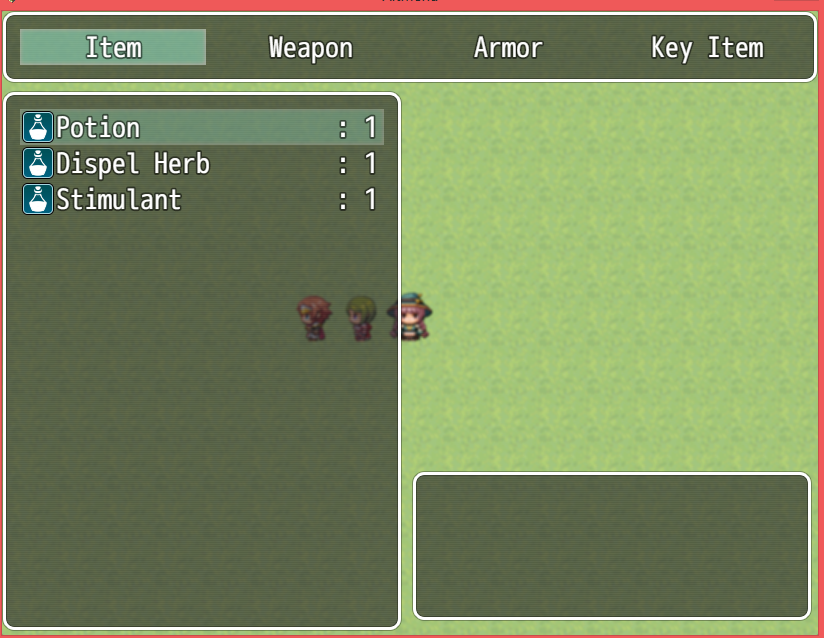
I am working on my own item menu plugin based off of the default item menu script. I have it the way I want, but the help info doesn't show in the box. Can anyone help me with this? Here is the script: Spoiler //-----------------------------------------------------------------------------
Archived First Post
Here is the script:
// Scene_Item
//
// The scene class of the item screen.
function Scene_Item() {
this.initialize.apply(this, arguments);
}
Scene_Item.prototype = Object.create(Scene_ItemBase.prototype);
Scene_Item.prototype.constructor = Scene_Item;
Scene_Item.prototype.initialize = function() {
Scene_ItemBase.prototype.initialize.call(this);
};
Scene_Item.prototype.create = function() {
Scene_ItemBase.prototype.create.call(this);
this.createHelpWindow();
this.createCategoryWindow();
this.createItemWindow();
this.createActorWindow();
};
Scene_Item.prototype.createCategoryWindow = function() {
this._categoryWindow = new Window_ItemCategory();
this._categoryWindow.x = 0;
this._categoryWindow.y = 0;
this._categoryWindow.setHandler('ok', this.onCategoryOk.bind(this));
this._categoryWindow.setHandler('cancel', this.popScene.bind(this));
this.addWindow(this._categoryWindow);
};
Scene_Item.prototype.createItemWindow = function() {
this._itemWindow = new Window_ItemList();
this._itemWindow.x = 200;
this._itemWindow.y = 80;
this._itemWindow.height = 540;
this._itemWindow.width = 400;
this._itemWindow.setHelpWindow(this._helpWindow);
this._itemWindow = new Window_ItemList(0, this._itemWindow.y, this._itemWindow.width, this._itemWindow.height);
this._itemWindow.setHandler('ok', this.onItemOk.bind(this));
this._itemWindow.setHandler('cancel', this.onItemCancel.bind(this));
this.addWindow(this._itemWindow);
this._categoryWindow.setItemWindow(this._itemWindow);
};
Scene_Item.prototype.createHelpWindow = function() {
this._helpWindow = new Window_Help();
this._helpWindow.height = 150;
this._helpWindow.width = 400;
this._helpWindow.x = 410;
this._helpWindow.y = 460;
this.addWindow(this._helpWindow);
};
Window_ItemList.prototype.maxCols = function() {
return 1;
}
Scene_Item.prototype.user = function() {
var members = $gameParty.movableMembers();
var bestActor = members[0];
var bestPha = 0;
for (var i = 0; i < members.length; i++) {
if (members.pha > bestPha) {
bestPha = members.pha;
bestActor = members;
}
}
return bestActor;
};
Scene_Item.prototype.onCategoryOk = function() {
this._itemWindow.activate();
this._itemWindow.selectLast();
};
Scene_Item.prototype.onItemOk = function() {
$gameParty.setLastItem(this.item());
this.determineItem();
};
Scene_Item.prototype.onItemCancel = function() {
this._itemWindow.deselect();
this._categoryWindow.activate();
};
Scene_Item.prototype.playSeForItem = function() {
SoundManager.playUseItem();
};
Scene_Item.prototype.useItem = function() {
Scene_ItemBase.prototype.useItem.call(this);
this._itemWindow.redrawCurrentItem();
};
Here is a screenshot: (the box at the bottom right is the desc box)
Downloads / Referenced Files
RPG Maker Web attachments are mirrored locally when available. Other external links remain hosted by their original creator or third-party service.
- Local mirror: 31791-0a6b1c34e64397a767daf8fcd0d3575e.png
SHA-256:7f20c8652eb0caa7dc75df7625e6eb4ab5401eb8d7b1ab0f0596d3f1fd07c847
Original attachment URL: https://forums.rpgmakerweb.com/attachments/itemmenu-png.51674/
Referenced Images / Attachments
Creator Claims / Removal
If you are the original creator and want this listing reassigned, edited, or removed, join BMMPlay and contact the moderators with proof that matches the original RPG Maker Web profile, linked GitHub, itch.io page, or another public creator identity.
Replies (0)
No replies yet.
Topic Summary
Loading summary...