

Images drawn in window not loading
BMM_Archive · July 15, 2026

Original Source
- Original title: Images drawn in window not loading
- Original author: Genji
- Original date: September 28, 2016
- Source thread: https://forums.rpgmakerweb.com/threads/images-drawn-in-window-not-loading.68990/
- Source forum path: Game Development Engines > RPG Maker Javascript Plugins > Learning Javascript
Summary
Hi all, I'm creating an alternative load/save screen that shows the details of a save file in a separate window. Currently, it is only supposed to to draw the file number, the game title, the playtime, and the party's sprites. However, the first time I enter Scene_Load, the sprites aren't loaded, even though I aliased Scene_File.prototype.create(), which should call DataManager.loadAllSaveFileImages(). Spoiler
Archived First Post
I'm creating an alternative load/save screen that shows the details of a save file in a separate window. Currently, it is only supposed to to draw the file number, the game title, the playtime, and the party's sprites.
However, the first time I enter Scene_Load, the sprites aren't loaded, even though I aliased Scene_File.prototype.create(), which should call DataManager.loadAllSaveFileImages().
Scene_File.prototype.create = function() {
Scene_MenuBase.prototype.create.call(this);
DataManager.loadAllSavefileImages();
this.createHelpWindow();
this.createListWindow();
};
My Alias
var _Scene_File_create = Scene_File.prototype.create;
Scene_File.prototype.create = function() {
_Scene_File_create.call(this);
this.createSavefileInfoWindow();
};
Result
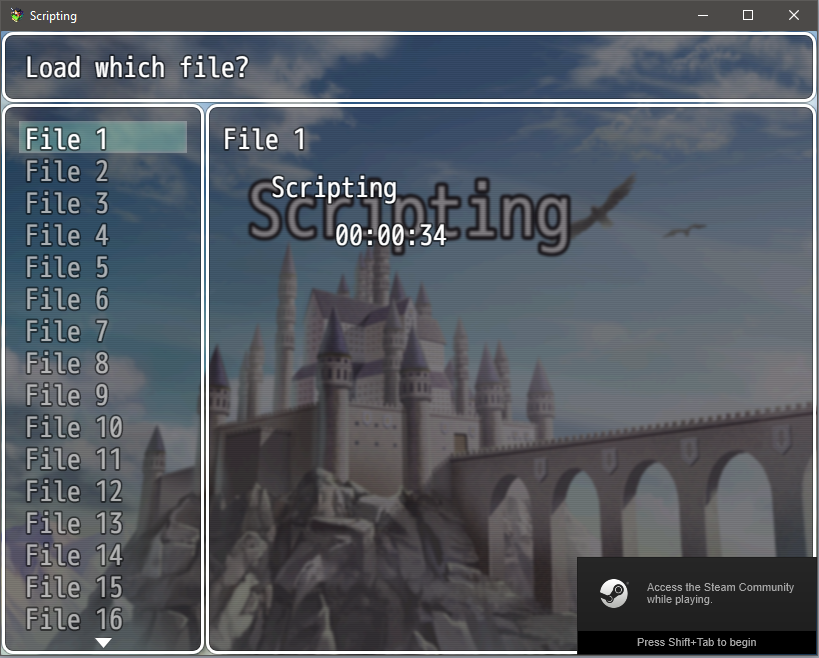
How can I ensure that the character images will be displayed the first time the player enters the load scene from the title screen after booting up the game?
Full plug-in:
//-----------------------------------------------------------------------------
// Window_SavefileList
//
// The window for selecting a save file on the save and load screens.

var _Window_SavefileList_initialize = Window_SavefileList.prototype.initialize;

Window_SavefileList.prototype.initialize = function(x, y, width, height) {
    _Window_SavefileList_initialize.call(this, x, y, width, height);
    this._savefileInfoWindow = null;
};

Window_SavefileList.prototype.maxVisibleItems = function() {
    return 16;
};

Window_SavefileList.prototype.drawItem = function(index) {
    var id = index + 1;
    var valid = DataManager.isThisGameFile(id);
    var rect = this.itemRectForText(index);
    this.resetTextColor();
    if (this._mode === 'load') {
        this.changePaintOpacity(valid);
    }
    this.drawFileId(id, rect.x, rect.y);
};

Window_SavefileList.prototype.select = function(index) {
    Window_Selectable.prototype.select.call(this, index);
    this.callUpdateSavefileInfo();
};

Window_SavefileList.prototype.setSavefileInfoWindow = function(savefileInfoWindow) {
    this._savefileInfoWindow = savefileInfoWindow;
    this.callUpdateSavefileInfo();
};

Window_SavefileList.prototype.callUpdateSavefileInfo = function() {
    if (this.active && this._savefileInfoWindow) {
        this.updateSaveFileInfo();
    }
};

Window_SavefileList.prototype.updateSaveFileInfo = function() {
    this._savefileInfoWindow.clear();
    this.setSavefileInfoWindowId(this._index + 1);
};

Window_SavefileList.prototype.setSavefileInfoWindowId = function(id) {
    if (this._savefileInfoWindow) {
        this._savefileInfoWindow.setID(id);
    }
};

//-----------------------------------------------------------------------------
// Window_SavefileInfo
//
// The window for selecting a save file on the save and load screens.

function Window_SavefileInfo() {
    this.initialize.apply(this, arguments);
};

Window_SavefileInfo.prototype = Object.create(Window_Base.prototype);
Window_SavefileInfo.prototype.constructor = Window_SavefileInfo;

Window_SavefileInfo.prototype.initialize = function(x, y, width, height) {
    Window_Base.prototype.initialize.call(this, x, y, width, height);
    this._id = 0;
};

Window_SavefileInfo.prototype.setID = function(index) {
    if (this._id !== index) {
        this._id = index;
        this.refresh();
    }
};

Window_SavefileInfo.prototype.clear = function() {
    this._id = 0;
};

Window_SavefileInfo.prototype.refresh = function() {
    this.contents.clear();
    this.drawItem();
};

Window_SavefileInfo.prototype.drawItem = function() {
    var info = DataManager.loadSavefileInfo(this._id);
    var valid = DataManager.isThisGameFile(this._id);
    this.resetTextColor();
    this.drawFileId(0, 0);
    if (info) {
        this.drawContents(info, valid);
    }
};

Window_SavefileInfo.prototype.drawFileId = function(x, y) {
    this.drawText(TextManager.file + ' ' + this._id, x, y, 180);
};

Window_SavefileInfo.prototype.drawContents = function(info, valid) {
    this.drawPlaytime(info, 96, 96, 128);
    if (valid){
        this.drawGameTitle(info, 48, 48, 128);
    }
    this.drawPartyCharacters(info, 48, 128);
};

Window_SavefileInfo.prototype.drawGameTitle = function(info, x, y, width) {
    if (info.title) {
        this.drawText(info.title, x, y, width);
    }
};

Window_SavefileInfo.prototype.drawPartyCharacters = function(info, x, y) {
    if (info.characters) {
        for (var i = 0; i < info.characters.length; i++) {
            var data = info.characters[i];
            this.drawCharacter(data[0], data[1], x, y + i * 48);
        }
    }
};

Window_SavefileInfo.prototype.drawPlaytime = function(info, x, y, width) {
    if (info.playtime) {
        this.drawText(info.playtime, x, y, width, 'right');
    }
};

//-----------------------------------------------------------------------------
// Scene_File
//
// The superclass of Scene_Save and Scene_Load.

var _Scene_File_create = Scene_File.prototype.create;

Scene_File.prototype.create = function() {
    _Scene_File_create.call(this);
    this.createSavefileInfoWindow();
};

Scene_File.prototype.createListWindow = function() {
    var x = 0;
    var y = this._helpWindow.height;
    var width = Graphics.boxWidth/4;
    var height = Graphics.boxHeight - y;
    this._listWindow = new Window_SavefileList(x, y, width, height);
    this._listWindow.setHandler('ok',     this.onSavefileOk.bind(this));
    this._listWindow.setHandler('cancel', this.popScene.bind(this));
    this._listWindow.select(this.firstSavefileIndex());
    this._listWindow.setTopRow(this.firstSavefileIndex() - 2);
    this._listWindow.setMode(this.mode());
    this._listWindow.refresh();
    this.addWindow(this._listWindow);
};

Scene_File.prototype.createSavefileInfoWindow = function() {
    var x = this._listWindow.width;
    var y = this._helpWindow.height;
    var width = Graphics.boxWidth - x;
    var height = Graphics.boxHeight - y;
    this._savefileInfoWindow = new Window_SavefileInfo(x, y, width, height);
    this.addWindow(this._savefileInfoWindow);
    this._savefileInfoWindow.refresh();
    this._listWindow.setSavefileInfoWindow(this._savefileInfoWindow);
}
Downloads / Referenced Files
RPG Maker Web attachments are mirrored locally when available. Other external links remain hosted by their original creator or third-party service.
- Local mirror: 29725-f4c2ff7ce84ab0b472b034429ef7632a.png
SHA-256:44e8ab27ff91afd89c58936da42eba27d87604405fe832a4663f73089c67bef7
Original attachment URL: https://forums.rpgmakerweb.com/attachments/screen1-png.48754/
Referenced Images / Attachments
Creator Claims / Removal
If you are the original creator and want this listing reassigned, edited, or removed, join BMMPlay and contact the moderators with proof that matches the original RPG Maker Web profile, linked GitHub, itch.io page, or another public creator identity.
Replies (0)
No replies yet.
Topic Summary
Loading summary...