

*very intimidated by scripting* Help with bust pictures + text boxes please?
BMM_Archive · July 15, 2026

Original Source
- Original title: *very intimidated by scripting* Help with bust pictures + text boxes please?
- Original author: Petrie
- Original date: August 14, 2013
- Source thread: https://forums.rpgmakerweb.com/threads/very-intimidated-by-scripting-help-with-bust-pictures-text-boxes-please.16940/
- Source forum path: Game Development Engines > Ruby Game System (RGSS) Scripts > RGSS3 Scripts (RMVX Ace) > RGSS3 Script Requests
Summary
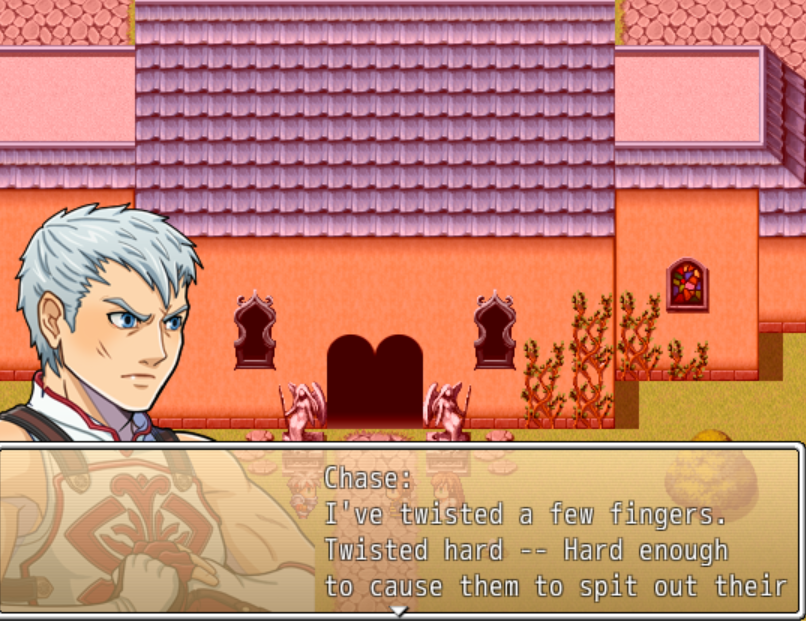
Hello =3 Long time silent researcher, first time poster here... ( I'm making a game that uses busts for the more important cutscenes (for the first time). I've avoided it in the past because I don't understand scripts at all (I've read lots but it just hasn't clicked for me), and I'd want the pictures to be in front of the text boxes, like so: [IMG]http://lbq.mist.so/wp-content/uploads/sites/10/2013/07/screenshot.png[/IMG]
Archived First Post
Long time silent researcher, first time poster here... (<-- awkward me)
I'm making a game that uses busts for the more important cutscenes (for the first time). I've avoided it in the past because I don't understand scripts at all (I've read lots but it just hasn't clicked for me), and I'd want the pictures to be in front of the text boxes, like so:
[IMG]http://lbq.mist.so/wp-content/uploads/sites/10/2013/07/screenshot.png[/IMG]
There is a screenshot of my game currently attached, or follow this link:
( http://girlgamesgalactica.tumblr.com/image/58224088350 )
Anyway. From what I understand, all I want is a "simple" script that has pictures automatically over the text. I've been searching everywhere, but I can't seem to find exactly what I'm looking for...
...Or else it's possible I have and I just really don't get how to add scripts to my game.
Either way, I'm hoping that you geniuses can help me~~
I'd really like a non-complicated script (if that exists?) with some very specific instructions... That would be absolutely wonderful~
Additional notes: I am sorry if there *is* already a script for this, I did read through many, but most of them were too complicated for me, and I couldn't make heads/tails of this problem. Thank you so much in advance =3
Petrie
Credits to Dark Horesman for "Chase" picture aka Vick, ty for sharing your work =3
Downloads / Referenced Files
RPG Maker Web attachments are mirrored locally when available. Other external links remain hosted by their original creator or third-party service.
- Local mirror: 1844-46dfd4bd465b2afa66ec113f180b9404.png
SHA-256:d65b6634bb0a04e3813da158450315de7daa759012dada98024c41261c72cdb0
Original attachment URL: https://forums.rpgmakerweb.com/attachments/random-screenshot-png.7675/
License / Terms Note
Credits to Dark Horesman for "Chase" picture aka Vick, ty for sharing your work =3 { "lightbox_close": "Close", "lightbox_next": "Next",
Referenced Images / Attachments
Creator Claims / Removal
If you are the original creator and want this listing reassigned, edited, or removed, join BMMPlay and contact the moderators with proof that matches the original RPG Maker Web profile, linked GitHub, itch.io page, or another public creator identity.
Replies (0)
No replies yet.
Topic Summary
Loading summary...