

Moving the Help Window
BMM_Archive · July 15, 2026

Original Source
- Original title: Moving the Help Window
- Original author: Paulionassus
- Original date: May 5, 2016
- Source thread: https://forums.rpgmakerweb.com/threads/moving-the-help-window.61426/
- Source forum path: Game Development Engines > RPG Maker Javascript Plugins > Learning Javascript
Summary
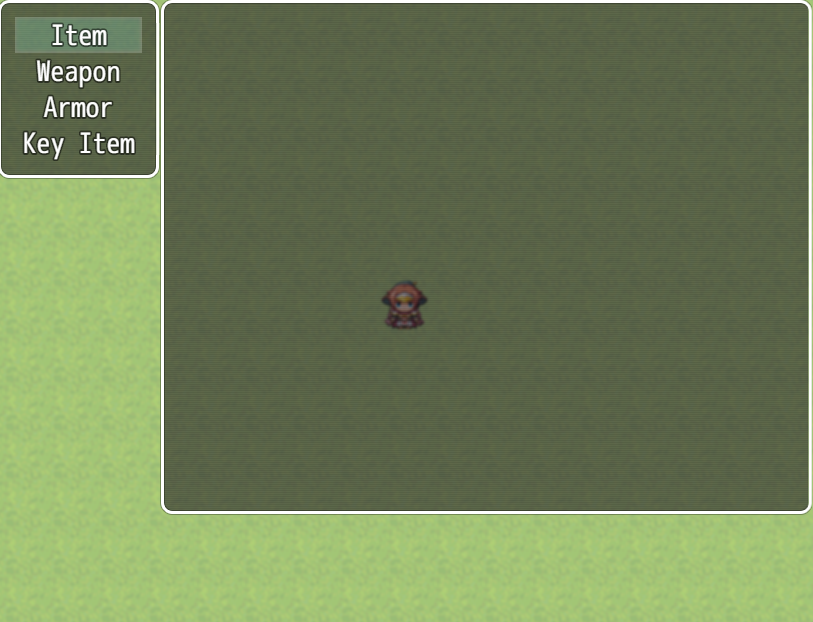
EDIT - Sorted it. I foolishly had the X and Y co-ords backwards in the window call. Oops lol Hi, I need a little help. I working on rearranging my menus and I am stuck on my Item Menu. I have attached an image of what I have so far. I want the help window to appear at the bottom of the screen under the item list window but I am having a hard time doing this. I have tried a few things and found that this._helpWindow.x does not work...
Archived First Post
Hi,
I need a little help. I working on rearranging my menus and I am stuck on my Item Menu. I have attached an image of what I have so far. I want the help window to appear at the bottom of the screen under the item list window but I am having a hard time doing this. I have tried a few things and found that this._helpWindow.x does not work as the x and y seem to be hard coded in the Window_Help section. So I have copied the Window_Help and renamed to Window_Help_Item and called this from createHelpWindow function I have written for Scene_Item but still no help window shows when I go in to the Item menu. I have checked the code flows by using the console.log and they appear in the console window.
Any help you guys could share would be grateful thanks.
console.log("createHelpWindow has been called");
this._helpWindow = new Window_Help_Item();
this.addWindow(this._helpWindow);
};
function Window_Help_Item() {
this.initialize.apply(this, arguments);
}
Window_Help_Item.prototype = Object.create(Window_Base.prototype);
Window_Help_Item.prototype.constructor = Window_Help_Item;
Window_Help_Item.prototype.initialize = function() {
console.log("Window_Help_Item has been called");
var width = Graphics.boxWidth;
var height = this.fittingHeight(2);
Window_Base.prototype.initialize.call(this, Graphics.boxHeight - height, 0, width, height);
this._text = '';
};
Window_Help_Item.prototype.setText = function(text) {
if (this._text !== text) {
this._text = text;
this.refresh();
}
};
Window_Help_Item.prototype.clear = function() {
this.setText('');
};
Window_Help_Item.prototype.setItem = function(item) {
this.setText(item ? item.description : '');
};
Window_Help_Item.prototype.refresh = function() {
this.contents.clear();
this.drawTextEx(this._text, this.textPadding(), 0);
};
Downloads / Referenced Files
RPG Maker Web attachments are mirrored locally when available. Other external links remain hosted by their original creator or third-party service.
- Local mirror: 22341-538598d7277fc26fd93d327a264acaea.png
SHA-256:e618557a62a9e81dc6f3745ad7cef21775bed2f6b44fa941bb1368758335cf20
Original attachment URL: https://forums.rpgmakerweb.com/attachments/itemwindow-png.37556/
Referenced Images / Attachments
Creator Claims / Removal
If you are the original creator and want this listing reassigned, edited, or removed, join BMMPlay and contact the moderators with proof that matches the original RPG Maker Web profile, linked GitHub, itch.io page, or another public creator identity.
Replies (0)
No replies yet.
Topic Summary
Loading summary...