

VXACECC - Right-To-Left Text
BMM_Archive · July 15, 2026

Original Source
- Original title: CC - Right-To-Left Text
- Original author: CC_Yellow
- Original date: August 12, 2014
- Source thread: https://forums.rpgmakerweb.com/threads/cc-right-to-left-text.30992/
- Source forum path: Game Development Engines > Ruby Game System (RGSS) Scripts > RGSS3 Scripts (RMVX Ace)
Summary
CC_Text_RTL_v2 by CC (2014/08/23) Updated: Now Effects goes on BattleLog! and several other windows! (2014/08/12) Day before yesterday I saw this post, and yesterday I wrote, and today, finished.
Archived First Post
by CC
(2014/08/23) Updated: Now Effects goes on BattleLog! and several other windows!
(2014/08/12) Day before yesterday I saw this post, and yesterday I wrote, and today, finished.
Features
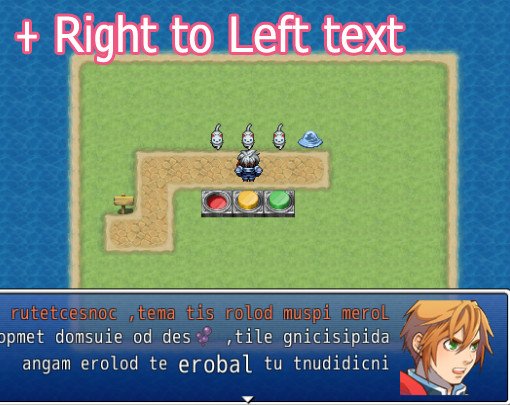
This script allows you to show text from Right To Left(RTL).
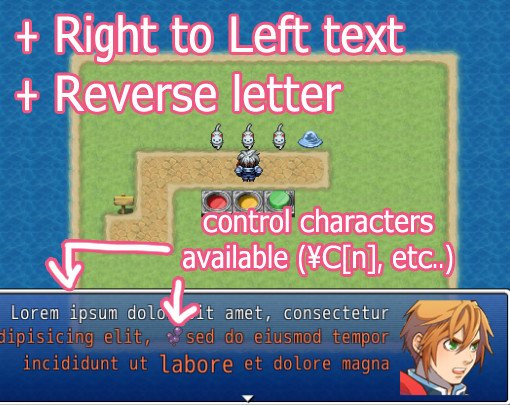
You can reverse letters. => "dlrow ,olleH"
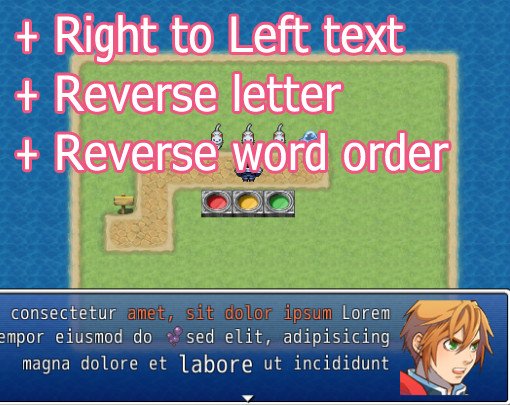
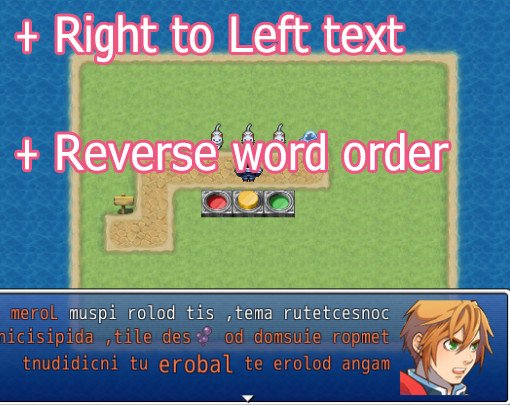
You can revese the order of words. => "World, Hello"
Windows under effect:
- 'Show Text' in Event Command.
- Item/Skill Description
- BattleLog
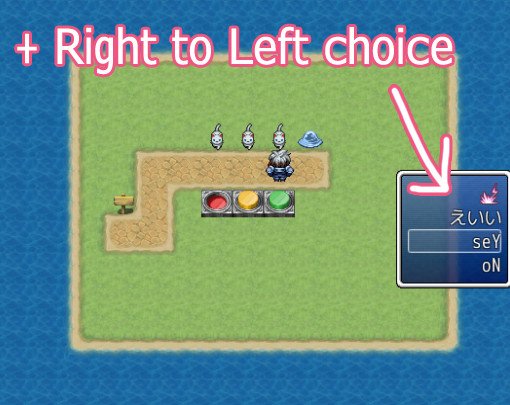
- Choice List
- The window on the top of the Save Menu.
- Character description in Status Menu.
- 'Show Scrolling Text' in Event Command.
Video and Screenshots
(v2)
https://www.youtube.com/watch?v=wk1ci-n22zM
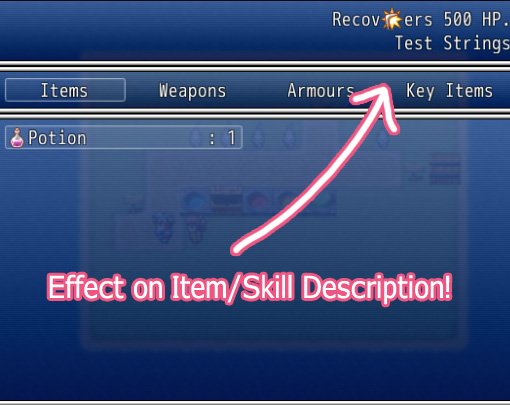
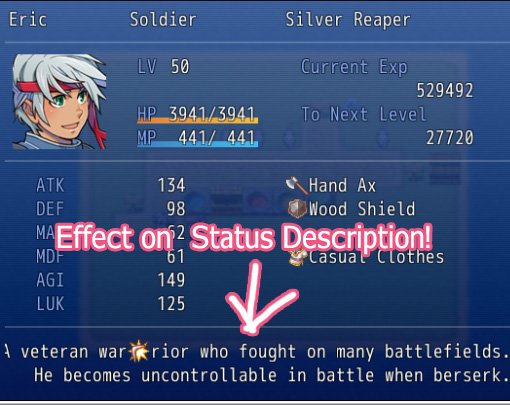
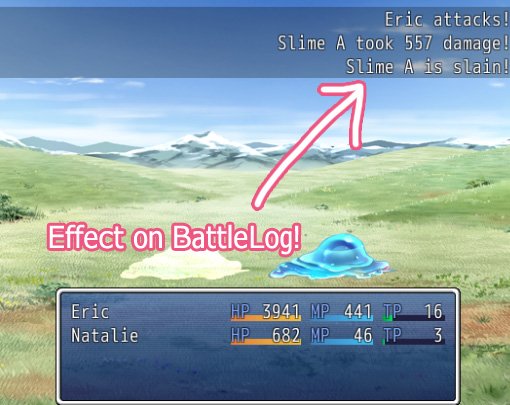
(v1)
https://www.youtube.com/watch?v=0G0I6QScD-8
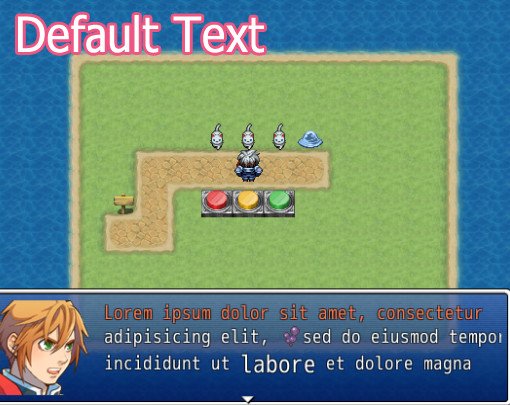
Demo (Script included)
https://drive.google.com/file/d/0B0JxxKZGa-01eEdyMUNGRFhDOWc/edit?usp=sharing
How to Use
[1] Settings
By default, effects are controled by switches.
Switches[1] => RTL, Show text from Right To Left.
Switches[2] => RL, Reverse letters in line.
Switches[3] => RS, Reverse the order of words in line.
IDs of those switches are determined in CC::TEXT_RTL controls ON/OFF.
See CC::TEXT_RTL if you want to change.
[2] Control Characters in RTL + Reverse-Letter mode
Default Control Characters(\C{n], \I[n], \{, \}) will be reserved.
But you need some attention since numbers also be reserved.
ex. "\C[1]Lorem\C[0] Ipsum\n" => "muspi \eC[0]meroL\eC[2]\n" = white text.
[3] Examples
(Mode) : (Text)
Default : "Lorem Ipsum" (Left To Right, LTR)
RTL : "muspi meroL" (RTL)
RTL + RL : "Lorem ipsum" (RTL)
RTL + RS : "muspi meroL" (RTL)
RTL + RL + RS : "ipsum Lorem" (RTL)
RL : "muspi meroL" (LTR)
RS : "ipsum Lorem" (LTR)
RL + RS : "meroL muspi" (LTR)
trial and error.
[4] In-Battle Text
if CC::TEXT_RTL.enable_in_battle? is true, effects on battle-log will be shown.
[5] Conflict Warning
This script rely on overwriting methods heavily.
It may cause conflict against other message scripts.
References
Bulletxt, "Arabic Reading Right to left", http://sourceforge.net/p/lodestone2d/code/HEAD/tree/
Thanks
q8fft3 for advices (at RPGMakerWeb).
Author's notes
This work is licensed under the Creative Commons Attribution 4.0 International License.
To view a copy of this license, visit http://creativecommo...icenses/by/4.0/.
In Short:
As long as you give credits, you are free to use this script in Commercial/Non-Commercial Projects.
We appreciate your donation.
If you find this script useful, please consider to make a donation. Pledgie URL: https://pledgie.com/campaigns/26257
Features Mentioned
- This script allows you to show text from Right To Left(RTL).
- You can reverse letters. => "dlrow ,olleH"
- You can revese the order of words. => "World, Hello"
- Windows under effect:
- 'Show Text' in Event Command.
- Item/Skill Description
- BattleLog
- Choice List
- The window on the top of the Save Menu.
- Character description in Status Menu.
- 'Show Scrolling Text' in Event Command.
- Video and Screenshots
- (v2)
- "lightbox_close": "Close",
- "lightbox_next": "Next",
- "lightbox_previous": "Previous",
- "lightbox_error": "The requested content cannot be loaded. Please try again later.",
- "lightbox_start_slideshow": "Start slideshow",
Downloads / Referenced Files
RPG Maker Web attachments are mirrored locally when available. Other external links remain hosted by their original creator or third-party service.
- Local mirror: 7697-61e1427bc56a3ec92c29cf1dd6b0e13f.jpg
SHA-256:3edbe0ff1b03a64adf3e0226c13823e1e0ac5591911172172972a27ac99de612
Original attachment URL: https://forums.rpgmakerweb.com/attachments/008g-jpg.16081/ - Local mirror: 7698-2a9ae5243131c72dc7fe066aba7023bf.jpg
SHA-256:015f339d4e5d0539a006eb4fef095e4817ddfc470ccc139025356c43a0b3481e
Original attachment URL: https://forums.rpgmakerweb.com/attachments/008h-jpg.16082/ - Local mirror: 7699-428a85e60e8f031e1894201c33937260.jpg
SHA-256:ea0c4474ca2dd3ce13e8eaedcfaa058cb90a87bb2c46737222a70920a82facd6
Original attachment URL: https://forums.rpgmakerweb.com/attachments/008i-jpg.16083/ - Local mirror: 7509-95c965b49dbb038d396480b629ea4e4b.jpg
SHA-256:fa6ef4e85bfbf38270d1f48cead30594e0f88f139426914394edde32585c1d4f
Original attachment URL: https://forums.rpgmakerweb.com/attachments/008a-jpg.15805/ - Local mirror: 7510-4d30933667f9181039a01f62c47305f4.jpg
SHA-256:0cc397d06adb1a6dec783eb9dbd402548ff6c2bfcfde7ee09976ed4cc3438b79
Original attachment URL: https://forums.rpgmakerweb.com/attachments/008b-jpg.15806/ - Local mirror: 7511-364323fb15f5c7faa422095eced7c3ea.jpg
SHA-256:4c4624528bc44c47acd9130a5db45335518bec808c403d3328a370145acc6a39
Original attachment URL: https://forums.rpgmakerweb.com/attachments/008c-jpg.15807/ - Local mirror: 7512-cdbc41836775488046fa701017e41347.jpg
SHA-256:bc4af1e0b60725ff51d99b248713ba01559b493e32382312b31b3ba62d58ad30
Original attachment URL: https://forums.rpgmakerweb.com/attachments/008d-jpg.15808/ - Local mirror: 7513-a268b919e2adac19b7d7fe8ccc2c47eb.jpg
SHA-256:15ccc3a1f3256ea544795dded430bc80644de6afcd6934ba7f9b2474e3d052c6
Original attachment URL: https://forums.rpgmakerweb.com/attachments/008e-jpg.15809/ - Download: https://drive.google.com/file/d/0B0JxxKZGa-01eEdyMUNGRFhDOWc/edit?usp=sharing
- Local mirror: 7508-69c4997209c913ea989d2bb8cd940057.jpg
SHA-256:7a686919681cd8e032fe5e73115e81e066be27c49b16285b4fefe1ea40ceface
Original attachment URL: https://forums.rpgmakerweb.com/attachments/008f-jpg.15804/
License / Terms Note
This work is licensed under the Creative Commons Attribution 4.0 International License. To view a copy of this license, visit http://creativecommo...icenses/by/4.0/. In Short: As long as you give credits, you are free to use this script in Commercial/Non-Commercial Projects.
Referenced Images / Attachments
Creator Claims / Removal
If you are the original creator and want this listing reassigned, edited, or removed, join BMMPlay and contact the moderators with proof that matches the original RPG Maker Web profile, linked GitHub, itch.io page, or another public creator identity.
Replies (0)
No replies yet.
Topic Summary
Loading summary...