


VXACEModified Map Name Display
BMM_Archive · July 15, 2026

Preserved forum archive. This topic stores the original first post and locally mirrored RPG Maker Web attachments when available. It is posted by the BMMPlay archive account, not by the original creator.
Original Source
- Original title: Modified Map Name Display
- Original author: Majirefy
- Original date: May 2, 2012
- Source thread: https://forums.rpgmakerweb.com/threads/modified-map-name-display.1739/
- Source forum path: Game Development Engines > Ruby Game System (RGSS) Scripts > RGSS3 Scripts (RMVX Ace)
Summary
Map Name Display Plus v 1.0 by Majirefy
Archived First Post
Map Name Display Plus v 1.0
by Majirefy
Introduction
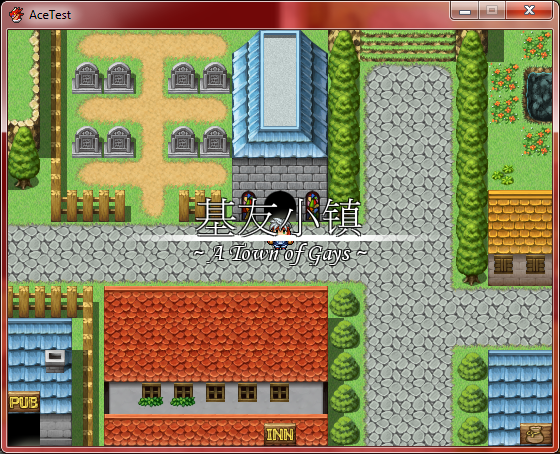
This script will dislpay your map name in a modified way when switching between maps in Ace.
Features
- Easy to custom style
- Good for muti-language or add descriptions for map
- Make your game more "PRO"(at least I believe that... )
How to Use
- Paste above main
- Turn to Scence_Map section, on Line 161, change #B22222">@map_name_window = Window_MapName.new to #B22222">@map_name_window = Window_MapNamePlus.new
- In Map Properties window, set Display Name in format like: #B22222">name1@name2. nam1 will be set above the split line and in bigger font size, while name2 will be below the split line and in smaller font size
- Run your game and see the change.
Demo
MapNamePlus.zip
Screenshot
Protected download
Script
Code:
# encoding: utf-8
#==============================================================================
# ** Window_MapNamePlus
#------------------------------------------------------------------------------
#  This window displays the map name.
#------------------------------------------------------------------------------
#	This class replaces the default Window_MapName class, adding more
#   modification and custom.
#------------------------------------------------------------------------------
#  Author: Majirefy
#------------------------------------------------------------------------------
#  Guide:
#	To use this script, create a new section below Materials in Script Editor
#   and paste the script there. Then turn to Scene_Map section, find string
#   "Window_MapName.new", replace it by "Winodw_MapNamePlus.new".
#	Map name should be set in pattern like "拉普兰德@Lapland", using symbol "@"
#   to split Chinese character and English text. You can also use "@" to split
#   everything in map name.
#------------------------------------------------------------------------------
#  Version: 1.0 - 20120502
#   First Release
#==============================================================================
class Window_MapNamePlus < Window_Base
  #--------------------------------------------------------------------------
  # * Settings
  #--------------------------------------------------------------------------
  FONT_NAME_CH = ["PMingLiU", "FangSong"]	   # Chinese Font Name
  FONT_SIZE_CH = 42							 # Chinese Font Size
  FONT_NAME_EN = ["Monotype Corsiva"]		   # English Font Name
  FONT_SIZE_EN = 28							 # English Font Size
  FONT_BOLD	= false						  # True if Font in Bold
  FONT_COLOR   = Color.new(255, 255, 255, 255)  # Color of Font
  FONT_OUT	 = true						   # True if Font Has Outline
  OUT_COLOR	= Color.new(0, 0, 0, 200)		# Color of Outline Color of Font
  FONT_SHADOW  = false						  # True if Text Drops Shadow
  MODIFIER	 = "~"							# Modifier Added beside Map Name
  PADDING	  = 8							  # Padding between Window's Frame and Contents
  LINE_HEIGHT  = 6							  # Height of Split Line
  #--------------------------------------------------------------------------
  # * Public Instance Variables
  #--------------------------------------------------------------------------
  attr_reader :map_name_ch					  # Chinese Map Name
  attr_reader :map_name_en					  # English Map Name
  attr_reader :line_x						   # Split Line X Coordinate
  attr_reader :line_y						   # Split Line Y Coordinate
  #--------------------------------------------------------------------------
  # * Object Initialization
  #--------------------------------------------------------------------------
  def initialize
	#----------------------------------------------------------------------
	# * Set the window in the middle of screen.
	#----------------------------------------------------------------------
	super(((Graphics.width - window_width) / 2),
	  ((Graphics.height - (FONT_SIZE_CH + FONT_SIZE_EN + PADDING * 4 + LINE_HEIGHT)) / 2),
	  window_width, FONT_SIZE_CH + FONT_SIZE_EN + PADDING * 4 + LINE_HEIGHT)
	#----------------------------------------------------------------------
	# * Custom font and style.
	#----------------------------------------------------------------------
	contents.font.bold	  = FONT_BOLD
	contents.font.color	 = FONT_COLOR
	contents.font.outline   = FONT_OUT
	contents.font.out_color = OUT_COLOR
	contents.font.shadow	= FONT_SHADOW
	#----------------------------------------------------------------------
	# * Set Window Opacity
	#----------------------------------------------------------------------
	self.opacity = 0
	self.contents_opacity = 0
	@show_count = 0
	refresh
  end
  #--------------------------------------------------------------------------
  # * Get Window Width
  #--------------------------------------------------------------------------
  def window_width
	return Graphics.width
  end
  #--------------------------------------------------------------------------
  # * Frame Update
  #--------------------------------------------------------------------------
  def update
	super
	if @show_count > 0 && $game_map.name_display
	  update_fadein
	  @show_count -= 1
	else
	  update_fadeout
	end
  end
  #--------------------------------------------------------------------------
  # * Update Fadein
  #--------------------------------------------------------------------------
  def update_fadein
	self.contents_opacity += 16
  end
  #--------------------------------------------------------------------------
  # * Update Fadeout
  #--------------------------------------------------------------------------
  def update_fadeout
	self.contents_opacity -= 16
  end
  #--------------------------------------------------------------------------
  # * Open Window
  #--------------------------------------------------------------------------
  def open
	refresh
	@show_count = 150
	self.contents_opacity = 0
	self
  end
  #--------------------------------------------------------------------------
  # * Close Window
  #--------------------------------------------------------------------------
  def close
	@show_count = 0
	self
  end
  #--------------------------------------------------------------------------
  # * Refresh
  #--------------------------------------------------------------------------
  def refresh
	contents.clear
	set_map_name
	unless $game_map.display_name.empty?
	  draw_map_name
	end
  end
  #--------------------------------------------------------------------------
  # * Draw Line
  #--------------------------------------------------------------------------
  def draw_line(rect)
	temp_rect = rect.clone
	temp_rect.height = LINE_HEIGHT
	temp_rect.width /= 4
	contents.gradient_fill_rect(temp_rect, color2, color1)
	temp_rect.x += temp_rect.width
	temp_rect.width *= 2
	contents.fill_rect(temp_rect, color1)
	temp_rect.x += temp_rect.width
	temp_rect.width /= 2
	contents.gradient_fill_rect(temp_rect, color1, color2)
  end
  #--------------------------------------------------------------------------
  # * Set Map Name
  #--------------------------------------------------------------------------
  def set_map_name
	temp_map_name = $game_map.display_name.split("@")
	@map_name_ch  = temp_map_name[0].to_s
	@map_name_en  = MODIFIER + " " + temp_map_name[1].to_s + " " + MODIFIER
  end
  #--------------------------------------------------------------------------
  # * Draw Map Name
  #--------------------------------------------------------------------------
  def draw_map_name
	set_line_position
	set_line_width
	temp_line_rect = Rect.new(@line_x, @line_y, set_line_width, LINE_HEIGHT)
	draw_line(temp_line_rect)
	temp_name_rect_ch = Rect.new(0, 0, contents.width, FONT_SIZE_CH)
	contents.font.name = FONT_NAME_CH
	contents.font.size = FONT_SIZE_CH
	draw_text(temp_name_rect_ch, @map_name_ch, 1)
	temp_name_rect_en = Rect.new(0, FONT_SIZE_CH, contents.width, FONT_SIZE_EN)
	contents.font.size = FONT_SIZE_EN
	contents.font.name = FONT_NAME_EN
	draw_text(temp_name_rect_en, @map_name_en, 1)
  end
  #--------------------------------------------------------------------------
  # * Set Line Width
  #--------------------------------------------------------------------------
  def set_line_width
	text_width_ch = text_size(@map_name_ch).width * 1.5
	text_width_en = text_size(@map_name_en).width * 1.5
	(text_width_ch >= text_width_en) ?
	  (text_width_ch) : (text_width_en)
  end
  #--------------------------------------------------------------------------
  # * Set Line Position
  #--------------------------------------------------------------------------
  def set_line_position
	@line_x = (contents.width - set_line_width) / 2
	@line_y = (contents.height - LINE_HEIGHT) / 2
  end
  #--------------------------------------------------------------------------
  # * Get Color 1
  #--------------------------------------------------------------------------
  def color1
	Color.new(255, 255, 255, 255)
  end
  #--------------------------------------------------------------------------
  # * Get Color 2
  #--------------------------------------------------------------------------
  def color2
	Color.new(255, 255, 255, 0)
  end
endThis is my first time working with script and I am thirst to have some advices from you.
Have fun and give me reply if that won't bother you! :
Features Mentioned
- Easy to custom style
- Good for muti-language or add descriptions for map
- Make your game more "PRO"(at least I believe that... )
Downloads / Referenced Files
Log in to download
Log in, then follow the RPG Maker Developers Group to see these download links.
Log in to downloadReferenced Images / Attachments
Creator Claims / Removal
If you are the original creator and want this listing reassigned, edited, or removed, join BMMPlay and contact the moderators with proof that matches the original RPG Maker Web profile, linked GitHub, itch.io page, or another public creator identity.


Replies (0)
No replies yet.
0
replies
5
views
Topic Summary
Loading summary...
