

VXACEKPockets Daphne ACE
BMM_Archive · July 15, 2026

BMM_Archive
Preserved forum archive. This topic stores the original first post and locally mirrored RPG Maker Web attachments when available. It is posted by the BMMPlay archive account, not by the original creator.
Original Source
- Original title: KPockets Daphne ACE
- Original author: kyonides
- Original date: August 29, 2021
- Source thread: https://forums.rpgmakerweb.com/threads/kpockets-daphne-ace.139995/
- Source forum path: Game Development Engines > Ruby Game System (RGSS) Scripts > RGSS3 Scripts (RMVX Ace)
Summary
KPockets Daphne v.1.0.5 by Kyonides Arkanthes Introduction
Archived First Post
KPockets Daphne
v.1.0.5
by Kyonides Arkanthes
v.1.0.5
by Kyonides Arkanthes
Introduction
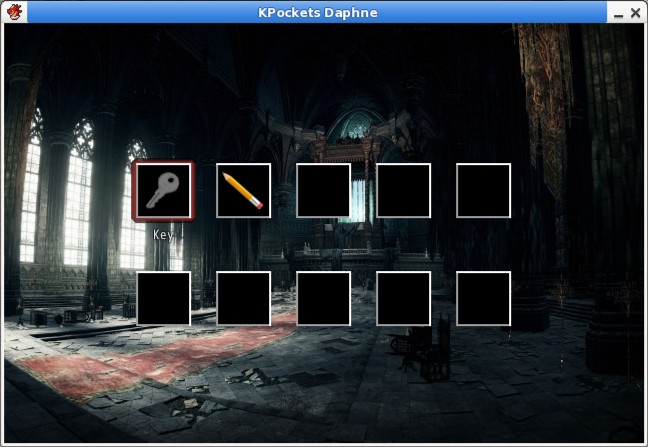
There was some user better known as Daphne Lijffijt that had once posted a request for a very specific limited inventory for VX Ace.
Now it does allow the player to consume items or call common events as you would usually do.
There is a single script call but it is optional so you might not need to ever care about that.
It now features the use of a few tags that you can leave in an item's note box.
Besides you can now open the actual :book: documents or notes you might have found so far.
Keep in mind that the demo includes a mystery to be solved by Grant, its lead character. :s
Ruby:
# * Instructions * #

# - Copy and paste the script in the script editor.
# - Place a backdrop in the Graphics/Titles1 directory.
# - Set the value of the BACKDROP Constant to the corresponding file name.
# - Add tags to items just like in the following examples:
# <daphne file-name>
# <daphne file name>
# - This will allow you to use large pictures for all items instead of the
#   typical icons. Place all pictures in the Graphics/Pictures directory.
# - Add the following tag to make an item stackable.
# <stack!>
# - Add another tag to let the menu open a paper or document.
# <open doc!>
# - Add yet another tag to make an item an useful clipboard with n slots.
# <clipboard 10>
# - Add another tag to let the menu recognize it as a pencil.
# <pencil>
# - Set the values of the other constants found in the KPocketsDaphne module.
# - Press any arrow to move the cursor around.

# * Script Calls * #

# You call it whenever you are about to add new documents aka papers.
# Include as many "docs" as necessary. Then use the Change Items event command.

# add_pocket_docs("sample doc", etc.)Terms & Conditions
Feel free to use it in any non commercial games.
Don't complain about it or I'll think you're an Eric hater!
Include me in your game credits!
Do not repost it anywhere else!
Downloads / Referenced Files
RPG Maker Web attachments are mirrored locally when available. Other external links remain hosted by their original creator or third-party service.
- Download: DOWNLOAD DEMO
License / Terms Note
Feel free to use it in any non commercial games. Don't complain about it or I'll think you're an Eric hater! Include me in your game credits! Do not repost it anywhere else!
Referenced Images / Attachments
Creator Claims / Removal
If you are the original creator and want this listing reassigned, edited, or removed, join BMMPlay and contact the moderators with proof that matches the original RPG Maker Web profile, linked GitHub, itch.io page, or another public creator identity.
Replies (0)
No replies yet.
0
replies
10
views
Topic Summary
Loading summary...