

VXACE[WS] CES - Character and Event Shadows (2019 Release)
BMM_Archive · July 15, 2026

BMM_Archive
Preserved forum archive. This topic stores the original first post and locally mirrored RPG Maker Web attachments when available. It is posted by the BMMPlay archive account, not by the original creator.
Original Source
- Original title: [WS] CES - Character and Event Shadows (2019 Release)
- Original author: Wyrelade
- Original date: October 28, 2019
- Source thread: https://forums.rpgmakerweb.com/threads/ws-ces-character-and-event-shadows-2019-release.114675/
- Source forum path: Game Development Engines > Ruby Game System (RGSS) Scripts > RGSS3 Scripts (RMVX Ace)
Summary
WyreScripts Character and event shadow Script version: 4.1 Future updates and plans: Support if plugin has bugs / issues. I can try to help fixing them.
Archived First Post
WyreScripts
<span style="color: #000000">Character and event shadow
Script version: 4.1
Future updates and plans: Support if plugin has bugs / issues. I can try to help fixing them.
What is this script for:
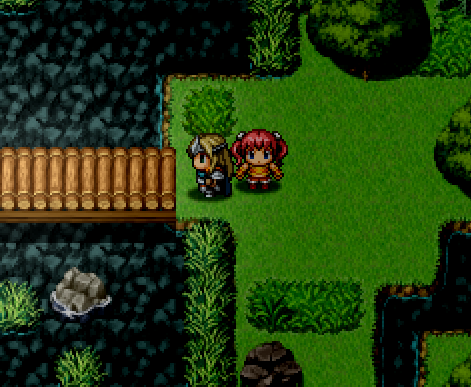
This script adds an image file shadow for your player character(s) and you can add or remove shadows from events with script command.
Preview:
How to install?
Plug in and play. Make sure to have shadow graphic in graphics/system folder.
Download this shadow image if you dont have your own.
Last update:
4.1V
Rebranding and 2019 release.
UPDATE 2.0 INFO:
Added feature to turn OFF and turn ON shadows VIA EVENT COMMAND.
Comment: shadow_on (to turn shadow on for the event)
Comment: Shadow_off (to turn shadow off from the event.)
Script:
Credits:
Wyrelade
(Script & Images)
Vindaca
(2.0v update)
Known issues (please let me know if you have more):
Certain (or most) Caching scripts for images like Jets cacher might cause an error. I have yet to create a fix for this.
Q: I get no bitmap error for system/graphics/shadow.png?
A: Do you have the Shadow Image file in your graphics/system folder? If not, Put one there.
Q: Can I make my own shadow (Customize it?)
A: Yes you can, With image editing software. You can make your shadow look what ever you wish. Just make sure to use opacity and transparency well. Render the image in .png format to keep the transparency.
<span style="color: #000000">Character and event shadow
Script version: 4.1
Future updates and plans: Support if plugin has bugs / issues. I can try to help fixing them.
What is this script for:
This script adds an image file shadow for your player character(s) and you can add or remove shadows from events with script command.
Preview:
How to install?
Plug in and play. Make sure to have shadow graphic in graphics/system folder.
Download this shadow image if you dont have your own.


Last update:
4.1V
Rebranding and 2019 release.
UPDATE 2.0 INFO:
Added feature to turn OFF and turn ON shadows VIA EVENT COMMAND.
Comment: shadow_on (to turn shadow on for the event)
Comment: Shadow_off (to turn shadow off from the event.)
Script:
Credits:
Wyrelade
(Script & Images)
Vindaca
(2.0v update)
Known issues (please let me know if you have more):
Certain (or most) Caching scripts for images like Jets cacher might cause an error. I have yet to create a fix for this.
Q: I get no bitmap error for system/graphics/shadow.png?
A: Do you have the Shadow Image file in your graphics/system folder? If not, Put one there.
Q: Can I make my own shadow (Customize it?)
A: Yes you can, With image editing software. You can make your shadow look what ever you wish. Just make sure to use opacity and transparency well. Render the image in .png format to keep the transparency.
Downloads / Referenced Files
RPG Maker Web attachments are mirrored locally when available. Other external links remain hosted by their original creator or third-party service.

License / Terms Note
Credits: Wyrelade (Script & Images) Vindaca
Referenced Images / Attachments
Creator Claims / Removal
If you are the original creator and want this listing reassigned, edited, or removed, join BMMPlay and contact the moderators with proof that matches the original RPG Maker Web profile, linked GitHub, itch.io page, or another public creator identity.
Replies (0)
No replies yet.
0
replies
16
views
Topic Summary
Loading summary...