


VXACESmarter Text Persistence (Show Text Combining With Choices)
BMM_Archive · July 15, 2026

Preserved forum archive. This topic stores the original first post and locally mirrored RPG Maker Web attachments when available. It is posted by the BMMPlay archive account, not by the original creator.
Original Source
- Original title: Smarter Text Persistence (Show Text Combining With Choices)
- Original author: Venima
- Original date: October 12, 2013
- Source thread: https://forums.rpgmakerweb.com/threads/smarter-text-persistence-show-text-combining-with-choices.18970/
- Source forum path: Game Development Engines > Ruby Game System (RGSS) Scripts > RGSS3 Scripts (RMVX Ace)
Summary
return false end @index += 1 @indent -= 1
Archived First Post
Smarter Text Persistence
Introduction
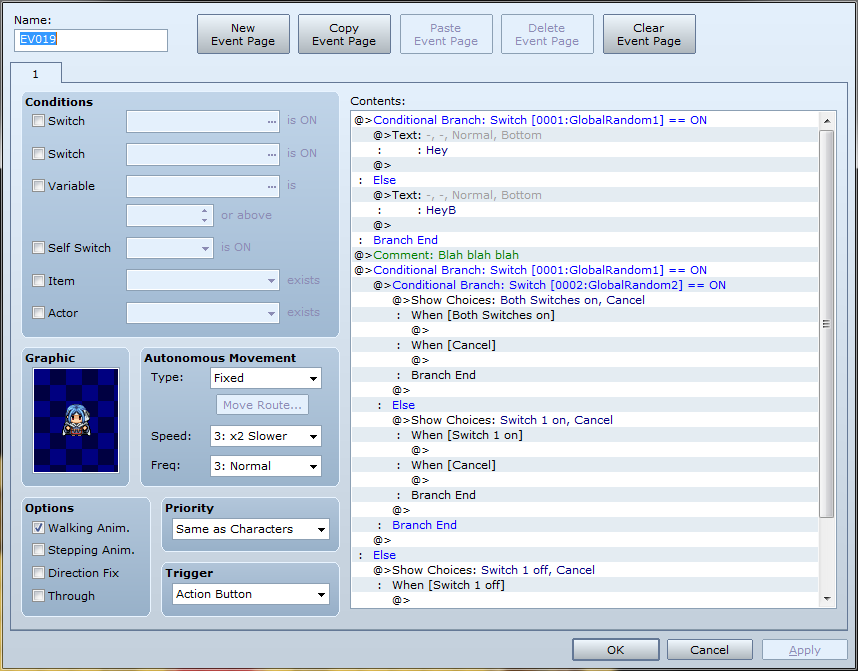
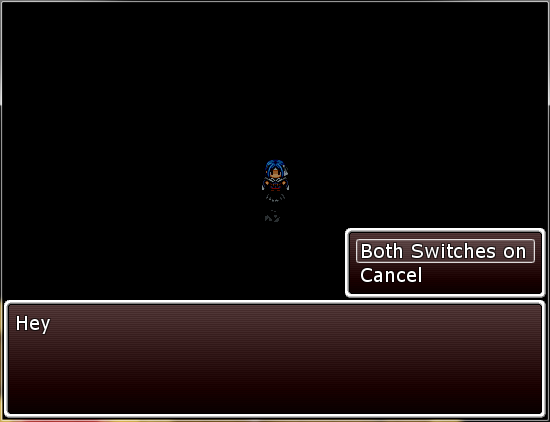
A simple script (fix) to make "show text" still combine windows with choice selections when separated by conditional branches, comments or jump to label events.
Features
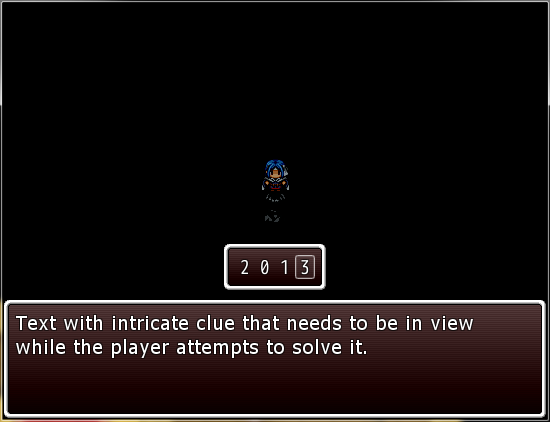
The event "show text" will combine with choice selection, number selection or item selection regardless of any of the following being executed inbetween:
- Conditional branches (can be nested)
- Jump to labels
- Comments
But not:
- Labels
Screenshots
How to Use
Installation: Simply insert this script in the Script Editor under Materials (above Main Process).
If you don't want the text to persist, just put a blank label underneath it.
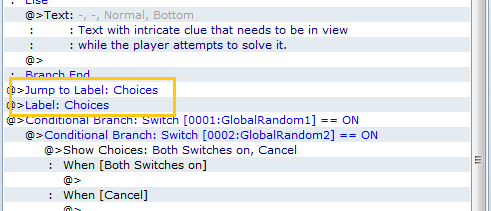
If you want to put a label between text and choices and have the text persist, put a jump to label above it as shown in the 4th screenshot.
Bugs
[Fixed 12/10] If text is the last event, game crashes (derp).
Script
FAQ
Q: What is this script compatible with?
A: Mostly anything, if another script modifies command_101, try adding in the line "while check_text_persist(next_event_code); end" above the "case next_event_code" in the other script.
Credit and Thanks
Muramasa & Venima
Feel free to use this script as you wish.
Introduction
A simple script (fix) to make "show text" still combine windows with choice selections when separated by conditional branches, comments or jump to label events.
Features
The event "show text" will combine with choice selection, number selection or item selection regardless of any of the following being executed inbetween:
- Conditional branches (can be nested)
- Jump to labels
- Comments
But not:
- Labels
Screenshots
Protected download
Protected download
Protected download
Protected download
Protected download
Protected download
Protected download
Installation: Simply insert this script in the Script Editor under Materials (above Main Process).
If you don't want the text to persist, just put a blank label underneath it.
If you want to put a label between text and choices and have the text persist, put a jump to label above it as shown in the 4th screenshot.
Bugs
[Fixed 12/10] If text is the last event, game crashes (derp).
Script
Code:
#==============================================================================
# Smarter Text Persistence
# By: Muramasa & Venima
# Version 1.01
#------------------------------------------------------------------------------
# A simple script to make "show text" still combine with choice selection
# when separated by conditional branches, comments or jump to label events.
#------------------------------------------------------------------------------
# Installation: Simply insert this script in the Script Editor near the bottom
# under Materials (above Main Process).
#------------------------------------------------------------------------------
# Special usage:
# If you don't want the text to persist, just put a blank label under it.
# If you want to put a label between text and choices and have the text
# persist, put a jump to label just above the label.
#==============================================================================
class Game_Interpreter
  #--------------------------------------------------------------------------
  # * Show Text
  #--------------------------------------------------------------------------
  def command_101
    wait_for_message
    $game_message.face_name = @params[0]
    $game_message.face_index = @params[1]
    $game_message.background = @params[2]
    $game_message.position = @params[3]
    while next_event_code == 401       # Text data
      @index += 1
      $game_message.add(@list[@index].parameters[0])
    end
    while check_text_persist(next_event_code); end #Smarter Text Persistence
    case next_event_code
    when 102  # Show Choices
      @index += 1
      setup_choices(@list[@index].parameters)
    when 103  # Input Number
      @index += 1
      setup_num_input(@list[@index].parameters)
    when 104  # Select Item
      @index += 1
      setup_item_choice(@list[@index].parameters)
    end
    wait_for_message
  end

  def check_text_persist(code)
    case code
    when 111 # Conditional Branch
      @index += 1
      execute_command
      if (next_event_code==411) # Else
        @index += 1
        execute_command
      end
      @indent += 1
      return true
    when 0 # Close indent
      if @index == @list.length - 2 #bugfix #1
        return false
      end
      @index += 1
      @indent -= 1
      return true
    when 108, 119, 411, 412 # Comment, Jump to Label, Else, Conditional Branch End
        @index += 1
        execute_command
      return true
    end
    return false
  end
end
FAQ
Q: What is this script compatible with?
A: Mostly anything, if another script modifies command_101, try adding in the line "while check_text_persist(next_event_code); end" above the "case next_event_code" in the other script.
Credit and Thanks
Muramasa & Venima
Feel free to use this script as you wish.
Features Mentioned
- The event "show text" will combine with choice selection, number selection or item selection regardless of any of the following being executed inbetween:
- Conditional branches (can be nested)
- Jump to labels
- Comments
- But not:
- Labels
Downloads / Referenced Files
Log in to download
Log in, then follow the RPG Maker Developers Group to see these download links.
Log in to downloadLicense / Terms Note
Credit and Thanks Muramasa & Venima Feel free to use this script as you wish.
Referenced Images / Attachments
Creator Claims / Removal
If you are the original creator and want this listing reassigned, edited, or removed, join BMMPlay and contact the moderators with proof that matches the original RPG Maker Web profile, linked GitHub, itch.io page, or another public creator identity.
Replies (0)
No replies yet.
0
replies
5
views
Topic Summary
Loading summary...

