

 Chromecast with Google TV HD
Compact streaming device for movies, live TV apps, and personalized entertainment.
View on Amazon
Chromecast with Google TV HD
Compact streaming device for movies, live TV apps, and personalized entertainment.
View on Amazon
Bmmplay may earn a commission from qualifying purchases made through these links.
No products in the cart.


Simple enough for a child, powerful enough for a developer
BMM_Archive · July 15, 2026
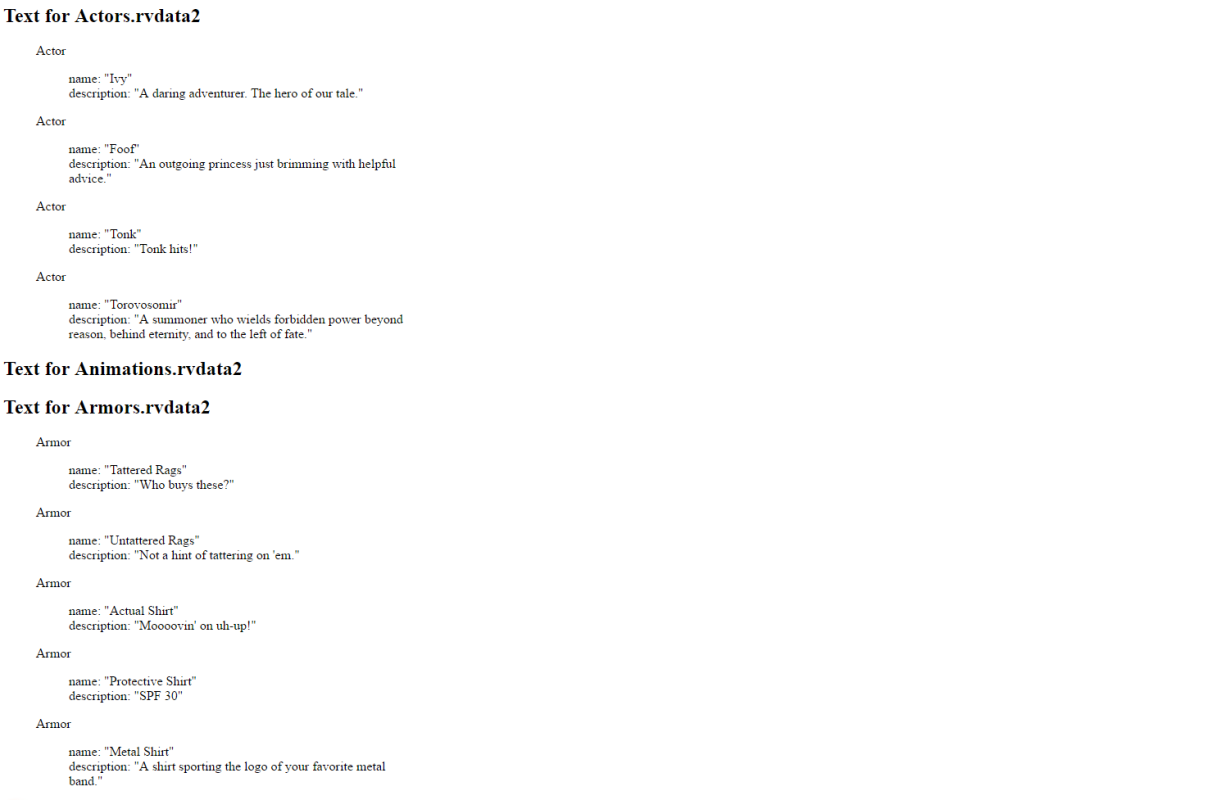
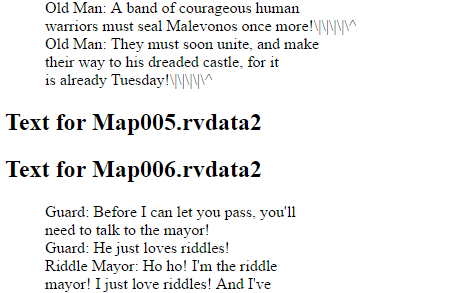
Hi all, I put together this spellcheck assistant script to catch typos in my game since I couldn't find anything like it already existing. I hope others find it helpful! SpellcheckAssistant v1.0 Description: Script creates a formatted HTML file with all/most of your games custom text. You can paste this into a standard text editor to spellcheck it.
Chromecast with Google TV HD
Compact streaming device for movies, live TV apps, and personalized entertainment.
View on Amazon
Bmmplay may earn a commission from qualifying purchases made through these links.
#==============================================================================
#                          SpellcheckAssistant v1.0
#------------------------------------------------------------------------------
#  Author:
#     Kyle Hughart
#
#  For use with:
#     RPG Maker VXAce
#
#  Description:
#     This script creates an html file containing your game's text so you can
#     spellcheck it!
#
#  Use:
#     Run this assistant by TEMPORARILY adding the following line:
#
#       SpellcheckAssistant.run
#
#     just before this line:
#
#       rgss_main { SceneManager.run }
#
#     in your 'Main' script. Then launch your game from RPG Maker. This may
#     take a little while to run and slow down your game's launch time so make
#     sure you remove the line from your Main file when you are done! You will
#     find a file called "spellcheck.html" in your game's project folder. It
#     will contain all/most custom text in your game in a readable format.
#     From here you can copy and paste the text into your preferred
#     spellcheck-enabled text editor!
#
#  License:
#     I ain't even care how you use this script, dawg. Go buck wild.
#==============================================================================

module SpellcheckAssistant

  @@spellcheck_output = ""
  TEXT_FIELDS = {
    'RPG::Actor' => ['name', 'description'],
    'RPG::Armor' => ['name', 'description'],
    'RPG::Weapon' => ['name', 'description'],
    'RPG::Enemy' => ['name'],
    'RPG::Item' => ['name', 'description'],
    'RPG::Class' => ['name', 'description'],
    'RPG::Skill' => ['name', 'description', 'message1', 'message2'],
    'RPG::State' => ['name', 'message1', 'message2', 'message3', 'message4'],
    'RPG::System' => ['elements', 'skill_types', 'weapon_types', 'armor_types'],
    'RPG::System::Terms' => ['params', 'etypes', 'commands']
  }

  MESSAGE = 401
  SCROLLING = 405
  PROMPT = 102
  SCRIPT = 355
  SCRIPT_CONTINUE = 655

  #Add SCRIPT and SCRIPT_CONTINUE to this list if you want to see scripts
  #displayed in the output
  TEXT_EVENTS = [MESSAGE, SCROLLING, PROMPT]

  def self.handle(key, val)
    if val.is_a? Hash
      val.each {|k,v| handle(k, v)}
    elsif (val.is_a? Array)
      for i in 0 .. (val.size - 1)
        handle('[' + i.to_s + ']', val[i])
      end
    else
      if (val.is_a? RPG::EventCommand) && (TEXT_EVENTS.include? val.code.to_i)
        params = val.parameters.flatten
        params.each do |p|
          if p.is_a? String
            println_to_output(p)
          end
        end
      end
      if TEXT_FIELDS.keys.include? val.class.to_s
        blank_entry = true
        single_entry = val.class.to_s.sub("RPG::","") + '<blockquote>'
        TEXT_FIELDS[val.class.to_s].each do |field|
          if (val.instance_variables.include? "@#{field}".to_sym)
            field_value = val.send(field)
            blank_entry = false unless field_value.empty?
            single_entry += "#{field}: #{field_value.inspect}<br>"
          else
            single_entry += "Error! Expected #{val.class.to_s} to
            have a field called #{field}, but it only has:
            #{val.instance_variables.inspect}<br>"
            blank_entry = false
          end
        end
        single_entry += '</blockquote>'
        print_to_output(single_entry) unless blank_entry
      end
      ivars = {}
      val.instance_variables.each {|x| ivars[x] = val.instance_variable_get(x)}
      handle("Instance variables" , ivars)
    end
  end

  def self.print_to_output(s)
    formatted_string = s.sub('\r\n', '<br>')
    @@spellcheck_output += formatted_string
  end

  def self.println_to_output(s)
    print_to_output(s + "<br>")
  end

  def self.run
    Dir.foreach("Data/") do |x|
      if (x.to_s.include? '.rvdata2')
        #puts "Now Analyzing #{x.to_s}"
        data = load_data("Data/#{x.to_s}")
        print_to_output("<h2>Text for #{x.to_s}</h2><blockquote>")
        handle("Output", data)
        print_to_output("</blockquote>")
      end
    end
    File.open("./spellcheck.html", 'w') { |file| file.write(@@spellcheck_output) }
  end

endLog in, then follow the RPG Maker Developers Group to see these download links.
Log in to download# License: # I ain't even care how you use this script, dawg. Go buck wild. #============================================================================== module SpellcheckAssistant
If you are the original creator and want this listing reassigned, edited, or removed, join BMMPlay and contact the moderators with proof that matches the original RPG Maker Web profile, linked GitHub, itch.io page, or another public creator identity.
No replies yet.
Loading summary...
Bmmplay creator tools
Log in or create an account to use this creator tool.
Join the conversation
Your reaction is ready. Log in and you will return to this page to add it.
Are you sure you want to close this music player?
 Antlion Audio ModMic USB Attachable Microphone
Attachable USB microphone that turns favorite headphones into a stream or chat headset.
View on Amazon
Antlion Audio ModMic USB Attachable Microphone
Attachable USB microphone that turns favorite headphones into a stream or chat headset.
View on Amazon
Bmmplay may earn a commission from qualifying purchases made through these links.
Community safety