

VXACEGame Over +
BMM_Archive · July 15, 2026

BMM_Archive
Preserved forum archive. This topic stores the original first post and locally mirrored RPG Maker Web attachments when available. It is posted by the BMMPlay archive account, not by the original creator.
Original Source
- Original title: Game Over +
- Original author: Todd
- Original date: May 1, 2012
- Source thread: https://forums.rpgmakerweb.com/threads/game-over.1719/
- Source forum path: Game Development Engines > Ruby Game System (RGSS) Scripts > RGSS3 Scripts (RMVX Ace)
Summary
Game Over + by Todd (or DoctorTodd on RMRK) Introduction Adds an option window to the GameOver screen.
Archived First Post
Game Over +
by Todd (or DoctorTodd on RMRK)
Introduction
Adds an option window to the GameOver screen.
Features
Screenshots
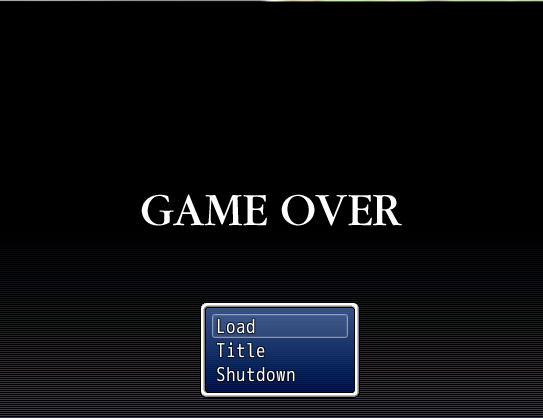
Demo
I don't think it's really necessary.
Script
FAQ
None right now.
Credit and Thanks
- Todd
Author's Notes
Free for non-commercial and commercial games. You must credit me! If you use this in a commercial game I expect a free copy.
by Todd (or DoctorTodd on RMRK)
Introduction
Adds an option window to the GameOver screen.
Features
- Plug and play
Screenshots
Demo
I don't think it's really necessary.
Script
Code:
#===============================================================================
#
# DT's GameOver +
# Author: DoctorTodd
# Date (04/27/2012)
# Version: (1.0.0) (VXA)
# Level: (Simple)
# Email: Todd@beacongames.com
#
#===============================================================================
#
# NOTES: 1)This script will only work with ace.
#
#===============================================================================
#
# Description: Adds an option window to the GameOver screen.
#
# Credits: Me (DoctorTodd)
#
#===============================================================================
#
# Instructions
# Paste above main.
#
#===============================================================================
#
# Contact me for commercial use, other wise just credit me and don't repost
# without my permission.
#
#===============================================================================
#
# Editing begins 37 and ends on 41.
#
#===============================================================================
module DTGOP

  #The Y coordinate of the Command Window
  COMWINY = 300

  #The X coordinate of the Command Window
  COMWINX = 180

end
#==============================================================================
# ** Window_MenuCommand
#------------------------------------------------------------------------------
#  This command window appears on the menu screen.
#==============================================================================

class Window_GameOverCommand < Window_Command
  #--------------------------------------------------------------------------
  # * Object Initialization
  #--------------------------------------------------------------------------
  def initialize
	super(0, 0)
  end
  #--------------------------------------------------------------------------
  # * Get Window Width
  #--------------------------------------------------------------------------
  def window_width
	return 160
  end
  #--------------------------------------------------------------------------
  # * Get Number of Lines to Show
  #--------------------------------------------------------------------------
  def visible_line_number
	item_max
  end
  #--------------------------------------------------------------------------
  # * Create Command List
  #--------------------------------------------------------------------------
  def make_command_list
	add_load_command
	add_title_command
	add_original_commands
	add_quit_command
  end
  #--------------------------------------------------------------------------
  # * Add load to Command List
  #--------------------------------------------------------------------------
  def add_load_command
   add_command("Load", :load)
  end
  #--------------------------------------------------------------------------
  # * For Adding Original Commands
  #--------------------------------------------------------------------------
  def add_original_commands
  end
  #--------------------------------------------------------------------------
  # * Add Title to Command List
  #--------------------------------------------------------------------------
  def add_title_command
	add_command("Title", :title)
  end
  #------------------------------------------------------------------------
  # * Add quit Game to Command List
  #--------------------------------------------------------------------------
  def add_quit_command
	add_command("Shutdown", :quit)
  end
end
#==============================================================================
# ** Scene_Gameover
#------------------------------------------------------------------------------
#  This class performs game over screen processing.
#==============================================================================

class Scene_Gameover < Scene_Base
  #--------------------------------------------------------------------------
  # * Start Processing
  #--------------------------------------------------------------------------
  def start
	super
	play_gameover_music
	fadeout_frozen_graphics
	create_background
	create_command_window
  end
  #--------------------------------------------------------------------------
  # * Termination Processing
  #--------------------------------------------------------------------------
  def terminate
	super
	dispose_background
  end
  #--------------------------------------------------------------------------
  # * Create Command Window
  #--------------------------------------------------------------------------
  def create_command_window
	@command_window =  Window_GameOverCommand.new
	@command_window.set_handler(:load,	  method(:command_load))
	@command_window.set_handler(:title,	 method(:command_title))
	@command_window.set_handler(:quit,	  method(:command_quit))
	@command_window.y = (DTGOP::COMWINY)
	@command_window.x = (DTGOP::COMWINX)
	end
  #--------------------------------------------------------------------------
  # * Execute Transition
  #--------------------------------------------------------------------------
  def perform_transition
	Graphics.transition(fadein_speed)
  end
  #--------------------------------------------------------------------------
  # * Play Music on Game Over Screen
  #--------------------------------------------------------------------------
  def play_gameover_music
	RPG::BGM.stop
	RPG::BGS.stop
	$data_system.gameover_me.play
  end
  #--------------------------------------------------------------------------
  # * Fade Out Frozen Graphics
  #--------------------------------------------------------------------------
  def fadeout_frozen_graphics
	Graphics.transition(fadeout_speed)
	Graphics.freeze
  end
  #--------------------------------------------------------------------------
  # * Create Background
  #--------------------------------------------------------------------------
  def create_background
	@sprite = Sprite.new
	@sprite.bitmap = Cache.system("GameOver")
  end
  #--------------------------------------------------------------------------
  # * Free Background
  #--------------------------------------------------------------------------
  def dispose_background
	@sprite.bitmap.dispose
	@sprite.dispose
  end
  #--------------------------------------------------------------------------
  # * Get Fade Out Speed
  #--------------------------------------------------------------------------
  def fadeout_speed
	return 60
  end
  #--------------------------------------------------------------------------
  # * Get Fade In Speed
  #--------------------------------------------------------------------------
  def fadein_speed
	return 120
  end
  #--------------------------------------------------------------------------
  # * [Load] Command
  #--------------------------------------------------------------------------
  def command_load
	SceneManager.call(Scene_Load)
  end
  #--------------------------------------------------------------------------
  # * [Title] Command
  #--------------------------------------------------------------------------
  def command_title
	SceneManager.call(Scene_Title)
  end
  #--------------------------------------------------------------------------
  # * [Quit] Command
  #--------------------------------------------------------------------------
  def command_quit
	fadeout_all
	SceneManager.exit
  end
endNone right now.
Credit and Thanks
- Todd
Author's Notes
Free for non-commercial and commercial games. You must credit me! If you use this in a commercial game I expect a free copy.
Features Mentioned
- Plug and play
Downloads / Referenced Files
RPG Maker Web attachments are mirrored locally when available. Other external links remain hosted by their original creator or third-party service.
- Local mirror: 36-35a5be6c5c91d74a50341094b378597a.png
SHA-256:34fb799ff6689b19f7e33b0dfc88848092c31fd674b98f464a30226c4a70eb77
Original attachment URL: https://forums.rpgmakerweb.com/attachments/capturekb-png.181/
License / Terms Note
# Credits: Me (DoctorTodd) # #=============================================================================== #
Referenced Images / Attachments
Creator Claims / Removal
If you are the original creator and want this listing reassigned, edited, or removed, join BMMPlay and contact the moderators with proof that matches the original RPG Maker Web profile, linked GitHub, itch.io page, or another public creator identity.
Replies (0)
No replies yet.
0
replies
12
views
Topic Summary
Loading summary...