


VXACEPlatformer Game Menu
BMM_Archive · July 15, 2026

Preserved forum archive. This topic stores the original first post and locally mirrored RPG Maker Web attachments when available. It is posted by the BMMPlay archive account, not by the original creator.
Original Source
- Original title: Platformer Game Menu
- Original author: HexMozart88
- Original date: August 21, 2016
- Source thread: https://forums.rpgmakerweb.com/threads/platformer-game-menu.67145/
- Source forum path: Game Development Engines > Ruby Game System (RGSS) Scripts > RGSS3 Scripts (RMVX Ace)
Summary
Platformer Game Menu v. 1.0 By HexMozart88 Introduction Just another menu script. It makes your menu screen look like a pause screen you'd find in a Platformer game. (Warning: Created by a newbie!)
Archived First Post
Platformer Game Menu v. 1.0
By HexMozart88
Introduction
Just another menu script. It makes your menu screen look like a pause screen you'd find in a Platformer game. (Warning: Created by a newbie!)
Features
- Gives the option of making a stage select screen with events or with a script
- Changeable command names
- Add your own background
- Change windowskin
Screenshots
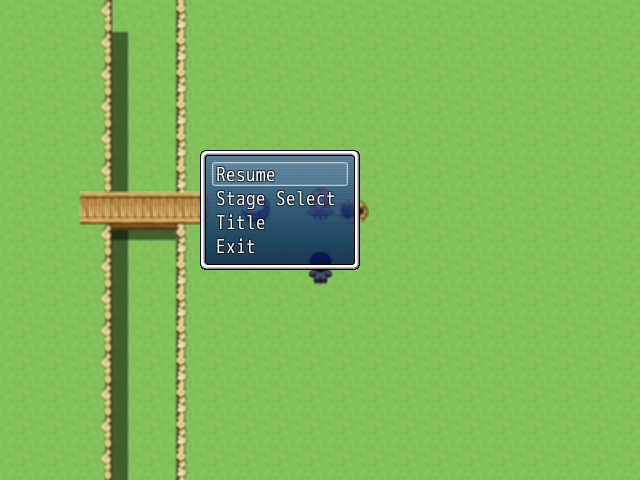
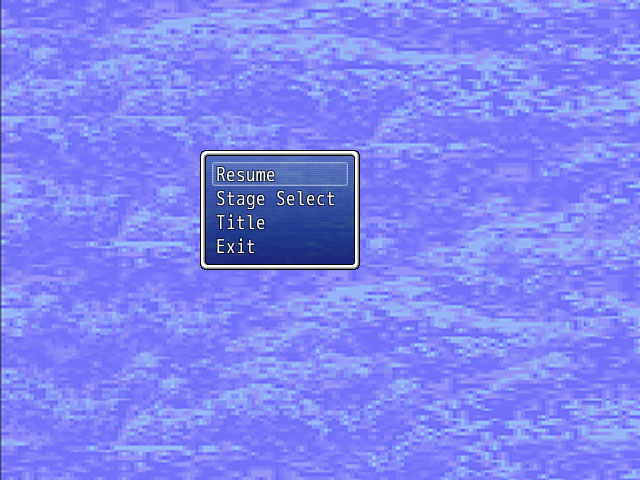
These are screenshots of the two different options you have in the config. The first shows the default menu background, the second shows a custom one.
Terms of Use
Free for all projects with credit (though a quick PM for commercial use would be nice ).
How to Use
Install above main, below materials.
Configuration: Edit the commands in the module with the names you see fit for your game. Decide how you would like to create your stage select screen, or if you wish to delete it.
You will need to create you own background and window graphics.
Script
Credits
HexMozart88
By HexMozart88
Introduction
Just another menu script. It makes your menu screen look like a pause screen you'd find in a Platformer game. (Warning: Created by a newbie!)
Features
- Gives the option of making a stage select screen with events or with a script
- Changeable command names
- Add your own background
- Change windowskin
Screenshots
These are screenshots of the two different options you have in the config. The first shows the default menu background, the second shows a custom one.
Protected download
Protected download
Protected download
Terms of Use
Free for all projects with credit (though a quick PM for commercial use would be nice ).
How to Use
Install above main, below materials.
Configuration: Edit the commands in the module with the names you see fit for your game. Decide how you would like to create your stage select screen, or if you wish to delete it.
You will need to create you own background and window graphics.
Script
=begin
================================================================================
Platformer Menu
By HexMozart88
--------------------------------------------------------------------------------
Description: This is a menu I made to look like a classic Platformer game pause
screen.
--------------------------------------------------------------------------------
Instructions: Place below Materials, but Above Main. You can change the names of
the commands in the below module.
If you choose to customize the background, your image should be named
menu_back
and go into Graphics/System.
--------------------------------------------------------------------------------
Terms of use: Free in all projects with credit given.(It would also be nice to
PM me for commercial use)
================================================================================
=end
#--------------------#
# COMPATIBILITY THING
#--------------------#
($imported ||= {})["Hex_Platform_Menu"] = true
#---------#
# SETTINGS
#---------#
module Hex
module Platform_Menu
MENU_LIST = [] # Customize command names.
MENU_LIST[0] = "Resume" # Return to game.
MENU_LIST[1] = "Stage Select" # To select levels.
MENU_LIST[2] = "Title" # Go back to title.
MENU_LIST[3] = "Exit" # Quit the game.
EVENT_STAGE_SELECT = true # true = events, false = script
STAGE_SELECT_SWITCH = 30 # Set the switch to turn on for events.
ENABLE_BACKGROUND = true # Customize backgrond or use default.
WINDOWSKIN = "Window" # Choose the windowskin for commands.
end
end
#===============================================================================
# WARNING: May cause crashing if editted. You have been warned.
#===============================================================================
#===============================================================================
# Scene_Menu
#===============================================================================
class Scene_Menu < Scene_MenuBase
#------------------#
# Start Processing #
#------------------#
def start
super
create_command_window
end
#----------------#
# Command Window #
#----------------#
def create_command_window
@command_window = Window_MenuCommand.new
@command_window.set_handlerresume, methodreturn_scene))
@command_window.set_handlerstages, methodstage_select))
@command_window.set_handlertitle, methodto_title))
@command_window.set_handlershutdown, methodcommand_shutdown))
end
#----------------------#
# Close Command Window #
#----------------------#
def close_command_window
@command_window.close
update until @command_window.close?
end
#--------------#
# Stage Select #
#--------------#
def stage_select
if Hex:latform_Menu::EVENT_STAGE_SELECT
close_command_window
SceneManager.return
$game_switches[Hex:latform_Menu::STAGE_SELECT_SWITCH] = true
else
SceneManager.call(Scene_Stage_Select)
end
end
#-------#
# Title #
#-------#
def to_title
close_command_window
fadeout_all
SceneManager.goto(Scene_Title)
end
#-----------#
# Quit Game #
#-----------#
def command_shutdown
close_command_window
fadeout_all
SceneManager.exit
end
end
#===============================================================================
# Window_MenuCommand
#===============================================================================
class Window_MenuCommand < Window_Command
#------------#
# Initialize #
#------------#
def initialize
super(200, 150)
self.windowskin = Cache.system(Hex:latform_Menu::WINDOWSKIN)
end
#------------------#
# Get Window Width #
#------------------#
def window_width
return 160
end
#-----------------------------#
# Get Number of Lines to Show #
#-----------------------------#
def visible_line_number
item_max
end
#---------------#
# Command Names #
#---------------#
def make_command_list
add_command(Hex:latform_Menu::MENU_LIST[0], :resume)
add_command(Hex:latform_Menu::MENU_LIST[1], :stage_select)
add_command(Hex:latform_Menu::MENU_LIST[2], :title)
add_command(Hex:latform_Menu::MENU_LIST[3], :shutdown)
end
#-------#
# On OK #
#-------#
def process_ok
@@last_command_symbol = current_symbol
super
end
end
#===============================================================================
# Scene_MenuBase
#===============================================================================
class Scene_MenuBase < Scene_Base
#-------------------#
# Create Background #
#-------------------#
def create_background
@background_sprite = Sprite.new
if Hex:latform_Menu::ENABLE_BACKGROUND
@background_sprite.bitmap = Cache.system("menu_back")
else
@background_sprite.bitmap = SceneManager.background_bitmap
end
end
end
#==============================================================================
# END OF SCRIPT
#==============================================================================
================================================================================
Platformer Menu
By HexMozart88
--------------------------------------------------------------------------------
Description: This is a menu I made to look like a classic Platformer game pause
screen.
--------------------------------------------------------------------------------
Instructions: Place below Materials, but Above Main. You can change the names of
the commands in the below module.
If you choose to customize the background, your image should be named
menu_back
and go into Graphics/System.
--------------------------------------------------------------------------------
Terms of use: Free in all projects with credit given.(It would also be nice to
PM me for commercial use)
================================================================================
=end
#--------------------#
# COMPATIBILITY THING
#--------------------#
($imported ||= {})["Hex_Platform_Menu"] = true
#---------#
# SETTINGS
#---------#
module Hex
module Platform_Menu
MENU_LIST = [] # Customize command names.
MENU_LIST[0] = "Resume" # Return to game.
MENU_LIST[1] = "Stage Select" # To select levels.
MENU_LIST[2] = "Title" # Go back to title.
MENU_LIST[3] = "Exit" # Quit the game.
EVENT_STAGE_SELECT = true # true = events, false = script
STAGE_SELECT_SWITCH = 30 # Set the switch to turn on for events.
ENABLE_BACKGROUND = true # Customize backgrond or use default.
WINDOWSKIN = "Window" # Choose the windowskin for commands.
end
end
#===============================================================================
# WARNING: May cause crashing if editted. You have been warned.
#===============================================================================
#===============================================================================
# Scene_Menu
#===============================================================================
class Scene_Menu < Scene_MenuBase
#------------------#
# Start Processing #
#------------------#
def start
super
create_command_window
end
#----------------#
# Command Window #
#----------------#
def create_command_window
@command_window = Window_MenuCommand.new
@command_window.set_handlerresume, methodreturn_scene))
@command_window.set_handlerstages, methodstage_select))
@command_window.set_handlertitle, methodto_title))
@command_window.set_handlershutdown, methodcommand_shutdown))
end
#----------------------#
# Close Command Window #
#----------------------#
def close_command_window
@command_window.close
update until @command_window.close?
end
#--------------#
# Stage Select #
#--------------#
def stage_select
if Hex:latform_Menu::EVENT_STAGE_SELECT
close_command_window
SceneManager.return
$game_switches[Hex:latform_Menu::STAGE_SELECT_SWITCH] = true
else
SceneManager.call(Scene_Stage_Select)
end
end
#-------#
# Title #
#-------#
def to_title
close_command_window
fadeout_all
SceneManager.goto(Scene_Title)
end
#-----------#
# Quit Game #
#-----------#
def command_shutdown
close_command_window
fadeout_all
SceneManager.exit
end
end
#===============================================================================
# Window_MenuCommand
#===============================================================================
class Window_MenuCommand < Window_Command
#------------#
# Initialize #
#------------#
def initialize
super(200, 150)
self.windowskin = Cache.system(Hex:latform_Menu::WINDOWSKIN)
end
#------------------#
# Get Window Width #
#------------------#
def window_width
return 160
end
#-----------------------------#
# Get Number of Lines to Show #
#-----------------------------#
def visible_line_number
item_max
end
#---------------#
# Command Names #
#---------------#
def make_command_list
add_command(Hex:latform_Menu::MENU_LIST[0], :resume)
add_command(Hex:latform_Menu::MENU_LIST[1], :stage_select)
add_command(Hex:latform_Menu::MENU_LIST[2], :title)
add_command(Hex:latform_Menu::MENU_LIST[3], :shutdown)
end
#-------#
# On OK #
#-------#
def process_ok
@@last_command_symbol = current_symbol
super
end
end
#===============================================================================
# Scene_MenuBase
#===============================================================================
class Scene_MenuBase < Scene_Base
#-------------------#
# Create Background #
#-------------------#
def create_background
@background_sprite = Sprite.new
if Hex:latform_Menu::ENABLE_BACKGROUND
@background_sprite.bitmap = Cache.system("menu_back")
else
@background_sprite.bitmap = SceneManager.background_bitmap
end
end
end
#==============================================================================
# END OF SCRIPT
#==============================================================================
Credits
HexMozart88
Features Mentioned
- Gives the option of making a stage select screen with events or with a script
- Changeable command names
- Add your own background
- Change windowskin
- Screenshots
- These are screenshots of the two different options you have in the config. The first shows the default menu background, the second shows a custom one.
- Spoiler
- "lightbox_close": "Close",
- "lightbox_next": "Next",
- "lightbox_previous": "Previous",
- "lightbox_error": "The requested content cannot be loaded. Please try again later.",
- "lightbox_start_slideshow": "Start slideshow",
- "lightbox_stop_slideshow": "Stop slideshow",
- "lightbox_full_screen": "Full screen",
- "lightbox_thumbnails": "Thumbnails",
- "lightbox_download": "Download",
- "lightbox_share": "Share",
- "lightbox_zoom": "Zoom",
Downloads / Referenced Files
Log in to download
Log in, then follow the RPG Maker Developers Group to see these download links.
Log in to downloadLicense / Terms Note
Terms of Use Free for all projects with credit (though a quick PM for commercial use would be nice ). How to Use Install above main, below materials.
Referenced Images / Attachments
Creator Claims / Removal
If you are the original creator and want this listing reassigned, edited, or removed, join BMMPlay and contact the moderators with proof that matches the original RPG Maker Web profile, linked GitHub, itch.io page, or another public creator identity.


Replies (0)
No replies yet.
0
replies
5
views
Topic Summary
Loading summary...
