

VXACEActor Damage Sounds
BMM_Archive · July 15, 2026

BMM_Archive
Preserved forum archive. This topic stores the original first post and locally mirrored RPG Maker Web attachments when available. It is posted by the BMMPlay archive account, not by the original creator.
Original Source
- Original title: Actor Damage Sounds
- Original author: Rinobi
- Original date: December 6, 2015
- Source thread: https://forums.rpgmakerweb.com/threads/actor-damage-sounds.52323/
- Source forum path: Game Development Engines > Ruby Game System (RGSS) Scripts > RGSS3 Scripts (RMVX Ace)
Summary
Actor Damage Sounds by: Rinobi Version History 1.00 [12/05/2015] Initial Release
Archived First Post
Actor Damage Sounds
by: Rinobi
Version History
- 1.00 [12/05/2015] Initial Release
- 1.10 [12/06/2015] ATB Compatability Update
- 1.20 [12/08/2015] Fixed occasional crash when enemy attacks.
- 1.30 [12/09/2015] Fixed crash when unarmored actor is damaged.
- 1.70 [12/10/2015] Major update. Fixed double sound effect bug.
Added sound options for barehanded and unarmored.
Shield armor types now have priority while actor is guarding.
Sensible default settings for making easy distinctions.
- 1.80 [01/07/2016] Option to include/exclude weapon SE from skills added.
- 2.00 [08/10/2016] Note tags added. Screen shake options included.
Introduction
This script allows damage sound effects to be assigned for specific weapons and armor types.
Note tags can also be used to give skills unique damage sound and screen-shake effects.
Features
- Weapons and armors can now have their own sound effects.
- Note tags allow skills to have unique sound and screen shake effects.
Screenshots
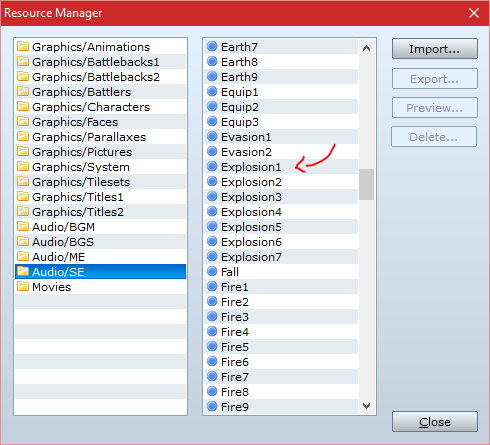
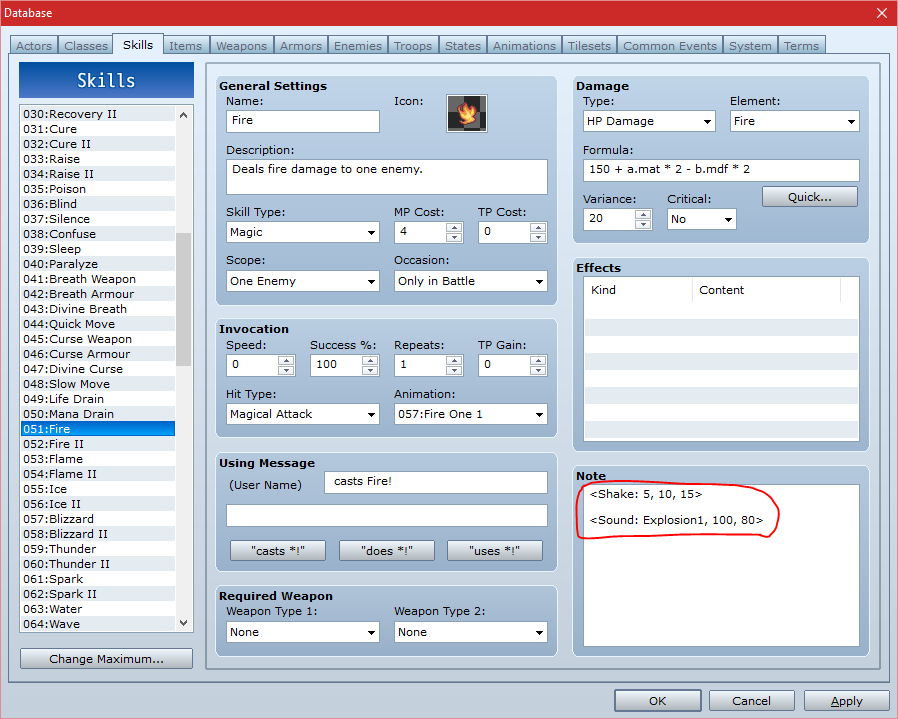
Script
module RINOBI module ActorSound # DO NOT MODIFY
#===============================================================================
# Actor Damage Sounds
#::::::::::::::::::::::::::::::::::::::::::::::::::::::::::::::::::::::::::::::
# By: Rinobi
#------------------------------------------------------------------------------
#
# Damage sound effects can now be assigned for specific weapons and armors.
#
#==============================================================================
# # VERSION HISTORY
#------------------------------------------------------------------------------
# @ 1.0 [12/05/2015] Completed
# @ 1.1 [12/06/2015] ATB Compatability Update
# @ 1.2 [12/08/2015] Fixed occasional crash when enemy attacks.
# @ 1.3 [12/09/2015] Fixed crash when actor is damaged without equipped armor.
# @ 1.7 [12/10/2015] Major update. Fixed double sound effect bug.
# Added sound options for barehanded and no armor.
# Shield Armor types have priority while guarding.
# Sensible default settings for making easy distinctions.
# @ 1.8 [01/07/2016] Option to include/exclude weapon SE from skills added.
# @ 2.0 [08/10/2016] Note tags added. Screen shake options included.
#==============================================================================
# # INSTRUCTIONS
#------------------------------------------------------------------------------
# Paste this script below Materials and above Main Process.
# See 'SETTINGS' for addtional instructions.
#-
#------------------------------------------------
# <Sound: file_name, volume, pitch>
#------------------------------------------------
# Place within the 'Note' textbox of 'Skills'
#-
# The sound effect to be played upon dealing
# damage to the target with said skill.
#-
# EX: <Sound: Gun1, 100, 60>
#------------------------------------------------
# <Shake: power, speed, duration>
#------------------------------------------------
# Place within the 'Note' textbox of 'Skills'
#-
# The screen shake effect to be used used upon
# dealing damage to the target with said skill.
#-
# EX: <Shake: 5, 10, 20>
#==============================================================================
# # SETTINGS
# -----------------------------------------------------------------------------
# Adjust the below settings to your liking.
#-
#======================================================================
# >> Armor Slot
# ---------------------------------------------------------------------
# The slot id for armor. Recommended settins 2 or 3. This controls
# which equipment slot actor damage sound effects relate to.
#-
# Weapon = 0 , Shield = 1 , Head = 2 , Body = 3 , Accessory = 4
#======================================================================
ArmorSlot = 3 # Default 3, Ignored if guarding with a shield.
#======================================================================
# >> Guard Slot
# ---------------------------------------------------------------------
# Allows an alternate sound effect to be played while an actor is
# guarding. The armor type of the equipment slot below will take
# priority over the above setting.
#-
# Weapon = 0 , Shield = 1 , Head = 2 , Body = 3 , Accessory = 4
#======================================================================
GuardSlot = 1 # Default 1, Has priority while guarding with a shield.
#======================================================================
# >> Skill SE
# ---------------------------------------------------------------------
# Controls whether or skills other than Attack inherit sound effects
# from weapons. Sound effect note tags will always take priority.
#-
# true or false
#======================================================================
Use_Attack_SE = false # Skills use Normal Attack SE by default.
#======================================================================
# >> Default Screen Shake
# ---------------------------------------------------------------------
# Controls the default settings for the screen shake effect. To disable
# screen shake for actors or enemies, set either of the below values to
# to nil. If disabled, note tags will still trigger screen shake.
#-
# [Power, Speed, Duration]
#======================================================================
Enemy_Screen_Shake = nil # When Enemy Recieves Damage.
Actor_Screen_Shake = [5, 5, 10] # When Actor Recieves Damage.
#======================================================================
# >> Armor SE Settings
# ---------------------------------------------------------------------
# Sound effect played when an actor recieves damage.
# Sound effect file names found in (Project_Name)/Audio/SE
# The below list is ordered by Armor Type IDs, with 0 being the
# SE used when no armor is equipped. Addtional armor types may be
# added or removed from the list below.
#======================================================================
ActorArmor = { #
0 => {:File => "Damage3", :Volume => 99, itch => 100}, # Naked
1 => {:File => "Damage3", :Volume => 95, itch => 120}, # General Armor
2 => {:File => "Damage2", :Volume => 90, itch => 150}, # Magic Armor
3 => {:File => "Damage4", :Volume => 85, itch => 110}, # Light Armor
4 => {:File => "Damage1", :Volume => 80, itch => 150}, # Heavy Armor
} # DO NOT MODIFY
#======================================================================
# >> Weapon SE Settings
# ---------------------------------------------------------------------
# Sound effect played when an enemy recieves damage.
# Sound effect file names found in (Project_Name)/Audio/SE
# The below list is ordered by Weapon Type IDs, with 0 being the
# SE used when no weapon is equipped. Addtional weapon types may be
# added or removed from the list below.
#======================================================================
ActorWeapon = { #
0 => {:File => "Blow3" , :Volume => 87, itch => 125}, # Barehanded
1 => {:File => "Slash1" , :Volume => 99, itch => 95}, # Axe
2 => {:File => "Slash2" , :Volume => 70, itch => 150}, # Claw
3 => {:File => "Slash10", :Volume => 80, itch => 130}, # Spear
4 => {:File => "Sword3" , :Volume => 78, itch => 150}, # Sword
5 => {:File => "Flash2" , :Volume => 85, itch => 150}, # Katana
6 => {:File => "Bow3" , :Volume => 80, itch => 100}, # Bow
7 => {:File => "Slash1" , :Volume => 65, itch => 150}, # Dagger
8 => {:File => "Blow8" , :Volume => 99, itch => 90}, # Hammer
9 => {:File => "Blow3" , :Volume => 72, itch => 125}, # Staff
10 => {:File => "Gun1" , :Volume => 90, itch => 100}, # Gun
} # DO NOT MODIFY
#==============================================================================
# # COMPATIBILITY
#------------------------------------------------------------------------------
# Created for use within RPG Maker VX Ace
#-
# Alias Methods:
# @ prepare in Game_Action
# @ perform_damage_effect in Game_Actor
# @ perform_damage_effect in Game_Enemy
#===============================================================================
# ** End of Settings
#-------------------------------------------------------------------------------
# Editing beyond this line may result in undesirable side-effects.
#===============================================================================
#======================================================================
# >> Regexp Module
#======================================================================
module Regexp
Sound_Override = /<Sound:[ ](.*?),[ ](\d+),[ ](\d+)>/i
Shake_Override = /<Shake:[ ](\d+),[ ](\d+),[ ](\d+)>/i
end # Regexp
end end # DO NOT MODIFY
#==============================================================================
# ** IMPORT SCRIPT
#------------------------------------------------------------------------------
$imported = {} if $imported.nil?
$imported[:RIN_ADamageSounds] = true
#==============================================================================
# ** Game_Action
#------------------------------------------------------------------------------
# This class handles battle actions. This class is used within the
# Game_Battler class.
#==============================================================================
class Game_Action
#--------------------------------------------------------------------------
# * Alias Method: prepare
#--------------------------------------------------------------------------
alias :se_prepare repare
def prepare ; se_prepare = $acting = @subject end # prepare
end # Game_Action
#==============================================================================
# ** Game_Actor
#------------------------------------------------------------------------------
# This class handles actors. It is used within the Game_Actors class
# ($game_actors) and is also referenced from the Game_Party class ($game_party).
#==============================================================================
class Game_Actor < Game_Battler
include RINOBI::ActorSound
#--------------------------------------------------------------------------
# * Alias Method: Execute Damage Effect
#--------------------------------------------------------------------------
alias :rinse_damage_effect erform_damage_effect
def perform_damage_effect
return rinse_damage_effect unless $game_party.in_battle
if guard? && equips[GuardSlot].is_a?(RPG::Armor)
armor = equips[GuardSlot].atype_id
elsif equips[ArmorSlot].nil? then armor = 0
else armor = equips[ArmorSlot].atype_id end #--
return rinse_damage_effect unless ActorArmor.include?(armor)
file = ActorArmor[armor][:File]
volume = ActorArmor[armor][:Volume]
pitch = ActorArmor[armor][itch]
if $acting.current_action.item.note =~ Regexp::Shake_Override
$game_troop.screen.start_shake($1.to_i, $2.to_i, $3.to_i)
elsif !Actor_Screen_Shake.nil?
ess = Actor_Screen_Shake
$game_troop.screen.start_shake(ess[0], ess[0], ess[0])
end #--
@sprite_effect_type = :blink
RPG::SE.new(file, volume, pitch).play
end # perform_damage_effect
end # Game_Actor
#==============================================================================
# ** Game_Enemy
#------------------------------------------------------------------------------
# This class handles enemies. It used within the Game_Troop class
# ($game_troop).
#==============================================================================
class Game_Enemy < Game_Battler
include RINOBI::ActorSound
#--------------------------------------------------------------------------
# * Alias Method: Execute Damage Effect
#--------------------------------------------------------------------------
alias :rinse_damage_effect erform_damage_effect
def perform_damage_effect
return rinse_damage_effect unless $acting.is_a?(Game_Actor)
if $acting.equips[0].nil? then weapon = 0
else weapon = $acting.equips[0].wtype_id end #--
if $acting.current_action.item.note =~ Regexp::Sound_Override
file, volume, pitch = $1, $2.to_i, $3.to_i
else
unless $acting.current_action.attack?
return rinse_damage_effect unless Use_Attack_SE
end #--
file = ActorWeapon[weapon][:File]
volume = ActorWeapon[weapon][:Volume]
pitch = ActorWeapon[weapon][itch]
end #--
if $acting.current_action.item.note =~ Regexp::Shake_Override
$game_troop.screen.start_shake($1.to_i, $2.to_i, $3.to_i)
elsif !Enemy_Screen_Shake.nil?
ess = Enemy_Screen_Shake
$game_troop.screen.start_shake(ess[0], ess[0], ess[0])
end #--
@sprite_effect_type = :blink
RPG::SE.new(file, volume, pitch).play
end # perform_damage_effect
end # Game_Enemy
#==============================================================================
# @@@@@ @ @ @@@@ @@@@@ @@@@@ @@@@@ @@@@@ @@@@ @@@@@ @@@@@ @@@@@
# @ @@ @ @ @ @ @ @ @ @ @ @ @ @ @ @
# @@@@@ @ @ @ @ @ @ @ @@@@ @@@@@ @ @@@@ @ @@@@@ @
# @ @ @@ @ @ @ @ @ @ @ @ @ @ @ @
# @@@@@ @ @ @@@@ @@@@@ @ @@@@@ @@@@@ @ @ @@@@@ @ @
#==============================================================================
#===============================================================================
# Actor Damage Sounds
#::::::::::::::::::::::::::::::::::::::::::::::::::::::::::::::::::::::::::::::
# By: Rinobi
#------------------------------------------------------------------------------
#
# Damage sound effects can now be assigned for specific weapons and armors.
#
#==============================================================================
# # VERSION HISTORY
#------------------------------------------------------------------------------
# @ 1.0 [12/05/2015] Completed
# @ 1.1 [12/06/2015] ATB Compatability Update
# @ 1.2 [12/08/2015] Fixed occasional crash when enemy attacks.
# @ 1.3 [12/09/2015] Fixed crash when actor is damaged without equipped armor.
# @ 1.7 [12/10/2015] Major update. Fixed double sound effect bug.
# Added sound options for barehanded and no armor.
# Shield Armor types have priority while guarding.
# Sensible default settings for making easy distinctions.
# @ 1.8 [01/07/2016] Option to include/exclude weapon SE from skills added.
# @ 2.0 [08/10/2016] Note tags added. Screen shake options included.
#==============================================================================
# # INSTRUCTIONS
#------------------------------------------------------------------------------
# Paste this script below Materials and above Main Process.
# See 'SETTINGS' for addtional instructions.
#-
#------------------------------------------------
# <Sound: file_name, volume, pitch>
#------------------------------------------------
# Place within the 'Note' textbox of 'Skills'
#-
# The sound effect to be played upon dealing
# damage to the target with said skill.
#-
# EX: <Sound: Gun1, 100, 60>
#------------------------------------------------
# <Shake: power, speed, duration>
#------------------------------------------------
# Place within the 'Note' textbox of 'Skills'
#-
# The screen shake effect to be used used upon
# dealing damage to the target with said skill.
#-
# EX: <Shake: 5, 10, 20>
#==============================================================================
# # SETTINGS
# -----------------------------------------------------------------------------
# Adjust the below settings to your liking.
#-
#======================================================================
# >> Armor Slot
# ---------------------------------------------------------------------
# The slot id for armor. Recommended settins 2 or 3. This controls
# which equipment slot actor damage sound effects relate to.
#-
# Weapon = 0 , Shield = 1 , Head = 2 , Body = 3 , Accessory = 4
#======================================================================
ArmorSlot = 3 # Default 3, Ignored if guarding with a shield.
#======================================================================
# >> Guard Slot
# ---------------------------------------------------------------------
# Allows an alternate sound effect to be played while an actor is
# guarding. The armor type of the equipment slot below will take
# priority over the above setting.
#-
# Weapon = 0 , Shield = 1 , Head = 2 , Body = 3 , Accessory = 4
#======================================================================
GuardSlot = 1 # Default 1, Has priority while guarding with a shield.
#======================================================================
# >> Skill SE
# ---------------------------------------------------------------------
# Controls whether or skills other than Attack inherit sound effects
# from weapons. Sound effect note tags will always take priority.
#-
# true or false
#======================================================================
Use_Attack_SE = false # Skills use Normal Attack SE by default.
#======================================================================
# >> Default Screen Shake
# ---------------------------------------------------------------------
# Controls the default settings for the screen shake effect. To disable
# screen shake for actors or enemies, set either of the below values to
# to nil. If disabled, note tags will still trigger screen shake.
#-
# [Power, Speed, Duration]
#======================================================================
Enemy_Screen_Shake = nil # When Enemy Recieves Damage.
Actor_Screen_Shake = [5, 5, 10] # When Actor Recieves Damage.
#======================================================================
# >> Armor SE Settings
# ---------------------------------------------------------------------
# Sound effect played when an actor recieves damage.
# Sound effect file names found in (Project_Name)/Audio/SE
# The below list is ordered by Armor Type IDs, with 0 being the
# SE used when no armor is equipped. Addtional armor types may be
# added or removed from the list below.
#======================================================================
ActorArmor = { #
0 => {:File => "Damage3", :Volume => 99, itch => 100}, # Naked
1 => {:File => "Damage3", :Volume => 95, itch => 120}, # General Armor
2 => {:File => "Damage2", :Volume => 90, itch => 150}, # Magic Armor
3 => {:File => "Damage4", :Volume => 85, itch => 110}, # Light Armor
4 => {:File => "Damage1", :Volume => 80, itch => 150}, # Heavy Armor
} # DO NOT MODIFY
#======================================================================
# >> Weapon SE Settings
# ---------------------------------------------------------------------
# Sound effect played when an enemy recieves damage.
# Sound effect file names found in (Project_Name)/Audio/SE
# The below list is ordered by Weapon Type IDs, with 0 being the
# SE used when no weapon is equipped. Addtional weapon types may be
# added or removed from the list below.
#======================================================================
ActorWeapon = { #
0 => {:File => "Blow3" , :Volume => 87, itch => 125}, # Barehanded
1 => {:File => "Slash1" , :Volume => 99, itch => 95}, # Axe
2 => {:File => "Slash2" , :Volume => 70, itch => 150}, # Claw
3 => {:File => "Slash10", :Volume => 80, itch => 130}, # Spear
4 => {:File => "Sword3" , :Volume => 78, itch => 150}, # Sword
5 => {:File => "Flash2" , :Volume => 85, itch => 150}, # Katana
6 => {:File => "Bow3" , :Volume => 80, itch => 100}, # Bow
7 => {:File => "Slash1" , :Volume => 65, itch => 150}, # Dagger
8 => {:File => "Blow8" , :Volume => 99, itch => 90}, # Hammer
9 => {:File => "Blow3" , :Volume => 72, itch => 125}, # Staff
10 => {:File => "Gun1" , :Volume => 90, itch => 100}, # Gun
} # DO NOT MODIFY
#==============================================================================
# # COMPATIBILITY
#------------------------------------------------------------------------------
# Created for use within RPG Maker VX Ace
#-
# Alias Methods:
# @ prepare in Game_Action
# @ perform_damage_effect in Game_Actor
# @ perform_damage_effect in Game_Enemy
#===============================================================================
# ** End of Settings
#-------------------------------------------------------------------------------
# Editing beyond this line may result in undesirable side-effects.
#===============================================================================
#======================================================================
# >> Regexp Module
#======================================================================
module Regexp
Sound_Override = /<Sound:[ ](.*?),[ ](\d+),[ ](\d+)>/i
Shake_Override = /<Shake:[ ](\d+),[ ](\d+),[ ](\d+)>/i
end # Regexp
end end # DO NOT MODIFY
#==============================================================================
# ** IMPORT SCRIPT
#------------------------------------------------------------------------------
$imported = {} if $imported.nil?
$imported[:RIN_ADamageSounds] = true
#==============================================================================
# ** Game_Action
#------------------------------------------------------------------------------
# This class handles battle actions. This class is used within the
# Game_Battler class.
#==============================================================================
class Game_Action
#--------------------------------------------------------------------------
# * Alias Method: prepare
#--------------------------------------------------------------------------
alias :se_prepare repare
def prepare ; se_prepare = $acting = @subject end # prepare
end # Game_Action
#==============================================================================
# ** Game_Actor
#------------------------------------------------------------------------------
# This class handles actors. It is used within the Game_Actors class
# ($game_actors) and is also referenced from the Game_Party class ($game_party).
#==============================================================================
class Game_Actor < Game_Battler
include RINOBI::ActorSound
#--------------------------------------------------------------------------
# * Alias Method: Execute Damage Effect
#--------------------------------------------------------------------------
alias :rinse_damage_effect erform_damage_effect
def perform_damage_effect
return rinse_damage_effect unless $game_party.in_battle
if guard? && equips[GuardSlot].is_a?(RPG::Armor)
armor = equips[GuardSlot].atype_id
elsif equips[ArmorSlot].nil? then armor = 0
else armor = equips[ArmorSlot].atype_id end #--
return rinse_damage_effect unless ActorArmor.include?(armor)
file = ActorArmor[armor][:File]
volume = ActorArmor[armor][:Volume]
pitch = ActorArmor[armor][itch]
if $acting.current_action.item.note =~ Regexp::Shake_Override
$game_troop.screen.start_shake($1.to_i, $2.to_i, $3.to_i)
elsif !Actor_Screen_Shake.nil?
ess = Actor_Screen_Shake
$game_troop.screen.start_shake(ess[0], ess[0], ess[0])
end #--
@sprite_effect_type = :blink
RPG::SE.new(file, volume, pitch).play
end # perform_damage_effect
end # Game_Actor
#==============================================================================
# ** Game_Enemy
#------------------------------------------------------------------------------
# This class handles enemies. It used within the Game_Troop class
# ($game_troop).
#==============================================================================
class Game_Enemy < Game_Battler
include RINOBI::ActorSound
#--------------------------------------------------------------------------
# * Alias Method: Execute Damage Effect
#--------------------------------------------------------------------------
alias :rinse_damage_effect erform_damage_effect
def perform_damage_effect
return rinse_damage_effect unless $acting.is_a?(Game_Actor)
if $acting.equips[0].nil? then weapon = 0
else weapon = $acting.equips[0].wtype_id end #--
if $acting.current_action.item.note =~ Regexp::Sound_Override
file, volume, pitch = $1, $2.to_i, $3.to_i
else
unless $acting.current_action.attack?
return rinse_damage_effect unless Use_Attack_SE
end #--
file = ActorWeapon[weapon][:File]
volume = ActorWeapon[weapon][:Volume]
pitch = ActorWeapon[weapon][itch]
end #--
if $acting.current_action.item.note =~ Regexp::Shake_Override
$game_troop.screen.start_shake($1.to_i, $2.to_i, $3.to_i)
elsif !Enemy_Screen_Shake.nil?
ess = Enemy_Screen_Shake
$game_troop.screen.start_shake(ess[0], ess[0], ess[0])
end #--
@sprite_effect_type = :blink
RPG::SE.new(file, volume, pitch).play
end # perform_damage_effect
end # Game_Enemy
#==============================================================================
# @@@@@ @ @ @@@@ @@@@@ @@@@@ @@@@@ @@@@@ @@@@ @@@@@ @@@@@ @@@@@
# @ @@ @ @ @ @ @ @ @ @ @ @ @ @ @ @
# @@@@@ @ @ @ @ @ @ @ @@@@ @@@@@ @ @@@@ @ @@@@@ @
# @ @ @@ @ @ @ @ @ @ @ @ @ @ @ @
# @@@@@ @ @ @@@@ @@@@@ @ @@@@@ @@@@@ @ @ @@@@@ @ @
#==============================================================================
Latest Version: View attachment ActorDamageSounds_20.txt
Previous Version: ActorDamageSounds_18.txt
Features Mentioned
- Weapons and armors can now have their own sound effects.
- Note tags allow skills to have unique sound and screen shake effects.
Downloads / Referenced Files
RPG Maker Web attachments are mirrored locally when available. Other external links remain hosted by their original creator or third-party service.
- Local mirror: 27051-5e7fa11e6eb8316b7922118bac3a41cc.png
SHA-256:e1342a5ddb8dec077120156f76ec5ba05a0fb2e926b03ba5cc909aca45f239a7
Original attachment URL: https://forums.rpgmakerweb.com/attachments/ads_00-png.44900/ - Local mirror: 27052-158b34fd55b1cb112e3c3e80a09fe88e.png
SHA-256:0e2817d9f2a560a46cff70207d33bd4a1a15f39193807e2f5ecf8e20954e23bf
Original attachment URL: https://forums.rpgmakerweb.com/attachments/ads_01-png.44901/ - Local mirror: ActorDamageSounds_20.txt
SHA-256:c98dc4529b007b74f199bea93225c5c55bba6b3695fe36395d908eca88c266a8
Original attachment URL: https://forums.rpgmakerweb.com/attachments/actordamagesounds_20-txt.44902/
Referenced Images / Attachments
Creator Claims / Removal
If you are the original creator and want this listing reassigned, edited, or removed, join BMMPlay and contact the moderators with proof that matches the original RPG Maker Web profile, linked GitHub, itch.io page, or another public creator identity.
Replies (0)
No replies yet.
0
replies
13
views
Topic Summary
Loading summary...