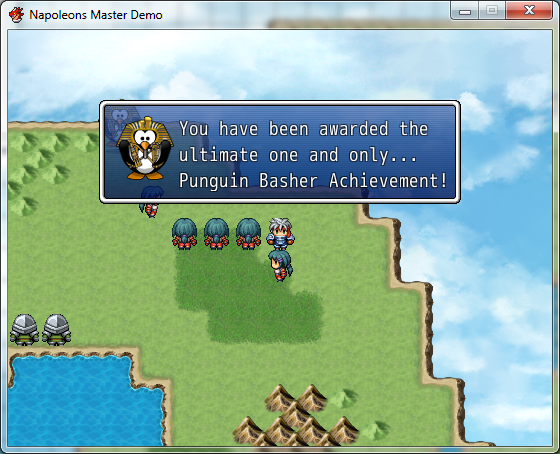
#==============================================================================# Napoleons Popup Window# Version 1.03a# By Napoleon## About:# - Displays a popup window that fades in and out. When a popup window is# created while another one is still active then it will be queued.# - It can optionally have an image and it scales according to line-width. Does# not perform word-wrapping (intended).# - Note that these popup windows are not saved. So if the user saves the game# while a popup is being displayed/queued it will not be there when the user# loads the save file.## Instructions:# - Place below "▼ Materials" but above "▼ Main Process".# - If you use another scripts that modifies the# "Window_Base.convert_escape_characters" then you must place this script# below that one.# - Call like this (from an event and then Script):# # The sample below uses an array. Each item represents 1 sentence.# popup(['You found a Potion!', 'But you dropped it and it broke...'])# # The sample below requires the "Graphics\Popup\Telephone.png" image# popup("You received \\N[2]'s telephone number!", 'Telephone')# - To delete the popup(s)# popup_delete # deletes the current popup and shows the next# one (if any).# popup_delete_all # deletes all popup windows.# - Supported escape characters:# \\I[x], \\V[x], \\N[x], \\P[x], \\G# - Supported escape characters for Yanfly's Msg System:# \\II[x], \\IW[x], \\IA[x], \\IS[x], \\IT[x]## Requires:# - RPG Maker VX Ace## Terms of Use:# - Attribution 3.0 Unported (CC BY 3.0)#
http://creativecommons.org/licenses/by/3.0/# - Attribution is not required. This overrules what's stated in the above# license.## Version History:# 1.03a (19 December 2013)# - Fixed a crash when using an image + an array of text.# - Added (limited) escape character support (including some from Yanfly's# message system).# 1.02 (20 june 2013)# - No longer shows in save menu's and other 'sub-scenes'# - Queue is now cleared when loading a game or returning to the title screen.# - Popup Window is now automatically saved & loaded.# 1.01a (09 June 2013)# - Improved the text/image offset by using standard_padding * 2# - Updated $imported version number...# - Can now be hidden/deleted when transferring the player/opening the menu# 1.01 (09 June 2013)# - added the popup_remove & popup_remove_all scripts calls# 1.00 (08 June 2013)# - First Release#===============================================================================# Configurable section#===============================================================================module Nap $imported ||= {} $imported[:nap_popup_window] = 1.03#===============================================================================# Window Popup#=============================================================================== class Window_Popup < Window_Base #--------------------------------------------------------------------------- # Settings #--------------------------------------------------------------------------- LOCATION_Y = 70 # Y location of the window. FOLDER = 'Popup' # Folder that contains the images for the popup. OFFSET_X = 5 # Text offset for the left and right sides. OFFSET_Y = 4 # Text offset for the top and bottom sides. PADDING = 2 # Spacing between lines. IMAGE_TEXT_SPACING = 5 # Horizontal spacing between image and text. CENTER_SINGLE_LINE = true # When true it will center the text (if it is a # single string and not an array) on the Y-axis. DELETE_ON_TRANSFER = :all # Possible values: # :all, :active, :none ACTION_ON_OPEN_MENU = :none # :hide, :del_all, :del_active, :none #--------------------------------------------------------------------------- # Do not edit below this line #--------------------------------------------------------------------------- attr_accessor :requires_refresh # Because Window_Base doesn't work correctly # after being created by the DataManager. attr_accessor :fade_direction #--------------------------------------------------------------------------- # * Initialize # image : may be nil to not display any image at all. # text : Can either be a string or an array of strings. Each item # in the array represents a single line of text. # display_time: is in frames. #--------------------------------------------------------------------------- def initialize(text, image=nil, fade_speed=6, display_time=100) @requires_refresh = false @image_str = image # for saving/loading @fade_speed = fade_speed @fade_direction = @fade_speed @display_time = display_time text_offset_left = OFFSET_X if image img = Cache.popup(image) text_offset_left += img.width + IMAGE_TEXT_SPACING end # Text measuring new_line_x = 0 new_line_x += text_offset_left if image txt_size = nil # Must assign it here or Ruby won't know it's existince out of the .each-loop. if text.kind_of?(Array) text.each { |t| biggest_width = 0 line_size = calculate_text_width(t, new_line_x) if line_size[:x] > biggest_width txt_size = line_size biggest_width = line_size[:x] end } if image txt_size[:y] = [line_height * text.length, img.height].max else txt_size[:y] = line_height * text.length end else txt_size = calculate_text_width(text, new_line_x) end width = txt_size[:x] + OFFSET_X * 2 + standard_padding * 2 width += img.width if img height = txt_size[:y] + OFFSET_Y * 2 + standard_padding * 2 height = [height, img.height + OFFSET_Y * 2 + standard_padding * 2].max if img x = Graphics.width / 2 - width / 2 y = LOCATION_Y # [End of] Size super(x,y,width,height) self.contents_opacity = self.opacity = 0 # Draw if img contents.blt(OFFSET_X, OFFSET_Y, img, Rect.new(0,0,img.width,img.height)) img.dispose end if text.kind_of?(Array) text.each_with_index { |t, index| h = text_size(t).height draw_text_ex(text_offset_left, OFFSET_Y + (h + PADDING) * index, t) } else if CENTER_SINGLE_LINE draw_text_ex(text_offset_left, OFFSET_Y, text) else draw_text_ex(text_offset_left, OFFSET_Y, text) end end @text = text # for saving/loading end # initialize #===============================================================================# Text Measure Methods#===============================================================================# new approach:# 1. Calculate total line width# 2. Find all control characters and put those into an array (what is the regexp for that...)# 3. Substract the text-length of all those control strings in the array from the total line width.# 4. Loop through each control character and append it's 'escaped-result-length to the total line width. def text_size2(str) @dummy_bmp.text_size(str) end def text_width(str) text_size2(str).width end def calculate_text_width(text, new_line_x) txt = text.clone @dummy_bmp = Bitmap.new(1,1) result = {:x => text_width(txt), :y=>line_height} # Array Commands a_commands = create_array_commands(txt) result[:x] -= text_width(a_commands.join) convert_array_commands(a_commands, result) # Regular Commands r_commands = create_regular_commands(txt) result[:x] -= text_width(r_commands.join) convert_regular_commands(r_commands, result) @dummy_bmp.dispose#~ p '----------------------------' return result end def create_regular_commands(txt) regular_commands = [] regular_commands << txt.scan(/\\G/i) # FOR DEVS: Add extra commands here (and further down below in the code) return regular_commands.flatten end def convert_regular_commands(commands, pos) commands.each { |cmd| cmd_code = cmd.partition('\\').last.upcase case cmd_code when "G" pos[:x] += text_width(Vocab::currency_unit) end # FOR DEVS: Add extra commands here } # .each end def create_array_commands(txt)#~ p "text: #{txt}" commands = [] commands << txt.scan(/\\I\[\d+\]/i) commands << txt.scan(/\\V\[\d+\]/i) commands << txt.scan(/\\N\[\d+\]/i) commands << txt.scan(/\\P\[\d+\]/i) if $imported["YEA-MessageSystem"] commands << txt.scan(/\\II\[\d+\]/i) commands << txt.scan(/\\IW\[\d+\]/i) commands << txt.scan(/\\IA\[\d+\]/i) commands << txt.scan(/\\IS\[\d+\]/i) commands << txt.scan(/\\IT\[\d+\]/i) end # FOR DEVS: Add extra commands here (and further down below in the code) return commands.flatten end def convert_array_commands(commands, pos) commands.each { |cmd|#~ p "current cmd: #{cmd}" cmd_code = cmd.match(/\\(.*)\[/)[1].strip.upcase#~ p "current cmd_code: #{cmd_code}"#~ #\\(.*)\[\d+\] case cmd_code when "I" pos[:x] += 24
#param = cmd.gsub(/\\I\[(\d+)\]/i) { $1.to_i } #p "param for #{cmd_code}: #{param} code: #{cmd_code}" when "V" param = cmd.gsub(/\\V\[(\d+)\]/i) { $1 } pos[:x] += text_width($game_variables[param.to_i]) when "N" param = cmd.gsub(/\\N\[(\d+)\]/i) { $1 } pos[:x] += text_width(actor_name(param.to_i)) when "P" param = cmd.gsub(/\\P\[(\d+)\]/i) { $1 } pos[:x] += text_width(party_member_name(param.to_i)) end # case if $imported["YEA-MessageSystem"] case cmd_code when "II" param = cmd.gsub(/\\II\[(\d+)\]/i) { $1 } pos[:x] += text_width($data_items[param.to_i].name) + 24 when "IW" param = cmd.gsub(/\\IW\[(\d+)\]/i) { $1 } pos[:x] += text_width($data_weapons[param.to_i].name) + 24 when "IA" param = cmd.gsub(/\\IA\[(\d+)\]/i) { $1 } pos[:x] += text_width($data_armors[param.to_i].name) + 24 when "IS" param = cmd.gsub(/\\IS\[(\d+)\]/i) { $1 } pos[:x] += text_width($data_skills[param.to_i].name) + 24 when "IT" param = cmd.gsub(/\\IT\[(\d+)\]/i) { $1 } pos[:x] += text_width($data_states[param.to_i].name) + 24 end # case end # if $imported["YEA-MessageSystem"] # FOR DEVS: Add extra commands here } # .each end # convert_array_commands#=============================================================================== #--------------------------------------------------------------------------- # * Convert Text (override) # * This one is also compatible with arrays instead of just strings #--------------------------------------------------------------------------- def convert_escape_characters(text) if text.kind_of?(Array) result = [] text.each { |t| result << super(t)} return result else return super(text) end end #--------------------------------------------------------------------------- # * Update #--------------------------------------------------------------------------- def update super return if !self.visible # Do not update when hidden if @display_time > 0 && @fade_direction == -@fade_speed @display_time -= 1 @requires_refresh ? @requires_refresh = false : return end self.opacity += @fade_direction self.contents_opacity = self.opacity if self.opacity >= 255 # self.opacity does not need a correction to 255 because that is already performed by the RGSS framework. @fade_direction = -@fade_speed elsif self.opacity <= 0 && @fade_direction == -@fade_speed Window_Popup.next_window end end #--------------------------------------------------------------------------- # * To Data # - For: saving #--------------------------------------------------------------------------- def to_data Popup_Data.new(@text,@image_str, @fade_speed, @fade_direction, @display_time, self.opacity) end #--------------------------------------------------------------------------- # * From Data (static) # - For: loading #--------------------------------------------------------------------------- def self.from_data(data) result = Window_Popup.new(data.text, data.image_str, data.fade_speed, data.display_time) result.fade_direction = data.fade_direction result.opacity = data.opacity return result end #--------------------------------------------------------------------------- # * Delete Active Window (static) #--------------------------------------------------------------------------- def self.del_active_window $popup_window.dispose if $popup_window $popup_window = nil end #--------------------------------------------------------------------------- # * Delete All Windows (static) #--------------------------------------------------------------------------- def self.del_all_windows $popup_queue.each { |w| w.dispose} $popup_queue = [] Nap::Window_Popup.del_active_window end #--------------------------------------------------------------------------- # * Next Window (static) #--------------------------------------------------------------------------- def self.next_window del_active_window if $popup_queue.length > 0 $popup_window = $popup_queue.shift $popup_window.visible = true end end end # class Window_Popup < Window_Base #=============================================================================== # Class Popup Data #=============================================================================== Popup_Data = Struct.newtext, :image_str, :fade_speed, :fade_direction, :display_time, pacity) #=============================================================================== # * Initialize Globals #=============================================================================== $popup_window = nil $popup_queue = []end # module Nap#===============================================================================# Game Player# For: DELETE_ON_TRANSFER#===============================================================================class Game_Player < Game_Character alias nap_popup_reserve_transfer reserve_transfer def reserve_transfer(map_id, x, y, d = 2) case Nap::Window_Popup:ELETE_ON_TRANSFER when :all Nap::Window_Popup.del_all_windows when :active Nap::Window_Popup.next_window when :none # Do nothing else raise "Scene_Base.nap_popup_start (alias): Unknown DELETE_ON_SCENE_START value #{Nap::Window_Popup:ELETE_ON_SCENE_START}" end nap_popup_reserve_transfer(map_id, x, y, d) end # reserve_transferend # class Game_Player < Game_Character#===============================================================================# Scene MenuBase# For: updating the active popup window#===============================================================================class Scene_Base alias nap_popup_update update def update nap_popup_update $popup_window.update if $popup_window && SceneManager.scene.is_a?(Scene_Map) endend # class Scene_Base#===============================================================================# Scene MenuBase# For: ACTION_ON_OPEN_MENU part 1/2#===============================================================================class Scene_MenuBase < Scene_Base alias nap_popup_terminate terminate def terminate $popup_window.visible = true if Nap::Window_Popup::ACTION_ON_OPEN_MENU == :hide && $popup_window nap_popup_terminate endend#===============================================================================# Scene Map# For: ACTION_ON_OPEN_MENU part 2/2#===============================================================================class Scene_Map < Scene_Base alias nap_update_call_menu update_call_menu def update_call_menu if Input.trigger? && !$game_player.moving? case Nap::Window_Popup::ACTION_ON_OPEN_MENU when :none # Do nothing when :hide $popup_window.visible = false if $popup_window when :del_all Nap::Window_Popup.del_all_windows when :del_active Nap::Window_Popup.next_window else raise "Scene_Map.nap_update_call_menu (alias): Unknown ACTION_ON_OPEN_MENU value #{Nap::Window_Popup::ACTION_ON_OPEN_MENU}" end end nap_update_call_menu endend#===============================================================================# Scene Title# For: clearing the queue if the user returned to the title screen.#===============================================================================class Scene_Title < Scene_Base alias nap_popup_start start def start Nap::Window_Popup.del_all_windows if $popup_window nap_popup_start endend#===============================================================================# Scene Base# For: Preventing the popup window from showing in the Save Scene, Title Scene,# etc.#===============================================================================class Scene_Base alias nap_popup_post_start post_start def post_start nap_popup_post_start $popup_window.visible = self.is_a?(Scene_Map) if $popup_window endend#===============================================================================# Saving & Loading#===============================================================================#===============================================================================# Module DataManager# For: Saving & Loading#===============================================================================module DataManager class << self alias nap_popup_event_make_save_contents make_save_contents alias nap_popup_event_extract_save_contents extract_save_contents end def self.make_save_contents contents = nap_popup_event_make_save_contents contents = contents.merge(make_popup_contents) contents end def self.make_popup_contents contents = {} popups = [] popups << $popup_window.to_data if $popup_window $popup_queue.each { |p| popups << p.to_data if p != nil } contents[:nap_popup_window] = popups contents end def self.extract_save_contents(contents) nap_popup_event_extract_save_contents(contents) extract_popup_contents(contents) end def self.extract_popup_contents(contents) if contents[:nap_popup_window].length > 0 $popup_window = Nap::Window_Popup.from_data(contents[:nap_popup_window].shift) $popup_window.requires_refresh = true end contents[:nap_popup_window].each { |data| $popup_queue << Nap::Window_Popup.from_data(data) } endend#===============================================================================# Cache#===============================================================================module Cache #-------------------------------------------------------------------------- # * Get Popup Graphic #-------------------------------------------------------------------------- def self.popup(filename) load_bitmap("Graphics/#{Nap::Window_Popup::FOLDER}/", filename) endend#===============================================================================# Game Interpreter#===============================================================================class Game_Interpreter #-------------------------------------------------------------------------- # * Popup Delete # Removes the active popup window #-------------------------------------------------------------------------- def popup_delete Nap::Window_Popup.next_window end #-------------------------------------------------------------------------- # * Popup Delete All # Removes the active and all queued popup windows #-------------------------------------------------------------------------- def popup_delete_all Nap::Window_Popup.del_all_windows end #-------------------------------------------------------------------------- # * Popup # Creates a new popup window #-------------------------------------------------------------------------- def popup(text, image=nil, fade_speed=6, display_time=100) if $popup_window $popup_queue << Nap::Window_Popup.new(text, image, fade_speed, display_time) $popup_queue.last.visible = false else $popup_window = Nap::Window_Popup.new(text, image, fade_speed, display_time) end endend#===============================================================================## ■ End of File##===============================================================================