

VXACEHelp Window Extension
BMM_Archive · July 15, 2026

BMM_Archive
Preserved forum archive. This topic stores the original first post and locally mirrored RPG Maker Web attachments when available. It is posted by the BMMPlay archive account, not by the original creator.
Original Source
- Original title: Help Window Extension
- Original author: Rinobi
- Original date: November 27, 2015
- Source thread: https://forums.rpgmakerweb.com/threads/help-window-extension.51612/
- Source forum path: Game Development Engines > Ruby Game System (RGSS) Scripts > RGSS3 Scripts (RMVX Ace)
Summary
Help Window Extension by: Rinobi [Version History] 1.00 Initial Release
Archived First Post
Help Window Extension
by: Rinobi
[Version History]
- 1.00 Initial Release
Introduction
My first public release! I hope someone out there finds this useful!
This script allows for the adjusting of visible line within help menus, effectively removing the imposed, two-line limited in the editor.
Features
- View more than two lines of help text!
- The notes section can be used to add additional text to the help windows.
Screenshots
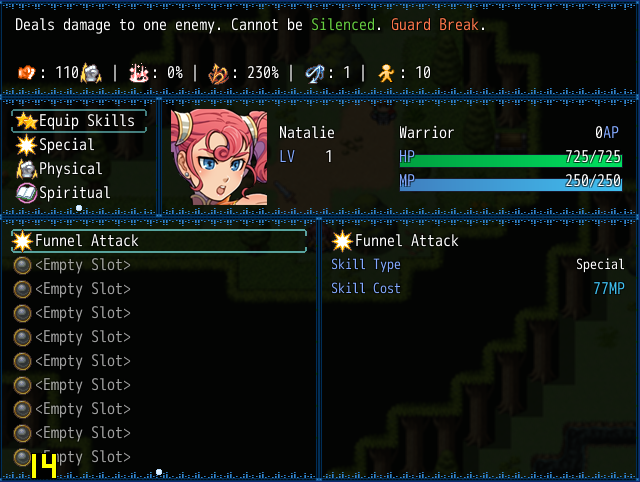
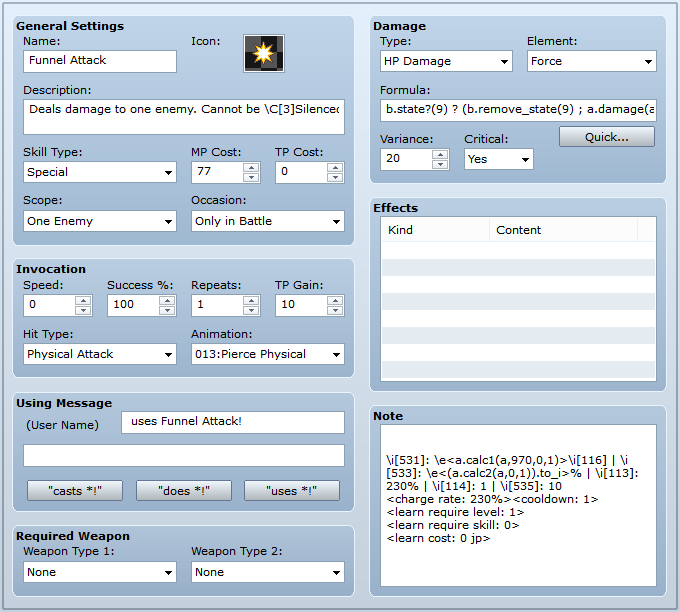
How to Use
Use the notes section as additional lines to add to your help text. You may use both help text and notes text in conjunction, or separately.
Demo
None necessary.
Script
Spoiler
Code:
#===============================================================================
# Rinobi: Help Window Extension
#-------------------------------------------------------------------------------
# This script allows for the adjusting of viable lines within help menus,
# effectively removing the imposed, two-line limit in the editor.
#-------------------------------------------------------------------------------
# Instructions:
#
# Use the notes section as additional lines to add to your help text. You may
# use both help text and notes text in conjunction, or separately.
#-------------------------------------------------------------------------------
# Version History:
#
# @ 1.0 Completed [11/23/2015]
#-------------------------------------------------------------------------------
# Compatibility:
#
# Modules:
# @ HelpMod < RINOBI
#
# Alias Methods:
# @ initialize  in Window_Help
# @ set_item    in Window_Help
#===============================================================================
module RINOBI module HelpMod # No Touchie!
#===============================================================================
# ** Settings Module
#===============================================================================
  Line_Number = 4   # Default help lines to display.
  #-----------------------------------------------------------------------------
  # Setting any of the constants below to 0 returns the default value set above.
  #-----------------------------------------------------------------------------
  Line_Status = 0   # Help lines within status menu.
  Line_Battle = 0   # Help lines in battle when viewing skills.
  Line_Skill  = 4   # Help lines within the skill menu.
  Line_Equip  = 0   # Help lines within the equip menu.
  Line_Item   = 0   # Help lines within the item menu.
  Line_LSkill = 4   # Compability with Yanfly's Learn Skill Engine
#===============================================================================
# ** End of Settings
#-------------------------------------------------------------------------------
# Editing beyond this area may result in unfathomable terror.
#===============================================================================
end end # No Touchie!
$imported = {} if $imported.nil?
$imported[:RIN_HelpExtenson] = true
#===============================================================================
# ** Class: Window_Help < Window_Base
#===============================================================================
class Window_Help < Window_Base
  #--------------------------------------------------------------------------
  # * Alias Method: Object Initialization
  #--------------------------------------------------------------------------
  alias :rinwin_init :initialize
  def initialize(line_number = RINOBI::HelpMod::Line_Number)
    if SceneManager.scene_is?(Scene_Status)
      return rinwin_init(line_number) unless RINOBI::HelpMod::Line_Status > 0
      return rinwin_init(RINOBI::HelpMod::Line_Status) end
    if SceneManager.scene_is?(Scene_Battle)
      return rinwin_init(line_number) unless RINOBI::HelpMod::Line_Battle > 0
      return rinwin_init(RINOBI::HelpMod::Line_Battle) end
    if SceneManager.scene_is?(Scene_Skill)
      return rinwin_init(line_number) unless RINOBI::HelpMod::Line_Skill  > 0
      return rinwin_init(RINOBI::HelpMod::Line_Skill)  end
    if SceneManager.scene_is?(Scene_Equip)
      return rinwin_init(line_number) unless RINOBI::HelpMod::Line_Equip  > 0
      return rinwin_init(RINOBI::HelpMod::Line_Equip)  end
    if SceneManager.scene_is?(Scene_Item)
      return rinwin_init(line_number) unless RINOBI::HelpMod::Line_Item   > 0
      return rinwin_init(RINOBI::HelpMod::Line_Item)   end
    if SceneManager.scene_is?(Scene_LearnSkill) && $imported["YEA-LearnSkillEngine"]
      return rinwin_init(line_number) unless RINOBI::HelpMod::Line_LSkill > 0
      return rinwin_init(RINOBI::HelpMod::Line_LSkill) end
    return rinwin_init(line_number)
  end # initialize
  #--------------------------------------------------------------------------
  # * Alias Method: set_item
  #--------------------------------------------------------------------------
  alias :rinwin_set_item :set_item
  def set_item(item)
    rinwin_set_item = set_text(item ? item.description + item.note : "")
  end # set_item
end # Window_Help < Window_Base
Features Mentioned
- View more than two lines of help text!
- The notes section can be used to add additional text to the help windows.
Downloads / Referenced Files
RPG Maker Web attachments are mirrored locally when available. Other external links remain hosted by their original creator or third-party service.
- Local mirror: 15049-5fe7f3dc6a4da39636ff188076cebe2e.png
SHA-256:c5746bf7cfc8dc65beb725eac59b85f89c029b9d14ef25e7fe42f669132cb3f2
Original attachment URL: https://forums.rpgmakerweb.com/attachments/helpextension_01-png.26633/ - Local mirror: 15050-b962cb288e6dfa61db05d6c20e3ad807.png
SHA-256:a13a2c8562c9dc78a663c83fbed9d247383c75e65cfa2e57077a71ac4b11c1a6
Original attachment URL: https://forums.rpgmakerweb.com/attachments/helpextension_02-png.26634/
Referenced Images / Attachments
Creator Claims / Removal
If you are the original creator and want this listing reassigned, edited, or removed, join BMMPlay and contact the moderators with proof that matches the original RPG Maker Web profile, linked GitHub, itch.io page, or another public creator identity.
Replies (0)
No replies yet.
0
replies
19
views
Topic Summary
Loading summary...