

RPG MAKER 2003 - CONTROLLER SUPPORT
BMM_Archive · July 15, 2026

Original Source
- Original title: RPG MAKER 2003 - CONTROLLER SUPPORT
- Original author: Aikado
- Original date: January 26, 2023
- Source thread: https://forums.rpgmakerweb.com/threads/rpg-maker-2003-controller-support.154413/
- Source forum path: Game Development Engines > Legacy Engine Support > RPG Maker 2000/2003 Support
Summary
Here it is! The RPG Maker 2003 Controller Support Tool! With this tool you are able to play any unpatched RPG Maker 2003 game with a Gamepad and use all buttons. (I will try to make it compatible with maniac's patch in the future) Just edit the RM Launcher.dll.config to map the gamepad buttons to the keyboard keys you need.
Archived First Post
The RPG Maker 2003 Controller Support Tool!
With this tool you are able to play any unpatched RPG Maker 2003 game with a Gamepad and use all buttons. (I will try to make it compatible with maniac's patch in the future)
Just edit the RM Launcher.dll.config to map the gamepad buttons to the keyboard keys you need.
You can also choose if you want to disable the standart functions for the numpad keys (Walking with 2,4,6,8 and also 0 as Cancel Button).
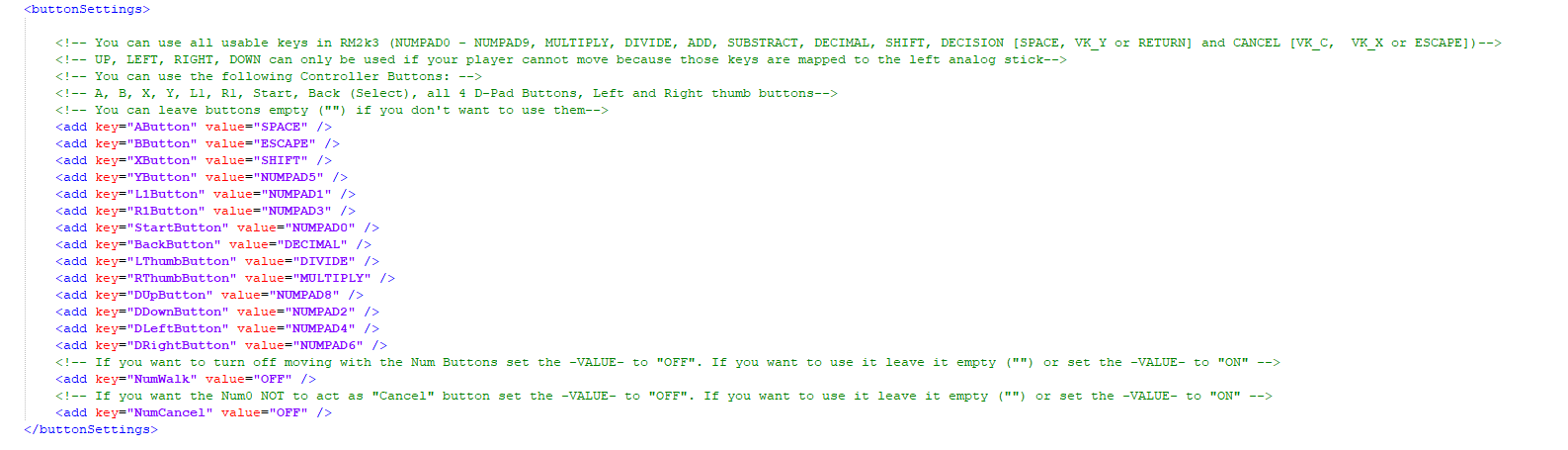
You just have to copy all your game files (everything from your project folder) into the "RM" folder and start "RM Launcher.exe".
Futhermore this tool is able to detect if a controller is plugged in or not.
You can define images that will be shown depending if a controller is plugged in.
NOTE:
Graphics you want to use for keyboard have to have "keyboard" in the file name.
Graphics you want to use for controller have to have "controller" in the file name.
Those graphic files have to be copied into the folder "ContImport" inside of "RM"

This can be done for any type of graphic your game uses.
-----------------------------------
This first version only supports gamepads that use XInput like every type of XBox Controller.
Other Gamepads will be supported in future versions.
-----------------------------------
If you have problems or questions, just contact me here or on Twitter.
A huge thank you to Cherry for helping me out with some bytes to deactivate the build in controller function. Without him this tool wouldn't exist.
You can get it HERE
To see how it works, check "RM2K3 Controller Supoort Sample" . I included a sample game to show how it works.
To see the full function of this tool download my game:
Dragon Ball Z - Bulma's Wish
Downloads / Referenced Files
RPG Maker Web attachments are mirrored locally when available. Other external links remain hosted by their original creator or third-party service.
- Download: HERE
- Download: Dragon Ball Z - Bulma's Wish
Referenced Images / Attachments
Creator Claims / Removal
If you are the original creator and want this listing reassigned, edited, or removed, join BMMPlay and contact the moderators with proof that matches the original RPG Maker Web profile, linked GitHub, itch.io page, or another public creator identity.
Replies (0)
No replies yet.
Topic Summary
Loading summary...