

VXACEIavra Generic Popup
BMM_Archive · July 15, 2026

BMM_Archive
Preserved forum archive. This topic stores the original first post and locally mirrored RPG Maker Web attachments when available. It is posted by the BMMPlay archive account, not by the original creator.
Original Source
- Original title: Iavra Generic Popup
- Original author: Iavra
- Original date: June 7, 2015
- Source thread: https://forums.rpgmakerweb.com/threads/iavra-generic-popup.40923/
- Source forum path: Game Development Engines > Ruby Game System (RGSS) Scripts > RGSS3 Scripts (RMVX Ace)
Summary
Description Provides a generic way to display popup messages. Screenshots {
Archived First Post
Description
Provides a generic way to display popup messages.
Screenshots
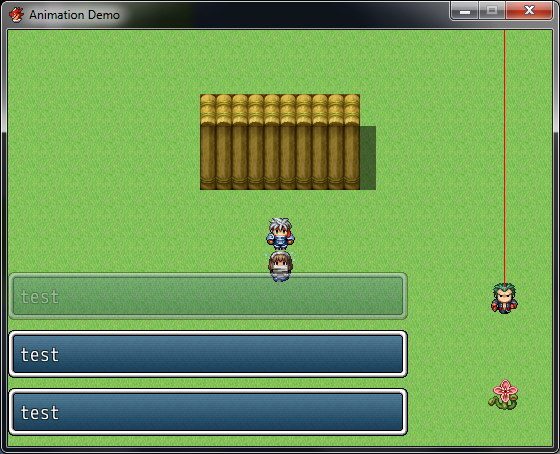
(Don't mind the guy with the laser coming out of his head...that belongs to another script)
Prerequisites
None
How to Use
To show a new popup message, call the following method:
IAVRA:OPUP.show("abc")The window height will automatically fit to the number of text lines.The method takes an optional hash, which can be used to override the default settings on a per-window basis, like this:
IAVRA:OPUP.show("abc", {:width => 200})Also, the method can take an optional block, that will be called once the popup window is created. "self" inside the proc is set to the window itself:
You can use all message codes in your text, but need to double backslashes for everything except newlines (\n).The popup will fade out over time and dispose itself afterwards.
Popups are global and will persist between scenes. Certain scenes can be set to dispose existing popups by modifying the DISPOSE_ON_SCENE constant.
Configuration
The default options for popup windows can be modified by setting the following variables:
DEFAULT_OPTIONS = { # Window width :width => 400, # Minimum number of lines to display. Can be nil. :min_lines => nil, # Maximum number of lines to display. Can be nil. :max_lines => nil, # Height of a single line. Set to nil for default. :line_height => nil, # Window padding. Set to nil for default. adding => nil, # Spacing between windows. The update method can use this. :spacing => 10, # Windowskin to be used. Set to nil for default. :windowskin => nil, # Number of frames before the window starts fading. :fade_delay => 120, # Rate at which the window fades out after the delay. :fade_rate => 10, # Update method to be used. :update_method => ush_older_up}The z-index of the popup viewport can also be changed:
Popups are global and persist between scenes, but since you wouldn't want your popups to be shown on the title screen, you can set some scenes to dispose all popups once they become active.
If this array contains "Scene_Base", popups will reset on every scene change.Terms of Use
Free to use for both commercial and non-commercial games. Please give credit.
Credits
Iavra
FAQ
None so far
Changelog
- 1.00: Release version.
- 1.01: Changed the way popup options are handled. The show method now takes an optional hash, that can be used to override the global defaults on a per-window basis. Everything except the z-index can be modified.
Download
http://pastebin.com/gf9E0pJV
Provides a generic way to display popup messages.
Screenshots
(Don't mind the guy with the laser coming out of his head...that belongs to another script)
Prerequisites
None
How to Use
To show a new popup message, call the following method:
IAVRA:OPUP.show("abc")The window height will automatically fit to the number of text lines.The method takes an optional hash, which can be used to override the default settings on a per-window basis, like this:
IAVRA:OPUP.show("abc", {:width => 200})Also, the method can take an optional block, that will be called once the popup window is created. "self" inside the proc is set to the window itself:
Code:
IAVRA::POPUP.show("abc") { p self }Popups are global and will persist between scenes. Certain scenes can be set to dispose existing popups by modifying the DISPOSE_ON_SCENE constant.
Configuration
The default options for popup windows can be modified by setting the following variables:
DEFAULT_OPTIONS = { # Window width :width => 400, # Minimum number of lines to display. Can be nil. :min_lines => nil, # Maximum number of lines to display. Can be nil. :max_lines => nil, # Height of a single line. Set to nil for default. :line_height => nil, # Window padding. Set to nil for default. adding => nil, # Spacing between windows. The update method can use this. :spacing => 10, # Windowskin to be used. Set to nil for default. :windowskin => nil, # Number of frames before the window starts fading. :fade_delay => 120, # Rate at which the window fades out after the delay. :fade_rate => 10, # Update method to be used. :update_method => ush_older_up}The z-index of the popup viewport can also be changed:
Code:
Z_INDEX = 1
Code:
DISPOSE_ON_SCENE = [ Scene_Title, Scene_Gameover, Scene_File]Free to use for both commercial and non-commercial games. Please give credit.
Credits
Iavra
FAQ
None so far
Changelog
- 1.00: Release version.
- 1.01: Changed the way popup options are handled. The show method now takes an optional hash, that can be used to override the global defaults on a per-window basis. Everything except the z-index can be modified.
Download
http://pastebin.com/gf9E0pJV
Downloads / Referenced Files
RPG Maker Web attachments are mirrored locally when available. Other external links remain hosted by their original creator or third-party service.
- Local mirror: 11183-9fed628b18ca4a8bb6903ae09c3847b3.png
SHA-256:e07a6496762351d4bcd9aa2f92d8180c8dd429146a15fe2b410496741087a7eb
Original attachment URL: https://forums.rpgmakerweb.com/attachments/screen-png.21308/
License / Terms Note
If this array contains "Scene_Base", popups will reset on every scene change.Terms of Use Free to use for both commercial and non-commercial games. Please give credit. Credits Iavra
Referenced Images / Attachments
Creator Claims / Removal
If you are the original creator and want this listing reassigned, edited, or removed, join BMMPlay and contact the moderators with proof that matches the original RPG Maker Web profile, linked GitHub, itch.io page, or another public creator identity.
Replies (0)
No replies yet.
0
replies
12
views
Topic Summary
Loading summary...