

VXACECC - Parallax Mapping Script
BMM_Archive · July 15, 2026

Original Source
- Original title: CC - Parallax Mapping Script
- Original author: CC_Yellow
- Original date: August 4, 2014
- Source thread: https://forums.rpgmakerweb.com/threads/cc-parallax-mapping-script.30733/
- Source forum path: Game Development Engines > Ruby Game System (RGSS) Scripts > RGSS3 Scripts (RMVX Ace)
Summary
and 'changer_var_id' is zero. (2)with animation If LAYERS[6] is Array of Numeric, format will be;
Archived First Post
by CC
Features
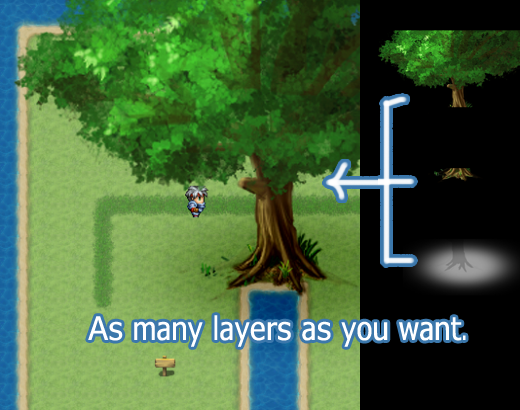
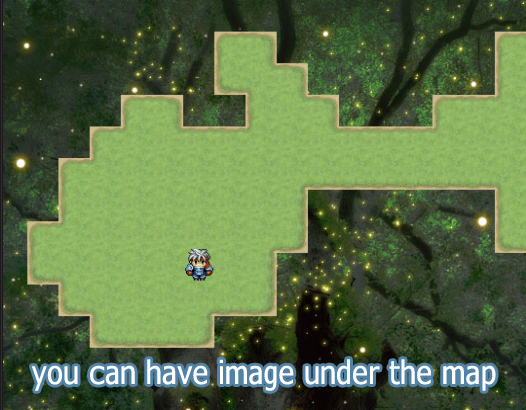
You can show multiple image layers on (or under) the map.
You can use as many layers as you want.
Each layer can have a different scroll speed.
Flip animation.
Screenshots
Demo (Script included)
>> Here
How to Use
[1] Settings
Edit CC:MS.
CC:MS::LAYERS decide how many layer it use and how does it appears.
LAYERS[6] is Array for the animation. Set [] if you don't need the animation.
[2] Prepare Images
In default, file directory is ./Graphics/ParallaxMaps/
Filename format
(1)without animation
map[@map_id]_[name][type]
ex1. 'map1_gnd0' is used when you enter map#1 and 'changer_var_id' is zero.
(2)with animation
If LAYERS[6] is Array of Numeric, format will be;
map[@map_id]_[name][type]_[anim_position]
ex2. [1,2,3,2] and "map1_water0_1" -> "map1_water0_2" -> "map1_water0_3" -> "map1_water0_2"
The script loads images automatically when you enter the map.
and if required image is not found, nothing happens.
[3] Cache
This script uses cache for speed. It can be heavy load for memory.
Call "Cache.clear_parallax_map()" to clear cache manually.
[4] Remarks
This script check files only when you enter the map and not again.
So, even if you change some variables in the map, PMS don't react and change images.
References
Yami, "Overlay Mapping", https://yamiworld.wordpress.com/
DasMoony, "DMO - LIQUID & PARALLAX SCRIPT", http://www.rpgmakervxace.net/topic/676-dmo-liquid-parallax-script/
Author's notes
This work is licensed under the Creative Commons Attribution 4.0 International License.
To view a copy of this license, visit http://creativecommo...icenses/by/4.0/.
In Short:
As long as you give credits, you are free to use this script in Commercial/Non-Commercial Projects.
Features Mentioned
- You can show multiple image layers on (or under) the map.
- You can use as many layers as you want.
- Each layer can have a different scroll speed.
- Flip animation.
Downloads / Referenced Files
RPG Maker Web attachments are mirrored locally when available. Other external links remain hosted by their original creator or third-party service.
- Local mirror: 7404-5de47f9ec568937cb810909147524d5c.png
SHA-256:87ef110caef9ff659a4eedc511ce6543a620ecfbf2b796166bef0719ae58229d
Original attachment URL: https://forums.rpgmakerweb.com/attachments/10-png.15618/ - Local mirror: 7405-6c24c7e1ad6c54277e8489c0235736aa.png
SHA-256:e71e95705ef4f1b80d3f976622da621e510cd7d0aea0219ccf34942c8e3a9ab5
Original attachment URL: https://forums.rpgmakerweb.com/attachments/18-png.15619/ - Download: >> Here
License / Terms Note
This work is licensed under the Creative Commons Attribution 4.0 International License. To view a copy of this license, visit http://creativecommo...icenses/by/4.0/. In Short: As long as you give credits, you are free to use this script in Commercial/Non-Commercial Projects.
Referenced Images / Attachments
Creator Claims / Removal
If you are the original creator and want this listing reassigned, edited, or removed, join BMMPlay and contact the moderators with proof that matches the original RPG Maker Web profile, linked GitHub, itch.io page, or another public creator identity.
Replies (0)
No replies yet.
Topic Summary
Loading summary...