

VXACEAdventure Menu with Map Mouse Button
BMM_Archive · July 15, 2026

Original Source
- Original title: Adventure Menu with Map Mouse Button
- Original author: Venka
- Original date: October 14, 2014
- Source thread: https://forums.rpgmakerweb.com/threads/adventure-menu-with-map-mouse-button.32888/
- Source forum path: Game Development Engines > Ruby Game System (RGSS) Scripts > RGSS3 Scripts (RMVX Ace)
Summary
Adventure Menuby VenkaFor use with Shaz's Amaranth's Super Simple Mouse Script Description: This is a graphical menu system that allows you to have an image for each menu selection. The image will change when selected or moused over. The menu portion of the script will work without the Mouse script, but the button on the map will not. Features: - Set what options appear in the menu
Archived First Post
This is a graphical menu system that allows you to have an image for each menu selection. The image will change when selected or moused over. The menu portion of the script will work without the Mouse script, but the button on the map will not.
Features:
- Set what options appear in the menu
- Set images and locations on the screen for all menu options
- You can easily disable/enable menu options with a script call
- Set an image file or icon to use as a button on the map scene
- You can set 3 opacity phases for the mouse button:
Normal opacity, when the player walks behind the button, and when moused over.
Screenshots:
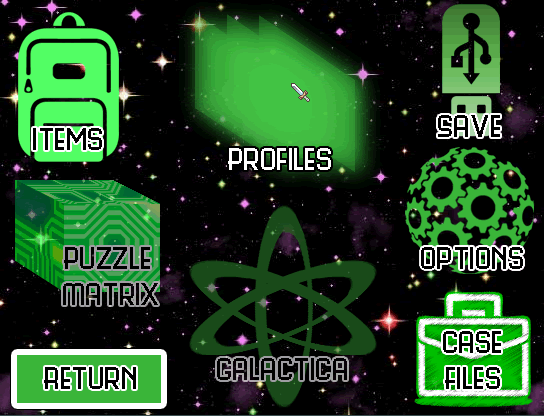
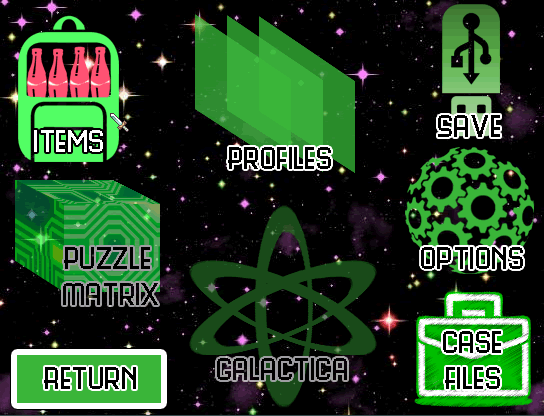
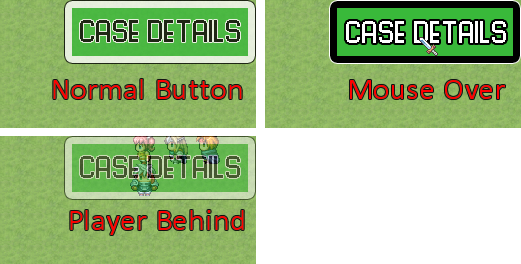
Menu Script
Map Button Snippet - needs to be placed below Shaz's mouse script.
Image Files only
Bonus script:
Save enable setting - saves the enable setting into the Game.ini file so it will remember if the mouse is turned on or off at the start up of a game.
Demo Links:
Dropbox Compressed Project
Mediafire zip file
Terms and Conditions:
Credit to Venka for the script. The script can be used commercially or non commercially.
See Shaz's thread for terms and conditions on the mouse script.
palladinthug created the images used in this demo so if you use them, you must credit him. The images are for non commercial use only.
NOTE:
The buttons in the menu were designed for mini games. So for the purposes of the demo, they just lead to more standard menu options like the equipment menu, skill menus etc.
I had intended to allow multiple buttons on the map but was running to heavy FPS loss when allowing buttons to be place anywhere. Until I can come up with a better way to handle the customization of locations and updating, this is not a feature I'm going to put in immediately.
Features Mentioned
- Set what options appear in the menu
- Set images and locations on the screen for all menu options
- You can easily disable/enable menu options with a script call
- Set an image file or icon to use as a button on the map scene
- You can set 3 opacity phases for the mouse button:
- Normal opacity, when the player walks behind the button, and when moused over.
- Screenshots:
- Spoiler
- "lightbox_close": "Close",
- "lightbox_next": "Next",
- "lightbox_previous": "Previous",
- "lightbox_error": "The requested content cannot be loaded. Please try again later.",
- "lightbox_start_slideshow": "Start slideshow",
- "lightbox_stop_slideshow": "Stop slideshow",
- "lightbox_full_screen": "Full screen",
- "lightbox_thumbnails": "Thumbnails",
- "lightbox_download": "Download",
- "lightbox_share": "Share",
Downloads / Referenced Files
RPG Maker Web attachments are mirrored locally when available. Other external links remain hosted by their original creator or third-party service.
- Local mirror: 8422-13eb5794a58bf9fd7fef929e8a168db5.png
SHA-256:06d72fd41a8fd29c72b80e0181883bf4e200a3851fe32ebc1eed049e4766c67b
Original attachment URL: https://forums.rpgmakerweb.com/attachments/menu1-png.17389/ - Local mirror: 8423-6ec2eca7c207fe4bacc5baaa59787ff3.png
SHA-256:124bd2fc00b1821ada07a895fbd2704369c45f668402422f25c2c4fb83eb8772
Original attachment URL: https://forums.rpgmakerweb.com/attachments/menu2-png.17390/ - Local mirror: 8424-89e88cd2f7d357cd5c6573370f01f7ec.png
SHA-256:a011642b3b82a1969fe3a4d23f7edcc44f762b7bfc0cc7de4a84d08df6612058
Original attachment URL: https://forums.rpgmakerweb.com/attachments/buttons-png.17391/ - Download: Menu Script
- Download: Map Button Snippet
- Download: Image Files only
- Download: Save enable setting
- Download: Dropbox Compressed Project
- Download: Mediafire zip file
License / Terms Note
Credit to Venka for the script. The script can be used commercially or non commercially. See Shaz's thread for terms and conditions on the mouse script. palladinthug created the images used in this demo so if you use them, you must credit him. The images are for non commercial use only. NOTE:
Referenced Images / Attachments
Creator Claims / Removal
If you are the original creator and want this listing reassigned, edited, or removed, join BMMPlay and contact the moderators with proof that matches the original RPG Maker Web profile, linked GitHub, itch.io page, or another public creator identity.
Replies (0)
No replies yet.
Topic Summary
Loading summary...