

VXACEEuphoria - Mood Gauge
BMM_Archive · July 15, 2026

BMM_Archive
Preserved forum archive. This topic stores the original first post and locally mirrored RPG Maker Web attachments when available. It is posted by the BMMPlay archive account, not by the original creator.
Original Source
- Original title: Euphoria - Mood Gauge
- Original author: Euphoria
- Original date: April 28, 2014
- Source thread: https://forums.rpgmakerweb.com/threads/euphoria-mood-gauge.26485/
- Source forum path: Game Development Engines > Ruby Game System (RGSS) Scripts > RGSS3 Scripts (RMVX Ace)
Summary
MOOD GAUGE V1.0 By Euphoria {
Archived First Post
MOOD GAUGE
V1.0
By Euphoria
Description:
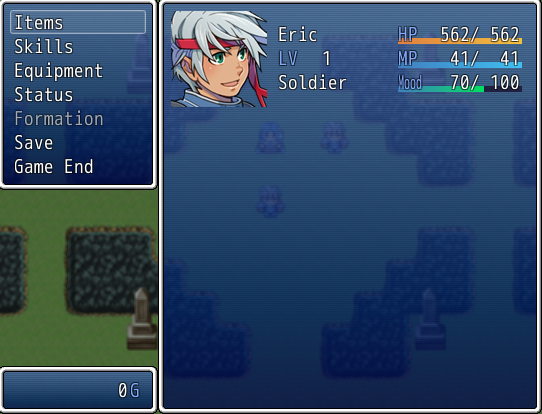
This script adds a new gauge to the actor's status in the menu. The gauge is titled "Mood" and can be changed via script calls.
Features:
To raise a character's mood the script call is: "$game_actors[x].mood_plus" (x being the actors ID). To decrease a character's mood use the script call: "$game_actors[x].mood_minus" (x once again is the actors ID). It only increases/decreases in increments of 5 as of now, and the bar in the menu will change to reflect that value. The script call for conditional branches to check the mood value of an actor is:
"$game_actors[x].mood == y" (x = actors ID, y = mood value)
Important:
This script overwrites the method "draw_actor_simple_status" and may cause problems with other scripts that use this method.
Note:
If you notice any errors or have any suggestions for this script, feel free to comment them here or on my website, thanks!
Credits/Terms of Use:
Credit me (Euphoria) if you want to use this script. The rest of the terms of use are in the scripts header.
Download Here
V1.0
By Euphoria
Description:
This script adds a new gauge to the actor's status in the menu. The gauge is titled "Mood" and can be changed via script calls.
Features:
To raise a character's mood the script call is: "$game_actors[x].mood_plus" (x being the actors ID). To decrease a character's mood use the script call: "$game_actors[x].mood_minus" (x once again is the actors ID). It only increases/decreases in increments of 5 as of now, and the bar in the menu will change to reflect that value. The script call for conditional branches to check the mood value of an actor is:
"$game_actors[x].mood == y" (x = actors ID, y = mood value)
Important:
This script overwrites the method "draw_actor_simple_status" and may cause problems with other scripts that use this method.
Note:
If you notice any errors or have any suggestions for this script, feel free to comment them here or on my website, thanks!
Credits/Terms of Use:
Credit me (Euphoria) if you want to use this script. The rest of the terms of use are in the scripts header.
Download Here
Features Mentioned
- To raise a character's mood the script call is: "$game_actors[x].mood_plus" (x being the actors ID). To decrease a character's mood use the script call: "$game_actors[x].mood_minus" (x once again is the actors ID). It only increases/decreases in increments of 5 as of now, and the bar in the menu will change to reflect that value. The script call for conditional branches to check the mood value of an actor is:
- "$game_actors[x].mood == y" (x = actors ID, y = mood value)
- Important:
- This script overwrites the method "draw_actor_simple_status" and may cause problems with other scripts that use this method.
- Note:
- If you notice any errors or have any suggestions for this script, feel free to comment them here or on my website, thanks!
- Credits/Terms of Use:
- Credit me (Euphoria) if you want to use this script. The rest of the terms of use are in the scripts header.
- Download Here
Downloads / Referenced Files
RPG Maker Web attachments are mirrored locally when available. Other external links remain hosted by their original creator or third-party service.
- Download: Download Here
License / Terms Note
Credits/Terms of Use: Credit me (Euphoria) if you want to use this script. The rest of the terms of use are in the scripts header. Download Here
Referenced Images / Attachments
Creator Claims / Removal
If you are the original creator and want this listing reassigned, edited, or removed, join BMMPlay and contact the moderators with proof that matches the original RPG Maker Web profile, linked GitHub, itch.io page, or another public creator identity.
Replies (0)
No replies yet.
0
replies
19
views
Topic Summary
Loading summary...