

VXACEFlexTimer - Calendar Event Management
BMM_Archive · July 15, 2026

BMM_Archive
Preserved forum archive. This topic stores the original first post and locally mirrored RPG Maker Web attachments when available. It is posted by the BMMPlay archive account, not by the original creator.
Original Source
- Original title: FlexTimer - Calendar Event Management
- Original author: whitesphere
- Original date: April 4, 2014
- Source thread: https://forums.rpgmakerweb.com/threads/flextimer-calendar-event-management.25725/
- Source forum path: Game Development Engines > Ruby Game System (RGSS) Scripts > RGSS3 Scripts (RMVX Ace)
Summary
FlexTimer Calendar Event Processing + v1.0 Script by whitesphere Introduction
Archived First Post
FlexTimer Calendar Event Processing + v1.0
Script by whitesphere
Introduction
This script creates an in game calendar which creates a Harvest Moon or Animal Crossing style calendar. It also triggers common events and sets switches, so you need minimal scripting to create very complex scripted events. All configuration (events, time window, etc) come from a single text file, or may be configured with script calls.
Features
- Timed events
- Uses system clock or in-game simulated clock
- Requires minimal scripting (2 calls and 1 config file required to set everything up)
- User-configurable month and weekday names to create fictional calendars
- Configurable clock window with all time units (year, month, week, week day, day of month, hour, minute and second) available
- Configurable clock window can add user chosen bitmaps alongside, useful for showing season, phase of the moon, etc
- Time events can be modified while the game is running. Useful for changing the length of a day with the season.
- All event state preserved within the savefile
Screenshots
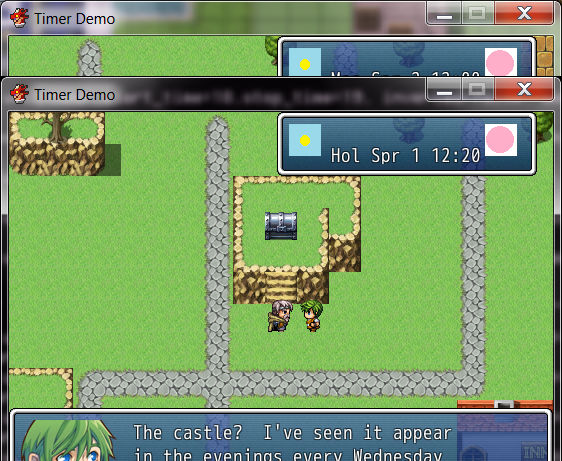
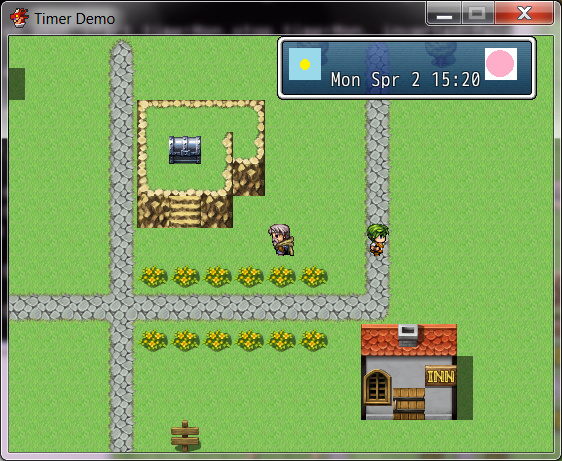
How to Use
To install this script, press F11 to open the Script Editor and move down to the
Materials section. Create a new entry called "Flex_Timer" and insert the script
there.
Then, take the sample configuration file contained in the script (look for
SAMPLE CONFIG FILE) and copy it from the script into a separate text file.
Save this text file in the Data directory of your project (located in
Users\*\Documents\RPGVXAce\(project name) ). Call the file "Flex_timer.txt"
In your intro, where you setup the initial party, etc, add the following
script lines to an autorun event that is executed precisely once. These
should be the last things to execute before starting the actual game.
FlexTimer::start "Data/Flex_timer.txt"
Demo
I have attached a small demo which shows various abilities of the script,
including time events triggering in-game commands, characters changing their
abilities with the seasons (via class change), etc.
FlexTimer.zip
Script
The script is in the Zip file as a separate entity. It appears to be too long to post here.
FAQ
Q: The start call failed with a RuntimeError
A: The start call is particular about the syntax of the config file. It will
raise this error if a required value is not present, such as a unit with
time ranges. It also raises this error if, say, a time event has no time ranges.
It will also raise this error if a value is set to a string
which is invalid for that entry, such as using "Rabbit" or "Sunday" for
a time unit. The latter would be "weekday"
Credit and Thanks
- Include your name first
- Thanks go out to V.M of D.T for his basic Game Time script. It showed me
how to insert my code into the game engine.
- Thanks also go out to Tsukihime who showed how to modify the game engine
so multiple common events could be queued at once.
Author's Notes
Calling FlexTimer::debug_specific_event (event_name) can help understand
why a particular event is active or inactive
Calling FlexTimer::debug_dump will show the internal state of every event
and the game clock.
Script by whitesphere
Introduction
This script creates an in game calendar which creates a Harvest Moon or Animal Crossing style calendar. It also triggers common events and sets switches, so you need minimal scripting to create very complex scripted events. All configuration (events, time window, etc) come from a single text file, or may be configured with script calls.
Features
- Timed events
- Uses system clock or in-game simulated clock
- Requires minimal scripting (2 calls and 1 config file required to set everything up)
- User-configurable month and weekday names to create fictional calendars
- Configurable clock window with all time units (year, month, week, week day, day of month, hour, minute and second) available
- Configurable clock window can add user chosen bitmaps alongside, useful for showing season, phase of the moon, etc
- Time events can be modified while the game is running. Useful for changing the length of a day with the season.
- All event state preserved within the savefile
Screenshots
How to Use
To install this script, press F11 to open the Script Editor and move down to the
Materials section. Create a new entry called "Flex_Timer" and insert the script
there.
Then, take the sample configuration file contained in the script (look for
SAMPLE CONFIG FILE) and copy it from the script into a separate text file.
Save this text file in the Data directory of your project (located in
Users\*\Documents\RPGVXAce\(project name) ). Call the file "Flex_timer.txt"
In your intro, where you setup the initial party, etc, add the following
script lines to an autorun event that is executed precisely once. These
should be the last things to execute before starting the actual game.
FlexTimer::start "Data/Flex_timer.txt"
Demo
I have attached a small demo which shows various abilities of the script,
including time events triggering in-game commands, characters changing their
abilities with the seasons (via class change), etc.
FlexTimer.zip
Script
The script is in the Zip file as a separate entity. It appears to be too long to post here.
FAQ
Q: The start call failed with a RuntimeError
A: The start call is particular about the syntax of the config file. It will
raise this error if a required value is not present, such as a unit with
time ranges. It also raises this error if, say, a time event has no time ranges.
It will also raise this error if a value is set to a string
which is invalid for that entry, such as using "Rabbit" or "Sunday" for
a time unit. The latter would be "weekday"
Credit and Thanks
- Include your name first
- Thanks go out to V.M of D.T for his basic Game Time script. It showed me
how to insert my code into the game engine.
- Thanks also go out to Tsukihime who showed how to modify the game engine
so multiple common events could be queued at once.
Author's Notes
Calling FlexTimer::debug_specific_event (event_name) can help understand
why a particular event is active or inactive
Calling FlexTimer::debug_dump will show the internal state of every event
and the game clock.
Features Mentioned
- Timed events
- Uses system clock or in-game simulated clock
- Requires minimal scripting (2 calls and 1 config file required to set everything up)
- User-configurable month and weekday names to create fictional calendars
- Configurable clock window with all time units (year, month, week, week day, day of month, hour, minute and second) available
- Configurable clock window can add user chosen bitmaps alongside, useful for showing season, phase of the moon, etc
- Time events can be modified while the game is running. Useful for changing the length of a day with the season.
- All event state preserved within the savefile
Downloads / Referenced Files
RPG Maker Web attachments are mirrored locally when available. Other external links remain hosted by their original creator or third-party service.
- Local mirror: 5115-9e2327de4c08709d084e9d6ca9f87c74.png
SHA-256:f71ddf6b4d195fe41f0a4ad0e7efb115f055be6cd547b5e883cb58a85f2cf5c8
Original attachment URL: https://forums.rpgmakerweb.com/attachments/screenshot-1-png.12313/ - Local mirror: 5116-7a411201058a6b7b013a81e464dacee4.png
SHA-256:99cfce21693a6e585384bd63ad807daf9b170f6707e124dd07654c4c32330a14
Original attachment URL: https://forums.rpgmakerweb.com/attachments/screenshot-2-png.12314/
License / Terms Note
Credit and Thanks - Include your name first - Thanks go out to V.M of D.T for his basic Game Time script. It showed me how to insert my code into the game engine.
Referenced Images / Attachments
Creator Claims / Removal
If you are the original creator and want this listing reassigned, edited, or removed, join BMMPlay and contact the moderators with proof that matches the original RPG Maker Web profile, linked GitHub, itch.io page, or another public creator identity.
Replies (0)
No replies yet.
0
replies
24
views
Topic Summary
Loading summary...