

rm2k/3 Font Changer can't find RTP
BMM_Archive · July 15, 2026

Original Source
- Original title: rm2k/3 Font Changer can't find RTP
- Original author: jpx
- Original date: August 19, 2016
- Source thread: https://forums.rpgmakerweb.com/threads/rm2k-3-font-changer-cant-find-rtp.67083/
- Source forum path: Game Development Engines > Legacy Engine Support > RPG Maker 2000/2003 Support
Summary
Hey, all! I've been trying to figure out how to get a custom font in RM2k3 and found that you can only do it by hacking the exe, but I was able to track down a working download for a third-party program by Cherry that can replace the ingame font. I heard it was "in German but not too hard to figure out" so I gave it a shot, and it looked something like this: { "lightbox_close": "Close",
Archived First Post
I've been trying to figure out how to get a custom font in RM2k3 and found that you can only do it by hacking the exe, but I was able to track down a working download for a third-party program by Cherry that can replace the ingame font. I heard it was "in German but not too hard to figure out" so I gave it a shot, and it looked something like this:
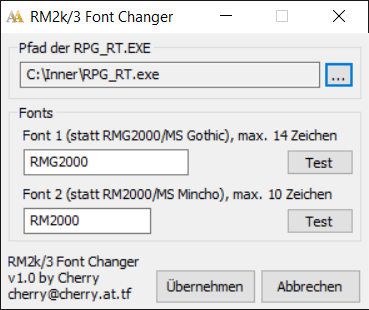
First thing I noticed was that I'm not sure what to type into the two text fields there. Do I put in the filename or font name of an installed font? Do I put a .ttf in the same directory as the game installation and type in the filename? I figured there might be some instructions in the readme, but when I ran that through Google Translate, it was just license terms and a few tips about which fonts will or won't work. The second problem I encountered was that it was impossible to effectively test, because no matter what I type into the text fields, hitting "Test" results in the following error:
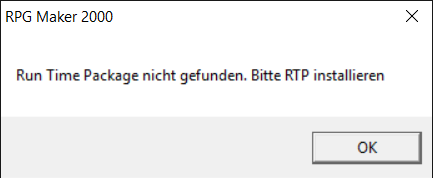
I understand enough to know this is telling me to install the RTP. So I installed the RTP for RM2k3 and tried putting it both in my root drive and in the same directory as RPG_RT but it still gives me the same error. Can anyone provide any help with this?
I'm using the Steam version of RM2k3 on Windows 10, FWIW.
Downloads / Referenced Files
RPG Maker Web attachments are mirrored locally when available. Other external links remain hosted by their original creator or third-party service.
- Local mirror: 27591-e00a28f3f0570ae23983cb959e989128.png
SHA-256:26ae1bebac7cf433fc244812a96988d5b5ccb39ef23ca22c87df3bac64174e59
Original attachment URL: https://forums.rpgmakerweb.com/attachments/fonts-png.45610/ - Local mirror: 27592-3ad6a5eed630aedbe816850be7a529c5.png
SHA-256:f6ddd9c1027d97405497459bad0b551c452652945ad73d619c8908b63f6ed576
Original attachment URL: https://forums.rpgmakerweb.com/attachments/runtime-png.45611/
License / Terms Note
First thing I noticed was that I'm not sure what to type into the two text fields there. Do I put in the filename or font name of an installed font? Do I put a .ttf in the same directory as the game installation and type in the filename? I figured there might be some instructions in the readme, but when I ran that through Google Translate, it was just license terms and a few tips about which fonts will or...
Referenced Images / Attachments
Creator Claims / Removal
If you are the original creator and want this listing reassigned, edited, or removed, join BMMPlay and contact the moderators with proof that matches the original RPG Maker Web profile, linked GitHub, itch.io page, or another public creator identity.
Replies (0)
No replies yet.
Topic Summary
Loading summary...