

RPG2k3 - Key Input Proc. Problems
BMM_Archive · July 15, 2026

Original Source
- Original title: RPG2k3 - Key Input Proc. Problems
- Original author: Kosmonautenjunge
- Original date: February 14, 2016
- Source thread: https://forums.rpgmakerweb.com/threads/rpg2k3-key-input-proc-problems.56900/
- Source forum path: Game Development Engines > Legacy Engine Support > RPG Maker 2000/2003 Support
Summary
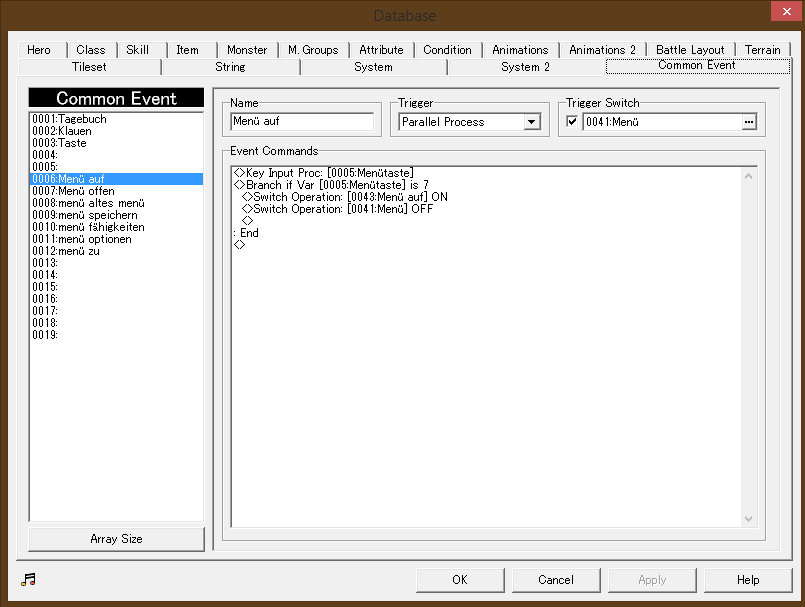
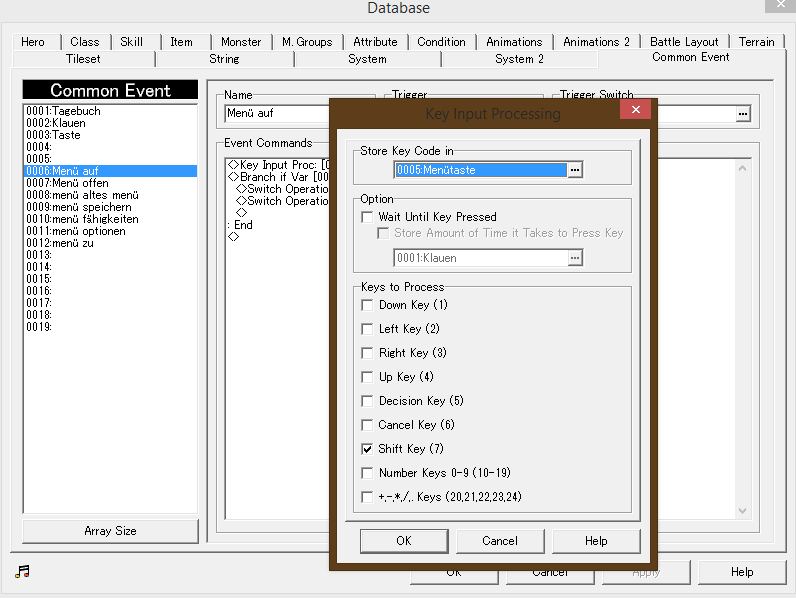
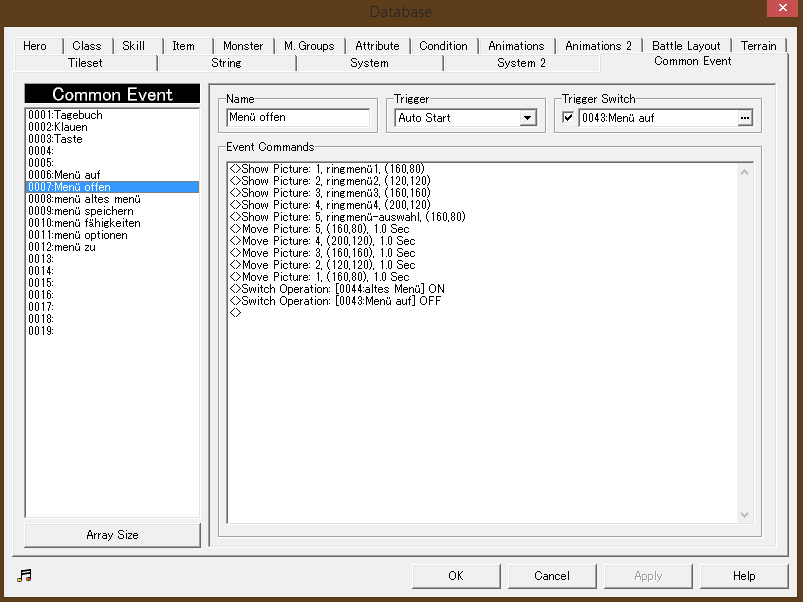
Hello, I wanna add an extra menu in my rpg and it just wont open. (show the pictures(skills, option, etc.)) I chose the 'shift'-key to open the menu, set the variable to '7', wich should be 'shift'. But when I press it. nothing happens. I also tried so set the variable to '6', so I can open it with 'esc' or 'x', but it just opens the original menu.
Archived First Post
I chose the 'shift'-key to open the menu, set the variable to '7', wich should be 'shift'.
But when I press it. nothing happens.
I also tried so set the variable to '6', so I can open it with 'esc' or 'x', but it just opens the original menu.
What's the problem? Maybe you know what I'm doing wrong.
I added some pictures for you to see. Sure I can show you more, if you need.
Thanks for help!
Downloads / Referenced Files
RPG Maker Web attachments are mirrored locally when available. Other external links remain hosted by their original creator or third-party service.
- Local mirror: 18376-1bbbfe8847aef2b17c256e7d15666244.png
SHA-256:ec9fb1e6ee3ae64e21252f22b43180ae18e77cbb7b521d9d79593c5ccc2492be
Original attachment URL: https://forums.rpgmakerweb.com/attachments/unbenannt-png.31791/ - Local mirror: 18377-a678d5cf0c7d73a678709e91cfeb3336.png
SHA-256:19cb79b49b6c5f72b525ac9d9255ad792b14f1b8de0d47be951c6f8e61f7eb77
Original attachment URL: https://forums.rpgmakerweb.com/attachments/unbenannt1-png.31792/ - Local mirror: 18378-6a38e0f86ee8d32e80c4c6f360cc2c31.png
SHA-256:34272c8ff8b30f7916f8f0d50f4ebbd565e38b05ceb9712bb0dac74d7d25b33f
Original attachment URL: https://forums.rpgmakerweb.com/attachments/unbenannt3-png.31793/
Referenced Images / Attachments
Creator Claims / Removal
If you are the original creator and want this listing reassigned, edited, or removed, join BMMPlay and contact the moderators with proof that matches the original RPG Maker Web profile, linked GitHub, itch.io page, or another public creator identity.
Replies (0)
No replies yet.
Topic Summary
Loading summary...