

VXACEActor Inventory
BMM_Archive · July 15, 2026

BMM_Archive
Preserved forum archive. This topic stores the original first post and locally mirrored RPG Maker Web attachments when available. It is posted by the BMMPlay archive account, not by the original creator.
Original Source
- Original title: Actor Inventory
- Original author: Kread-EX
- Original date: March 27, 2012
- Source thread: https://forums.rpgmakerweb.com/threads/actor-inventory.994/
- Source forum path: Game Development Engines > Ruby Game System (RGSS) Scripts > RGSS3 Scripts (RMVX Ace)
Summary
Actor Inventory Version: 1.11 Author: Kread-EX Introduction
Archived First Post
Actor Inventory
Version: 1.11
Author: Kread-EX
Introduction
Inspired from the Suikoden series. Allows consumable items to be equipped and carried in battle, which means that only these can be used. It offers strategic options, as the player is forced to decide between using up equipment slots for stats or items.
Requires Yanfly's Ace Equip Engine.
Features
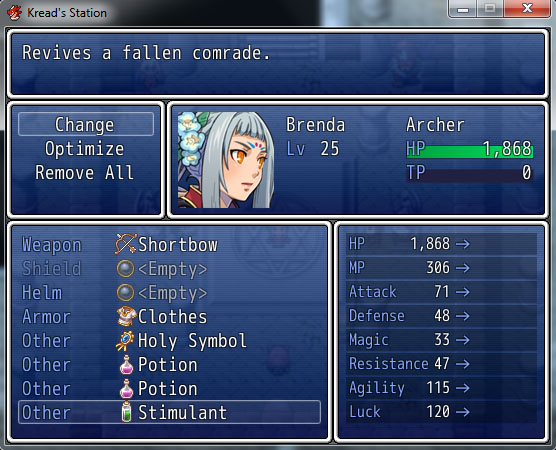 Instructions
Go to the config module and set the slot ID for the items.
ITEMS_ETYPE_ID = 4By default, it set to 4 (the accessory slot in Ace Equip Engine). Other than that, it’s pretty plug and play, as long as you know how to configure Ace Equip Engine properly. Visit Yanfly’s page for that or harass him directly hahahahaha. *ahem*Lock an item to certain classes:
<class_locks: x, y...>Use this notetag on the Item tab and put the ID of the classes allowed to equip the item.Script
Direct Download!
Blog page
Terms of use
You are free to adapt this work to suit your needs.
You can use this work for commercial purposes if you like it.
Credit is appreciated.
Author's Notes
Idea given to me by Seiryuki. Reposted here because Hesufo made me a feature request and never noticed it was done.
Version: 1.11
Author: Kread-EX
Introduction
Inspired from the Suikoden series. Allows consumable items to be equipped and carried in battle, which means that only these can be used. It offers strategic options, as the player is forced to decide between using up equipment slots for stats or items.
Requires Yanfly's Ace Equip Engine.
Features
- Only equipped items can be used.
- Now you can lock items to certain classes.
Go to the config module and set the slot ID for the items.
ITEMS_ETYPE_ID = 4By default, it set to 4 (the accessory slot in Ace Equip Engine). Other than that, it’s pretty plug and play, as long as you know how to configure Ace Equip Engine properly. Visit Yanfly’s page for that or harass him directly hahahahaha. *ahem*Lock an item to certain classes:
<class_locks: x, y...>Use this notetag on the Item tab and put the ID of the classes allowed to equip the item.Script
Direct Download!
Blog page
Terms of use
You are free to adapt this work to suit your needs.
You can use this work for commercial purposes if you like it.
Credit is appreciated.
Author's Notes
Idea given to me by Seiryuki. Reposted here because Hesufo made me a feature request and never noticed it was done.
Features Mentioned
- Only equipped items can be used.
- Now you can lock items to certain classes.
Downloads / Referenced Files
RPG Maker Web attachments are mirrored locally when available. Other external links remain hosted by their original creator or third-party service.
- Download: Direct Download!
License / Terms Note
Terms of use You are free to adapt this work to suit your needs. You can use this work for commercial purposes if you like it. Credit is appreciated.
Referenced Images / Attachments
Creator Claims / Removal
If you are the original creator and want this listing reassigned, edited, or removed, join BMMPlay and contact the moderators with proof that matches the original RPG Maker Web profile, linked GitHub, itch.io page, or another public creator identity.
Replies (0)
No replies yet.
0
replies
24
views
Topic Summary
Loading summary...