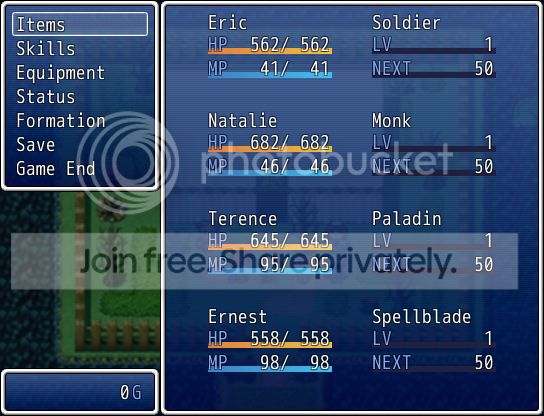
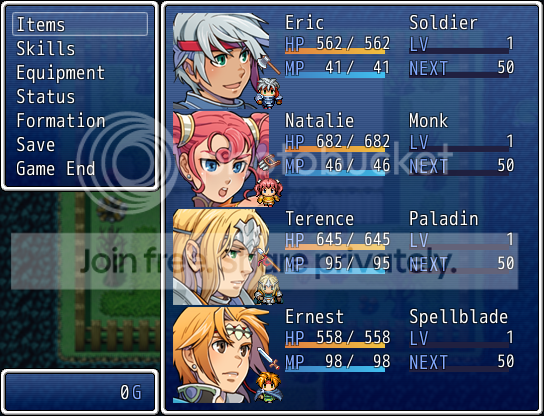
#==============================================================================# * dbchest's MenuStatus (v1.1)#==============================================================================# ** Credits (Freeware)#------------------------------------------------------------------------------# a list of credits for those involved in the production of said script. you# are responsible for crediting those mentioned. you do not have to credit my# special mentions. they are being thanked for their help now.#------------------------------------------------------------------------------# programmer: dbchest (none required, always appreciated)# special thanks: Riff (rpgmakervxace.net) # assisted in math equation# special thanks: Acebent (rpgmakervxace.net) # requested custom menu status# special thanks: Tsukihime (rpgmakervxace.net) # general help RGSS3#==============================================================================# * Details#------------------------------------------------------------------------------# dbchest's Menu Status is an aesthetic enhancement to the engine's default# menu status display. introducing this script to your project will not affect# gameplay directly.#==============================================================================# * Features#------------------------------------------------------------------------------# four layouts to choose from.# aligned layout (presets 1 and 3).# staggered layout (presets 2 and 4).# animated actor charasets (presets 3 and 4).# icon display depicting actor class (presets 3 and 4).# additional rate gauges:# - experience needed to reach next level.# - current level in relation to maximum level.#==============================================================================# * Installation Instructions (Plug and Play)#------------------------------------------------------------------------------# paste script in "Materials" section of the script editor.# no known compatibility issues.# no foreign script requirements.#==============================================================================# ** Author's Notes#------------------------------------------------------------------------------# if you experience errors, please contact me directly and / or make the error# known in the script's official thread. you can reach me via personal message# at the following locations: rpgmakerweb.com || rpgmakervxace.net#==============================================================================# * Module MenuStatus#------------------------------------------------------------------------------# PRESET # choose from existing preset layouts (0, 1, 2, 3)#==============================================================================module MenuStatus #---------------------------------------------------------------------------- # * Constants #---------------------------------------------------------------------------- PRESET = 0 # default is 0end#==============================================================================# ** Game_BattlerBase#------------------------------------------------------------------------------# This base class handles battlers. It mainly contains methods for calculating# parameters. It is used as a super class of the Game_Battler class.#==============================================================================class Game_BattlerBase #--------------------------------------------------------------------------- # * Get Percentage of LVL #--------------------------------------------------------------------------- def lvl_rate @level.to_f / max_level end #--------------------------------------------------------------------------- # * Get Percentage of EXP #--------------------------------------------------------------------------- def exp_rate equation1 = (exp.to_f - current_level_exp.to_f) equation2 = (next_level_exp.to_f - current_level_exp.to_f) equation1 / equation2 endend#==============================================================================# ** Scene_Menu#------------------------------------------------------------------------------# This class performs the menu screen processing.#==============================================================================class Scene_Menu < Scene_MenuBase #-------------------------------------------------------------------------- # * Create Status Window #-------------------------------------------------------------------------- alias dbchest_create_status_window create_status_window def create_status_window dbchest_create_status_window if MenuStatus:RESET == 2 || MenuStatus:RESET == 3 @status_window_anime = Window_CharAnime.new(@command_window.width, 0) end end #-------------------------------------------------------------------------- # * Formation [OK] #-------------------------------------------------------------------------- def on_formation_ok if @status_window.pending_index >= 0 $game_party.swap_order(@status_window.index, @status_window.pending_index) @status_window.pending_index = -1 @status_window.redraw_item(@status_window.index) else @status_window.pending_index = @status_window.index end @frame = 0 @anime_pose = 0 @status_window.refresh @status_window.activate endend#==============================================================================# ** Window_MenuStatus#------------------------------------------------------------------------------# This window displays party member status on the menu screen.#==============================================================================class Window_MenuStatus < Window_Selectable #---------------------------------------------------------------------------- # * Class Icon #---------------------------------------------------------------------------- # below is a method that you will need to adjust if you've opted to display # icons depicting your actor(s) class. the pattern is self explanitory, # simply follow the lead i've provided for you and declare an icon for each # class in your database. the else clause is a fail safe, designed only to # keep your system from crashing in the event that you failed to specify an # icon for one of your classes. memorize the icon you define here; if you # see it after changing classes, you made a mistake. #---------------------------------------------------------------------------- def class_icon(actor) case actor.class_id when 1 ; 144 when 2 ; 145 when 3 ; 146 when 4 ; 147 when 5 ; 148 when 6 ; 149 when 7 ; 150 when 8 ; 152 else ; 115 end end #-------------------------------------------------------------------------- # * Increase Font Size #-------------------------------------------------------------------------- def dbchest_make_font_bigger contents.font.size += 2 if contents.font.size <= 64 end #-------------------------------------------------------------------------- # * Decrease Font Size #-------------------------------------------------------------------------- def dbchest_make_font_smaller contents.font.size -= 2 if contents.font.size >= 16 end #--------------------------------------------------------------------------- # * Draw Level #--------------------------------------------------------------------------- def draw_actor_level(actor, x, y) draw_gauge(x, y, 124, actor.lvl_rate, text_color(17), text_color(6)) change_color(system_color) draw_text(x, y, 32, line_height, Vocab::level_a) change_color(normal_color) draw_text(x + 100, y, 24, line_height, actor.level, 2) end #--------------------------------------------------------------------------- # * Draw Level Alternate #--------------------------------------------------------------------------- def draw_actor_level_alt(actor, x, y, width = 100) draw_gauge(x, y, width, actor.lvl_rate, text_color(17), text_color(6)) change_color(system_color) draw_text(x, y, 32, line_height, Vocab::level_a) change_color(normal_color) dbchest_make_font_smaller draw_text(x + 84, y, 24, line_height, actor.level, 2) dbchest_make_font_bigger end #--------------------------------------------------------------------------- # * Draw Next Level #--------------------------------------------------------------------------- def draw_actor_nxtlevel(actor, x, y, width = 124) draw_gauge(x, y, width, actor.exp_rate, text_color(11), text_color(3)) next_level = actor.next_level_exp - actor.exp change_color(system_color) draw_text(x, y, 48, line_height, "NEXT") change_color(normal_color) draw_text(x + 64, y, 60, line_height, next_level, 2) end #--------------------------------------------------------------------------- # * Draw Next Level Alternate #--------------------------------------------------------------------------- def draw_actor_nxtlevel_alt(actor, x, y, width = 100) draw_gauge(x, y, width, actor.exp_rate, text_color(11), text_color(3)) next_level = actor.next_level_exp - actor.exp change_color(system_color) draw_text(x, y, 48, line_height, "NEXT") change_color(normal_color) dbchest_make_font_smaller draw_text(x + 48, y, 60, line_height, next_level, 2) dbchest_make_font_bigger end #-------------------------------------------------------------------------- # * Draw HP Alternate #-------------------------------------------------------------------------- def draw_actor_hp_alt(actor, x, y, width = 100) draw_gauge(x, y, width, actor.hp_rate, hp_gauge_color1, hp_gauge_color2) change_color(system_color) draw_text(x, y, 30, line_height, Vocab::hp_a) dbchest_make_font_smaller dbchest_draw_current_and_max_values(x + 4, y, width, actor.hp, actor.mhp, hp_color(actor), normal_color) dbchest_make_font_bigger end #-------------------------------------------------------------------------- # * Draw MP Alternate #-------------------------------------------------------------------------- def draw_actor_mp_alt(actor, x, y, width = 100) draw_gauge(x, y, width, actor.mp_rate, mp_gauge_color1, mp_gauge_color2) change_color(system_color) draw_text(x, y, 30, line_height, Vocab::mp_a) dbchest_make_font_smaller dbchest_draw_current_and_max_values(x + 4, y, width, actor.mp, actor.mmp, mp_color(actor), normal_color) dbchest_make_font_bigger end #-------------------------------------------------------------------------- # * Draw Current Value/Maximum Value in Fractional Format #-------------------------------------------------------------------------- def dbchest_draw_current_and_max_values(x, y, width, current, max, color1, color2) change_color(color1) xr = x + width if width < 96 draw_text(xr - 40 + 4, y, 42, line_height, current, 2) else draw_text(xr - 90 + 4, y, 42, line_height, current, 2) change_color(color2) draw_text(xr - 44, y, 12, line_height, "/", 2) draw_text(xr - 42 + 4, y, 42, line_height, max, 2) end end #--------------------------------------------------------------------------- # * Draw Item #--------------------------------------------------------------------------- def draw_item(index) mpad = standard_padding actor = $game_party.members[index] enabled = $game_party.battle_members.include?(actor) rect = item_rect(index) draw_item_background(index) case MenuStatus:RESET when 0 draw_actor_simple_status(actor, rect.x + mpad, rect.y + mpad) when 1 draw_actor_simple_status_alt1(actor, rect.x + mpad, rect.y + mpad) when 2 draw_actor_face(actor, rect.x + 1, rect.y + 1, enabled) draw_actor_simple_status_alt2(actor, rect.x + mpad, rect.y) when 3 draw_actor_face(actor, rect.x + 1, rect.y + 1, enabled) draw_actor_simple_status_alt3(actor, rect.x + mpad, rect.y) end end #--------------------------------------------------------------------------- # * Draw Simple Status (PRESET 0) #--------------------------------------------------------------------------- def draw_actor_simple_status(actor, x, y) pos = 188 mpad = standard_padding # medium padding (12 pixels) lpad = standard_padding * 2 # large padding (24 pixels) draw_actor_name(actor, x + lpad, y - mpad - 2) draw_actor_hp(actor, x + lpad, y + line_height * 1 - mpad - 4) draw_actor_mp(actor, x + lpad, y + line_height * 2 - mpad - 4) draw_actor_class(actor, x + pos, y - mpad - 2) draw_actor_level(actor, x + pos, y + line_height * 1 - mpad - 4) draw_actor_nxtlevel(actor, x + pos, y + line_height * 2 - mpad - 4) draw_actor_icons(actor, x + lpad, y + line_height * 3 - mpad) end #--------------------------------------------------------------------------- # * Draw Simple Status Alternate 1 (PRESET 1) #--------------------------------------------------------------------------- def draw_actor_simple_status_alt1(actor, x, y) pos = 188 mpad = standard_padding # medium padding (12 pixels) lpad = standard_padding * 2 # large padding (24 pixels) draw_actor_name(actor, x + mpad, y - mpad - 2) draw_actor_hp(actor, x + lpad, y + line_height * 1 - mpad - 4) draw_actor_mp(actor, x + mpad * 3, y + line_height * 2 - mpad - 4) draw_actor_class(actor, x + pos - mpad, y - mpad - 2) draw_actor_level(actor, x + pos, y + line_height * 1 - mpad - 4) draw_actor_nxtlevel(actor, x + pos + mpad, y + line_height * 2 - mpad - 4) draw_actor_icons(actor, x + lpad * 2, y + line_height * 3 - mpad) end #--------------------------------------------------------------------------- # * Draw Simple Status Alternate 2 (PRESET 2) #--------------------------------------------------------------------------- def draw_actor_simple_status_alt2(actor, x, y) face = 85 spad = standard_padding / 3 # small padding (4 pixels) mpad = standard_padding # medium padding (12 pixels) lpad = standard_padding * 2 # large padding (24 pixels) char_x = x + face char_y = y + line_height * 4 + 1 icon_x = char_x - mpad icon_y = y + line_height * 2 - spad * 2
#draw_actor_graphic(actor, char_x, char_y) draw_icon(class_icon(actor), icon_x, icon_y, true) draw_actor_name(actor, x + face + spad + mpad, y - 2) draw_actor_hp_alt(actor, x + face + spad + mpad, y + line_height * 1 - spad,) draw_actor_mp_alt(actor, x + face + spad + mpad, y + line_height * 2 - spad) draw_actor_class(actor, x + face + spad + 136, y - 2) draw_actor_level_alt(actor, x + face + spad + 136, y + line_height * 1 - spad) draw_actor_nxtlevel_alt(actor, x + face + spad + 136, y + line_height * 2 - spad) draw_actor_icons(actor, x + face + spad + mpad, y + line_height * 3) end #--------------------------------------------------------------------------- # * Draw Simple Status Alternate 3 (PRESET 3) #--------------------------------------------------------------------------- def draw_actor_simple_status_alt3(actor, x, y) face = 85 spad = standard_padding / 3 # small padding (4 pixels) mpad = standard_padding # medium padding (12 pixels) lpad = standard_padding * 2 # large padding (24 pixels) char_x = x + face char_y = y + line_height * 4 + 1 icon_x = char_x - mpad icon_y = y + line_height * 2 - spad * 2
#draw_actor_graphic(actor, char_x, char_y) draw_icon(class_icon(actor), icon_x, icon_y, true) draw_actor_name(actor, x + face + spad, y - 2) draw_actor_hp_alt(actor, x + face + spad + mpad, y + line_height * 1 - spad) draw_actor_mp_alt(actor, x + face + spad + lpad, y + line_height * 2 - spad) draw_actor_class(actor, x + face + spad + 124, y - 2) draw_actor_level_alt(actor, x + face + spad + 136, y + line_height * 1 - spad) draw_actor_nxtlevel_alt(actor, x + face + spad + 148, y + line_height * 2 - spad) draw_actor_icons(actor, x + face + spad + mpad * 3, y + line_height * 3) endend#==============================================================================# ** Window_CharAnime#------------------------------------------------------------------------------# This window displays party member charasets and animates them.#==============================================================================class Window_CharAnime < Window_Selectable #-------------------------------------------------------------------------- # * Public Instance Variables #-------------------------------------------------------------------------- attr_reader ending_index # Pending position (for formation) attr_accessor :frame attr_accessor :anime_pose #-------------------------------------------------------------------------- # * Object Initialization #-------------------------------------------------------------------------- def initialize(x, y) super(x, y, window_width, window_height) @pending_index = -1 @frame = 0 @anime_pose = 0 self.opacity = 0 refresh end #-------------------------------------------------------------------------- # * Get Window Width #-------------------------------------------------------------------------- def window_width Graphics.width - 160 end #-------------------------------------------------------------------------- # * Get Window Height #-------------------------------------------------------------------------- def window_height Graphics.height end #-------------------------------------------------------------------------- # * Get Number of Items #-------------------------------------------------------------------------- def item_max $game_party.members.size end #-------------------------------------------------------------------------- # * Get Item Height #-------------------------------------------------------------------------- def item_height (height - standard_padding * 2) / 4 end #-------------------------------------------------------------------------- # * Draw Character Graphic #-------------------------------------------------------------------------- def draw_character(character_name, character_index, x, y) return unless character_name bitmap = Cache.character(character_name) sign = character_name[/^[\!\$]./] if sign && sign.include?('$') cw = bitmap.width / 3 ch = bitmap.height / 4 else cw = bitmap.width / 12 ch = bitmap.height / 8 end n = character_index case @anime_pose when 0 ; src_rect = Rect.new((n%4*3+1)*cw, (n/4*4)*ch, cw, ch) when 1 ; src_rect = Rect.new((n%4*3)*cw, (n/4*4)*ch, cw, ch) when 2 ; src_rect = Rect.new((n%4*3+1)*cw, (n/4*4)*ch, cw, ch) when 3 ; src_rect = Rect.new((n%4*3+2)*cw, (n/4*4)*ch, cw, ch) when 4 ; src_rect = Rect.new((n%4*3+1)*cw, (n/4*4)*ch, cw, ch) end contents.blt(x - cw / 2, y - ch, bitmap, src_rect) end #-------------------------------------------------------------------------- # * Draw Item #-------------------------------------------------------------------------- def draw_item(index) actor = $game_party.members[index] enabled = $game_party.battle_members.include?(actor) rect = item_rect(index) face = 96 char_x = rect.x + face char_y = rect.y + line_height * 4 + 1 draw_actor_graphic(actor, rect.x + face, char_y) end #-------------------------------------------------------------------------- # * Frame Update #-------------------------------------------------------------------------- def update super update_frame update_anime_pose refresh if @frame == 10 reset_anime if @frame == 10 end #-------------------------------------------------------------------------- # * Update Animation Frame #-------------------------------------------------------------------------- def update_frame @frame += 1 end #-------------------------------------------------------------------------- # * Update Animation Pose #-------------------------------------------------------------------------- def update_anime_pose @anime_pose += 1 if @frame == 10 end #-------------------------------------------------------------------------- # * Reset Animation Count #-------------------------------------------------------------------------- def reset_anime @anime_pose = 0 if @anime_pose > 3 @frame = 0 endend