

MZ My missing MZ Plugins (Mostly Item & Shop related)
BMM_Archive · July 15, 2026

Original Source
- Original title: MZ My missing MZ Plugins (Mostly Item & Shop related)
- Original author: BurningOrca
- Original date: February 3, 2026
- Source thread: https://forums.rpgmakerweb.com/threads/my-missing-mz-plugins-mostly-item-shop-related.182268/
- Source forum path: Game Development Engines > RPG Maker Javascript Plugins > JS Plugins In Development
Summary
Preface: It is actually a long time ago (we talk about month or even years), that I have developed these plugins and kept them for myself, because I wanted to finish all my ideas before releasing, but then I lost motivation and never finished all of them. So I decided now, maybe I will regain the motivation if someone else may also use these plugins and therefore decided to finally release what I have so far. This thread therefore will have multiple plugins, all under the same terms of use...
Archived First Post
It is actually a long time ago (we talk about month or even years), that I have developed these plugins and kept them for myself, because I wanted to finish all my ideas before releasing, but then I lost motivation and never finished all of them. So I decided now, maybe I will regain the motivation if someone else may also use these plugins and therefore decided to finally release what I have so far.
This thread therefore will have multiple plugins, all under the same terms of use and maybe updated regularly.
However for start I won't be open for additional feature request, but only for bug fix requests.
Requirements:
All those plugins mentioned here require my base plugin BoMZ_PluginBase, which can be found under the same download link.
Terms of use:
1. These plugins may be used and redistributed with both free and commercial games.
2. These plugins may be redistributed otherwise only for free, but I would appreciate linking back to this thread instead.
3. I will allow other creators to modify these plugins, port them to MV and also to take code from these plugins if required for compatibility fixes or if they actually want to create an extesion plugins, as long as it's done for free and my name is kept in the author section. The plugins may not be renamed.
The wording of the terms of use within these plugins' helpfiles may be different, but that is what I actually by that wording.
Notes about compatibility to other creators:
I have developed these plugins mostly in a vacuum.
Any compatibility to other creators' plugins are purely coincidental.
If a plugin is absolutely not compatible to a certain plugin by another creator I will mention that explicitely again at the description of that specific plugin.
BoMZ_AdditionalControlsBase:
Some of the other plugins mentioned below will have the ability to add additional controls to certain scenes. However for me to not implement this functionality again into every single one of these plugins I have extracted it into this plugin, so it is required to enable the functionality in the other plugins. However the plugin is optional and not useful for other stuff.
BoMZ_ItemCategories:
Plugin Description:
My very own approach on adding custom item categories to MZ.
These will replace the categories (item, weapon, armor, key item) provided by the core scripts.
It also allows to customize the number of rows and columns shown on the categories window.
All categories are defined in the plugin parameters. By default no categories are defines, which should behave exactly like switching of all categories in the System 2 tab of the database.
The categories:
Each category consists of the following 7 properties:
- Name (optional): The name of the category. Depending on the type of the category this may also be defaulted from a term within the database. Only the types 'User defined category', 'Script' and 'Category Group' really require a name to be set.
- Type: Decides what is displayed in the items window if this category will be selected. The following types are available:
- All: Displayes everything except for hidden items
- Items: Displayes normal items
- Weapons: Displayes weapons
- Armors: Displayes armors
- Key Items: Displayes key items
- Equipment: Displayes weapons and armors
- Weapon Type: Displayes only weapons of a certain type (e.g. Sword)
- Armor Type: Displayes only armors of a certain type (e.g. Light Armor)
- Equipment Type: Displayes only equipment of a certain type (e.g. Body)
- User defined Category: A category with a user defined name. The notetag <Item Categories:
[values]>, e.g. <Item Categories:["Medical","Food"]> will be used within
the database to assign these categories to items, weapons and armors.
- Script: A category with a user defined name. A javascript statement will be evaluated to
determine if a item, weapon or armor belongs to this category. However hidden items are
still always excluded from this category type.
- Category Group: If two or more categories share the same name they will form a category
group. This special category type is specifically provided to make these groups
also appear as a seperate category in the menus.
A group must include at least two categories sharing the same name and must
be a top level category.
It is not allowed to have subcategories.
- Weapon/Armor/Equipment Type: Here the type id or name for the "Weapon Type", "Armor Type" and "Equipment Type" category types must be entered.
- Icon: If you want an icon to be shown in the menus next to the category name, enter the icon id here.
- Script: For the script category type, enter the javascript code to be evaluated here. It must end with a return statement.
e.g.will evaluate that the item exists and has a state removal effect.JavaScript:return !!item && DataManager.isItem(item) && item.effects.filter(e => e.code === Game_Action.EFFECT_REMOVE_STATE).length > 0;
- Show in Menu: Sets if the category appears in the item & shop menu by default. Can be changed later with provided plugin commands and will therefore be save with the games save data.
- Subcategories: My plugin allows to add subcategories. For each subcategory the parent categories conditions will automatically also be evaluated, when it gets selected in the respective menu. The subcategories allow to have subcategories themselves.
Multiple categories are allowed to have the same name. In this case they automatically form a category group even if you don't define it yourself using the "Category Group" type. However within a category tree the same name may appear only once per level.
e.g. you can have a Food Category both as a subcategory for items and for weapons:
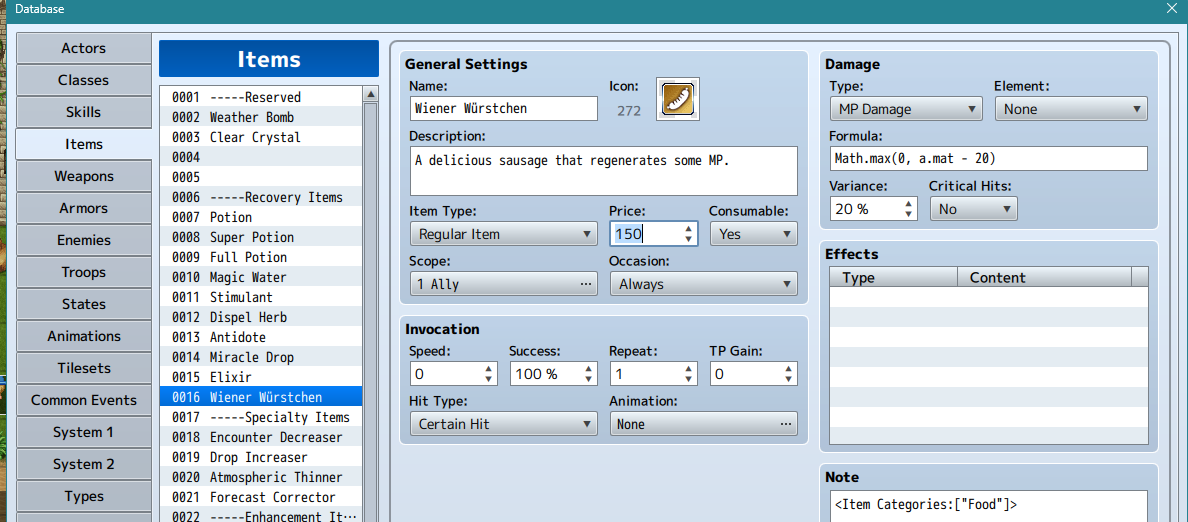
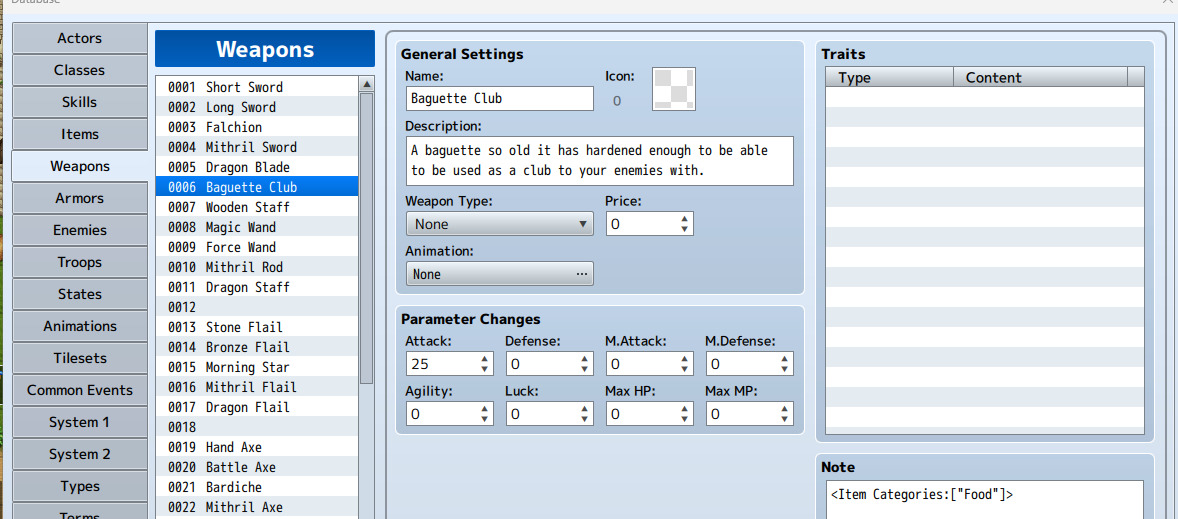
If multiple categories share the same name, than in order to access them via the plugin commands of other BoMZ plugins, that I will introduce later you have to user their fully qualified name, which is "ParentName | ChildName", e.g. "Weapons | Food" or "Equipment | Weapons | Food".
Additional Input Keys:
This plugin also provides a plugin parameter to configure both a keyboard and a gamepad key for the categories window using the aforementioned BoMZ_AdditionalControlsBase plugin to skip displaying the subcategories and enter the item window immediately for the parent category.
Notes about compatibility:
This plugin has been made explicitely incompatible to the VisuMZ_1_ItemsEquipsCore plugin, because I was unable to make them work together. Putting theirs under mine basically completely overwrote my plugins features. If mine was put under theirs, my categories overwrote their categories, but it seems they've changed the categories window in such a way, that I couldn't make my subcategories work.
BoMZ_ItemCategoriesBridge
I don't want people to force using my item categories plugin in order to access additional features and plugin commands of BoMZ plugins which I will introduce at later point in time. Therefore this plugin has been designed to build a bridge between custom item category plugins of other creatures and the BoMZ plugins. It reads the category names created in other plugins from an invisible category window and converts them into a structure similar than the one I've created for my own item categories plugin, just without sub categories. Therefore it is also incompatible to my own item categories plugin.
In case these plugins don't provide unique display names for their categories (pretty sure VisuMZ uses the database text for items both for their "All Items" and "Regular Items" categories, at least in the version I have), this plugin will give them a unique number before adding them to the structure (e.g. Items 1 and Items 2).
BoMZ_ItemCategoryShop
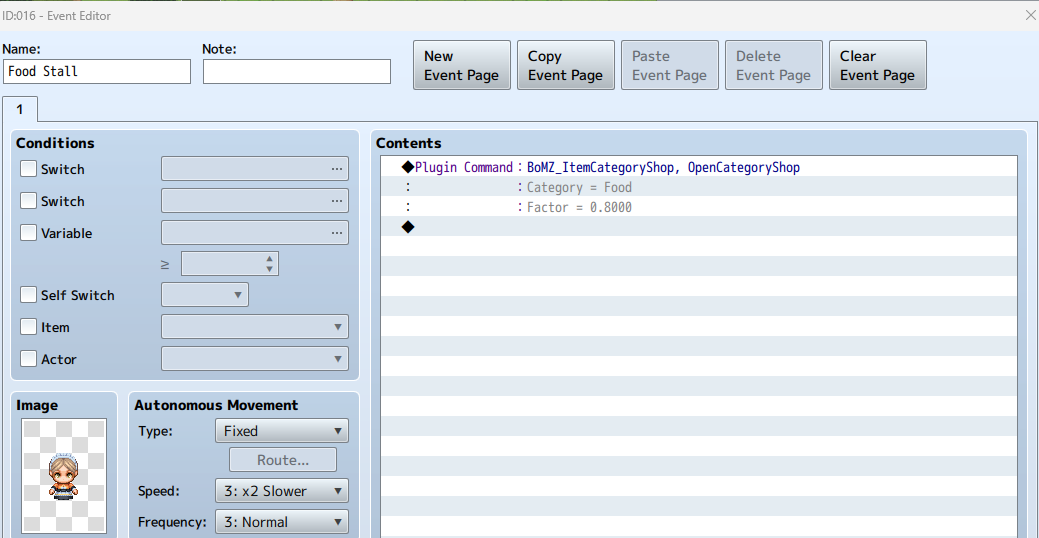
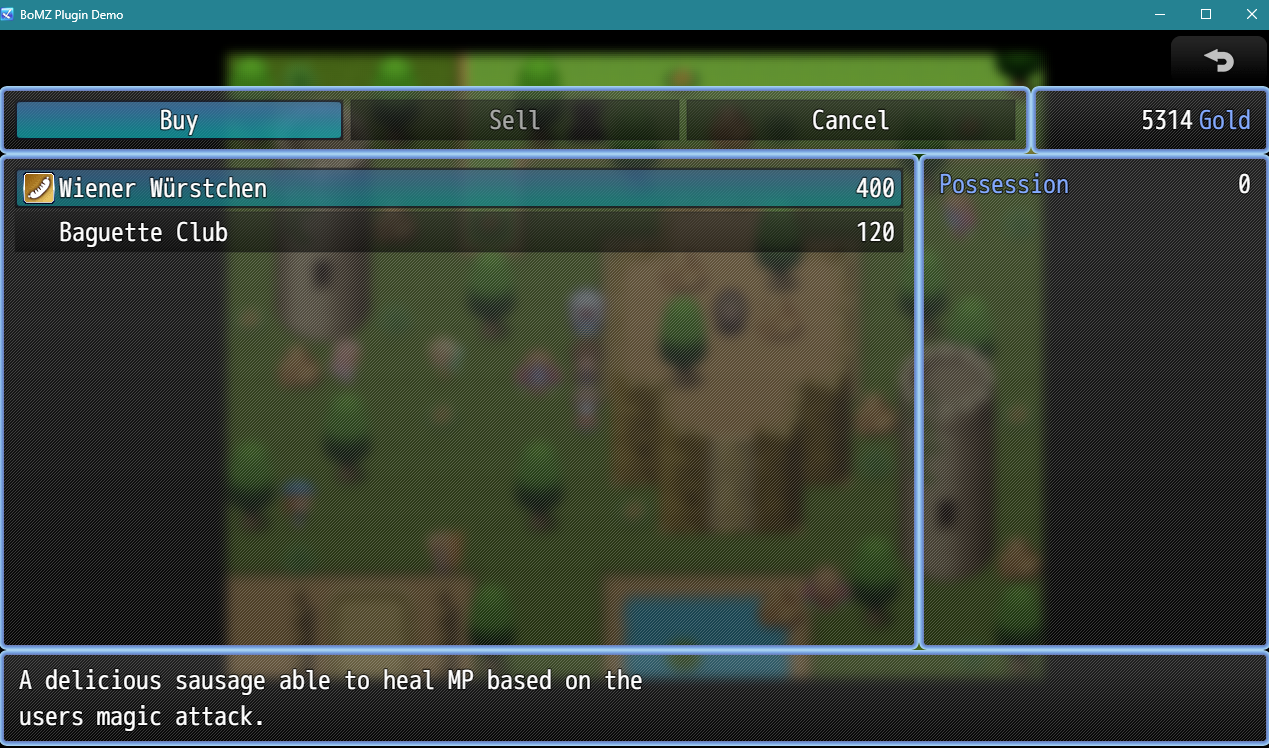
This plugin adds a single plugin command to open a shop selling all items of a certain category name with the default price multplied by a factor.
Download Link:
MZ - Google Drive
 drive.google.com
Downloads / Referenced Files
RPG Maker Web attachments are mirrored locally when available. Other external links remain hosted by their original creator or third-party service.
- Local mirror: 338911-440ab87517253da0e61ca47646006c94.png
SHA-256:bc5e529d5f9a4abb4c682355598c398e564d11b98c791cb96a6ad104c1b0a7c8
Original attachment URL: https://forums.rpgmakerweb.com/attachments/1770130275125-png.359831/ - Local mirror: 338912-d6b4670f6734ba5389ef8779e1b0434c.png
SHA-256:2b1785ffc2edb8a7bb754739d525ebba6e84def0d24c209e80e819d9b47cffc2
Original attachment URL: https://forums.rpgmakerweb.com/attachments/1770130379790-png.359832/ - Local mirror: 338933-bba99bdd9367b5fcdf778bc3c446a40e.png
SHA-256:93ae14d97953b35cea1f4024d107276018a1ba6b8333b15f7ba38f6eb1169662
Original attachment URL: https://forums.rpgmakerweb.com/attachments/1770177701424-png.359853/ - Local mirror: 338932-9233b1040a226b7077ab942a76039313.png
SHA-256:c1a84a828a40f5e37494937215355374a101b22753964ec9fb667b8d39b9db61
Original attachment URL: https://forums.rpgmakerweb.com/attachments/1770177673761-png.359852/ - Download: MZ - Google Drive
License / Terms Note
This thread therefore will have multiple plugins, all under the same terms of use and maybe updated regularly. However for start I won't be open for additional feature request, but only for bug fix requests. Requirements: All those plugins mentioned here require my base plugin BoMZ_PluginBase, which can be found under the same download link.
Referenced Images / Attachments
Creator Claims / Removal
If you are the original creator and want this listing reassigned, edited, or removed, join BMMPlay and contact the moderators with proof that matches the original RPG Maker Web profile, linked GitHub, itch.io page, or another public creator identity.
Replies (0)
No replies yet.
Topic Summary
Loading summary...