

MV Map running in the background, see map through menu
BMM_Archive · July 15, 2026

Original Source
- Original title: MV Map running in the background, see map through menu
- Original author: utunnels
- Original date: February 20, 2025
- Source thread: https://forums.rpgmakerweb.com/threads/map-running-in-the-background-see-map-through-menu.175674/
- Source forum path: Game Development Engines > RPG Maker Javascript Plugins > JS Plugins In Development
Summary
I made a plugin last year that preserve the map scene when you open a menu, a shop or other similar scene. Fix lag on close menu/See map thru menu by utunnels Fix close menu lag, and display map through menu. utstudio.itch.io
Archived First Post
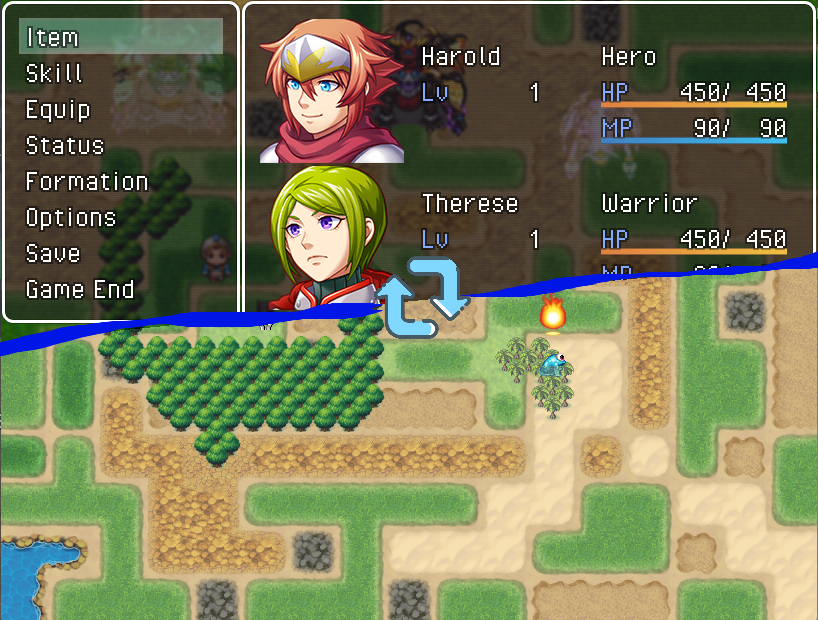
Fix lag on close menu/See map thru menu by utunnels
 utstudio.itch.io
Now I have an idea, maybe the map can update in the background while the menu is open?
Here's the code I'm using, you need to install PreserveMapScene.js first.
You can now also download it in prevous link, along with PreserveMapScene.js
/*:
 * @target MV MZ
 * @plugindesc Allow map update in the background of the menu, requires PreserveMapScene.js
 * @author utunnels
 *
 * @help No plugin commands.
 *
 * @param scenes
 * @text Available scenes
 * @type struct<SceneItem>[]
 * @default ["{\"scene\":\"Scene_Menu\",\"globalObjects\":\"[]\",\"layerObject\":\"_backgroundSprite\",\"enable\":\"true\"}","{\"scene\":\"Scene_Item\",\"globalObjects\":\"[]\",\"layerObject\":\"_backgroundSprite\",\"enable\":\"true\"}","{\"scene\":\"Scene_Skill\",\"globalObjects\":\"[]\",\"layerObject\":\"_backgroundSprite\",\"enable\":\"true\"}","{\"scene\":\"Scene_Equip\",\"globalObjects\":\"[]\",\"layerObject\":\"_backgroundSprite\",\"enable\":\"true\"}","{\"scene\":\"Scene_Status\",\"globalObjects\":\"[]\",\"layerObject\":\"_backgroundSprite\",\"enable\":\"true\"}","{\"scene\":\"Scene_Options\",\"globalObjects\":\"[]\",\"layerObject\":\"_backgroundSprite\",\"enable\":\"true\"}","{\"scene\":\"Scene_Save\",\"globalObjects\":\"[]\",\"layerObject\":\"_backgroundSprite\",\"enable\":\"true\"}","{\"scene\":\"Scene_Load\",\"globalObjects\":\"[]\",\"layerObject\":\"_backgroundSprite\",\"enable\":\"true\"}","{\"scene\":\"Scene_GameEnd\",\"globalObjects\":\"[]\",\"layerObject\":\"_backgroundSprite\",\"enable\":\"true\"}","{\"scene\":\"Scene_Shop\",\"globalObjects\":\"[]\",\"layerObject\":\"_backgroundSprite\",\"enable\":\"true\"}","{\"scene\":\"Scene_Name\",\"globalObjects\":\"[]\",\"layerObject\":\"_backgroundSprite\",\"enable\":\"true\"}","{\"scene\":\"Scene_Debug\",\"globalObjects\":\"[]\",\"layerObject\":\"_backgroundSprite\",\"enable\":\"true\"}","{\"scene\":\"Scene_Battle\",\"globalObjects\":\"[\\\"$gameTemp=new Game_Temp()\\\",\\\"$gameScreen=new Game_Screen()\\\",\\\"$gameMessage=new Game_Message()\\\"]\",\"layerObject\":\"_spriteset._backgroundSprite\",\"enable\":\"false\"}"]
 *
 */
/*~struct~SceneItem:
 * @param scene
 * @text Which scene?
 * @type combo
 * @option Scene_Menu
 * @option Scene_Item
 * @option Scene_Skill
 * @option Scene_Equip
 * @option Scene_Status
 * @option Scene_Options
 * @option Scene_Save
 * @option Scene_Load
 * @option Scene_GameEnd
 * @option Scene_Shop
 * @option Scene_Name
 * @option Scene_Debug
 * @option Scene_Battle
 *
 * @param globalObjects
 * @text Global objects made private
 * @desc Global objects you wish to make private while the map is served as background
 * @type combo[]
 * @option $gameTemp=new Game_Temp()
 * @option $gameScreen=new Game_Screen()
 * @option $gameMessage=new Game_Message()
 *
 * @param layerObject
 * @text Place before?
 * @desc Place the map before which display object? Leave blank to place it behind everything.
 * @type combo
 * @option _backgroundSprite
 * @option _spriteset._backgroundSprite
 *
 * @param enable
 * @desc What to switch it off but don't want to delete it? Try this.
 * @default true
 *
 */

(function(){

const script = document.currentScript.src.match(/\/([^\/]+)\.js/i)[1];
const param  = PluginManager.parameters(script);
var scenes = JSON.parse(param.scenes);
var scenesRef = {};
for(var i=0;i<scenes.length;i++){
  scenes[i] = JSON.parse(scenes[i]);
  scenes[i].globalObjects = JSON.parse(scenes[i].globalObjects);
  scenes[i].scene = eval(scenes[i].scene);
  scenesRef[scenes[i].scene.name] = scenes[i];
}

window.BgMapScenes = scenes;
window.BgMapScenesRef = scenesRef;

function clearFade(scene){
  var _this = scene;
  _this._fadeDuration = 0;
  _this._fadeOpacity = 0;//MZ
  if(_this._fadeSprite) _this._fadeSprite.opacity = 0;//MV
  if(_this.updateFade) _this.updateFade();//MV
  if(_this.updateColorFilter) _this.updateColorFilter();//MZ
}

Spriteset_Map.prototype.showCharacters = function() {
  for (var i = 0; i < this._characterSprites.length; i++) {
      this._characterSprites[i].show();
  }
};

function registerBgSceneUpdate(sceneClass) {
  var sceneClassCreate = sceneClass.prototype.create;
  var sceneClassTerminate = sceneClass.prototype.terminate;
  sceneClass.prototype.create = function () {
    if (!SceneManager.preserveScene) {
      throw "Plugin PreserveMapScene.js is not installed or not turned on!";
    }
    sceneClassCreate.apply(this, arguments);
    var si = scenesRef[sceneClass.name];
    this._useBgMap = eval(si.enable);
    var sm = SceneManager._preserved;
    if (this._useBgMap && sm) {
      //add bg map above this display object
      var obj = si.layerObject? eval('this.' + si.layerObject):null;
      var ind = 0;
      var parent = this;
      if(obj){
        ind = obj.parent.getChildIndex(obj) + 1;
        parent = obj.parent;
      }
      parent.addChildAt(sm, ind);
      //replace global variables, e.g. $gameMessage
      var keys = [];
      for(var gv of si.globalObjects){
        var pk = gv.split('=');
        var k = pk[0].trim();
        keys.push(k);
        sm[k] = eval(pk[1]);// new Game_Message()
        sm['$'+k] = window[k];
      }
      sm._spriteset.showCharacters();
      sm.update = function () {
        var sms = SceneManager._scene;
        SceneManager._scene = this;
        SceneManager._realScene = sms;
        for(var k of keys){
          window[k] = sm[k];
        }
        //a bit hack for battle scene
        if(sceneClass===Scene_Battle && !parent._firstUpdate){
           clearFade(this);
           parent._firstUpdate = true;
        }
        this.__proto__.update.apply(this, arguments);
        for(var k of keys){
          window[k] = sm['$'+k];
        }
        SceneManager._scene = sms;
      };
    }
  };
  sceneClass.prototype.terminate = function () {
    if (this._useBgMap && SceneManager._preserved) {
      //just be safe, prevent GC from collecting it?
      this._backgroundSprite.removeChild(SceneManager._preserved);
    }
    sceneClassTerminate.apply(this, arguments);
  };
}

for(var si of scenes){
  registerBgSceneUpdate(si.scene)
}

})();//(function(){Plugin parameters:
Usually, they are not supposed to be chagned, unless you know what you're doing.
But just in case you have custom scenes.
It is disabled in battle scene by default, if you want it you can turn it on by yourself.
Term of use:
You can use it in any project, credit is not required but appreciated.
Demo project:
MZ only for now: https://utstudio.itch.io/battleonmapmzdemo
Downloads / Referenced Files
RPG Maker Web attachments are mirrored locally when available. Other external links remain hosted by their original creator or third-party service.
- Download: Fix lag on close menu/See map thru menu by utunnels
- Download: https://utstudio.itch.io/battleonmapmzdemo
License / Terms Note
You can use it in any project, credit is not required but appreciated. Demo project: MZ only for now: https://utstudio.itch.io/battleonmapmzdemo
Referenced Images / Attachments
Creator Claims / Removal
If you are the original creator and want this listing reassigned, edited, or removed, join BMMPlay and contact the moderators with proof that matches the original RPG Maker Web profile, linked GitHub, itch.io page, or another public creator identity.
Replies (0)
No replies yet.
Topic Summary
Loading summary...