

MV [MV+MZ] FIXED v1.6! Optimized Lighting with Real-Time Shadows (new: saving system fixed!)
BMM_Archive · July 15, 2026

Original Source
- Original title: MV [MV+MZ] FIXED v1.6! Optimized Lighting with Real-Time Shadows (new: saving system fixed!)
- Original author: SebyDevDev
- Original date: September 5, 2021
- Source thread: https://forums.rpgmakerweb.com/threads/mv-mz-fixed-v1-6-optimized-lighting-with-real-time-shadows-new-saving-system-fixed.140191/
- Source forum path: Game Development Engines > RPG Maker Javascript Plugins > JS Plugins In Development
Summary
{ "lightbox_close": "Close", "lightbox_next": "Next", "lightbox_previous": "Previous",
Archived First Post
Link:
DAE's Lighting System by SebyDevDev
 daedrakyne.itch.io
(The help file has more detailed instructions, make sure to check it out!)
Download FREE (non-commercial, encrypted) or PRO (commercial): https://daedrakyne.itch.io/daes-lighting-system
Hey there!
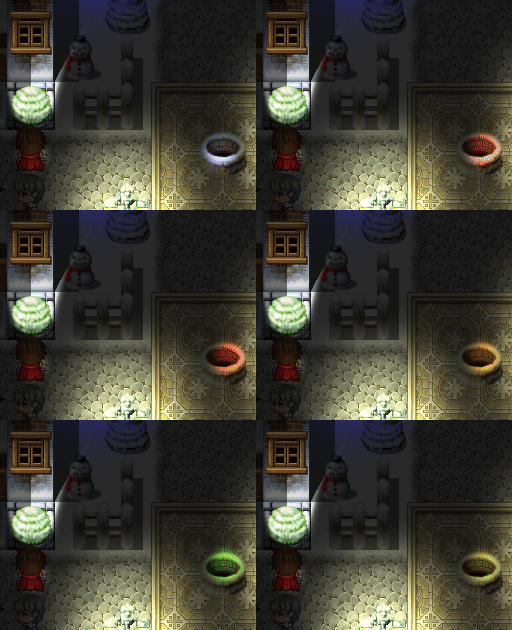
I've been working for a while now on a new lighting plugin for both MV and MZ.
My reason for starting down this road was due to this post from about a month ago:
<div class="bbCodeBlock bbCodeBlock--unfurl js-unfurl fauxBlockLink" data-unfurl="true" data-result-id="81436" data-url="https://forums.rpgmakerweb.com/index.php?threads/khas-ultralighting-remake-for-commercial-purposes.137694/#post-1197863" data-host="forums.rpgmakerweb.com" data-pending="false">
MV - Khas UltraLighting Remake for Commercial Purposes
 forums.rpgmakerweb.com
I've researched the most efficient 2D-RTS lighting systems, and have decided to base mine on a pure-hardware (GPU) implementation.
In its current state, without culling (meaning that for now every light in the scene is being rendered/updated, regardless of whether it's even on the screen or not), the game can handle ~650 lights (with shadows) in one scene without its fps dropping.
For now, the plugin will be in beta, and will be posted here (ie: can be used for non-commercial projects, commercial version will be up on itch.io before the end of the month once enough features have been added for the inital version to be released publicly).
If you could try it out, and leave your thoughts down in a reply below, I would really appreciate it! My goal is to make a plugin that is more diverse than khas' while still being optimised enough.
Plugin commands (MV) (no need for MZ plugin command instructions):
- dae_light setambientlight r g b
- Sets the current ambient light to the specified color.
- r, g and b are numbers from 0 to 255 that represent an rgb color.
- Example: dae_light setambientlight 0 20 0
- THE REST OF THE PLUGIN COMMANDS ARE THE SAME AS THE EVENT COMMENTS, BUT WITHOUT "[" AND "]"
Event comments (run whenever event page changes):
- [dae_light addlight uniqueID type]
- Adds a new light and sets its position to that of the event. Light will follow the event wherever it goes
- uniqueID can be either "null" or any word (letters, numbers and underscore). If set to null, the light will not be stored as a unique light (meaning that it won't be designable by other commands / comments)
- type must be one of the light types from the plugin parameters. For example, "halogen". New light types can be created in the plugin parameters.
- Example: [dae_light addlight halo2 halogen]
- [dae_light setoffset uniqueID offsetX offsetY]
- Sets a manual offset for the designed light, if it exists.
- offsetX and offsetY are numbers.
- Example: [dae_light setoffset halo2 0 24]
- [dae_light setcolor uniqueID R G B]
- Sets the color of the light
- R, G and B are numbers between 0 and 255
- Example: [dae_light setcolor uniqueID 255 0 255] (pink)
- [dae_light setrotation uniqueID rotation]
- Sets the rotation of the light
- Rotation is an angle between 0 and 360
- [dae_light setangle uniqueID angle]
- Sets the angle wideness of the light.
- Angle is between 0 (no light) and 360 (full light)
- Example: an angle of 180 will create a semi-circle light
- [dae_light setintensity uniqueID intensity]
- Sets the intensity of the light.
- Intensity is between 0 (no light) to 200 (bright light).
- For some reason, the MZ plugin can't handle a single intense light, but works fine with multiple lights added together. Until this is fixed, you can overlap multiple lights together to create a bright light.
- [dae_light setrotation/f uniqueID rotation]
- Sets how much the light rotates every frame.
- Rotation is any number, negative or positive, and with decimals allowed.
- <dae_light off> -- Disables lighting for that map
- <dae_light shadowpicture picture_name> -- Uses the given picture as a shadow map for that map. The picture must be in the "img/shadows/" folder.
- Example: <dae_light shadowpicture shopping_map_shadow>
- Shadow maps can be easily created by saving a picture of a map (right-click on map -> save), going to a picture editor (I used piskelapp.com), and drawing black in a new layer wherever you want shadows to be.
There is no current customization for RegionIDs (it is easily implementable, just wanted to get the demo out first), but you can currently use the regionID 17 to create a blue light, and regionIDs 4, 6 and 7 to create shadows. (4: full block shadow, 6: left wall shadow, 7: right wall shadow)
Changelog:
- v 1.6
- Fixed a bug where you wouldn't be able to save/load!
- v 1.5
- Added support for light spritesheet animations.
- Added support for light custom animations (settings-based)
- Implemented customisability for Region Shadows and Region Lights.
- Implemented various performance optimisations.
- Implemented basic light-culling.
- v1.3
- Added support for custom images for lights! (like khas' plugin)
- Added customisability support for custom-image lights (resizing, color tinting, + everything else)
- Added direction-based custom offset option for lights, useful when making flashlights
- Added plugin command for ambient light
- v1.2
- In-game light modifications (color, intensity, rotation, angle, rotation/f, offset)
- Automatic offset change depending on the rotation of the light
- Automatic light rotations (rotating lights!!), with customizable speeds
- Light angle/wideness customization: you can now create flashlights, and beams!
Current goals for the next version:
- light / shadow heights
- event shadows (you heard that right! events will be able to have shadows too)
Downloads / Referenced Files
RPG Maker Web attachments are mirrored locally when available. Other external links remain hosted by their original creator or third-party service.
- Download: DAE's Lighting System by SebyDevDev
License / Terms Note
Download FREE (non-commercial, encrypted) or PRO (commercial): https://daedrakyne.itch.io/daes-lighting-system Hey there! I've been working for a while now on a new lighting plugin for both MV and MZ. My reason for starting down this road was due to this post from about a month ago:
Referenced Images / Attachments
Creator Claims / Removal
If you are the original creator and want this listing reassigned, edited, or removed, join BMMPlay and contact the moderators with proof that matches the original RPG Maker Web profile, linked GitHub, itch.io page, or another public creator identity.
Replies (0)
No replies yet.
Topic Summary
Loading summary...